
Time Sheet Grid
Time Sheet Grid
 on top of the grid.
2. In the **Add Deduction** window, fill in all required fields.
3. Click **Create**.
The deduction is immediately applied and the Time to Count and Duration values are recalculated.
| Fields | Description |
| ------------------- | ---------------------------------------------------------------------------- |
| From Date | Start of deduction (not to count period) |
| To Date | End of deduction (not to count period) |
| Deducted Time | Amount of time to deduct |
| % Not to Count | Percentage specifying the % of time not to count |
| Reason for Stoppage | The reason for the stoppage |
| Prorate | Applies the deduction proportionally across applicable laytime calculations. |
| Description | Additional description for the deduction (not to count) |
on top of the grid.
2. In the **Add Deduction** window, fill in all required fields.
3. Click **Create**.
The deduction is immediately applied and the Time to Count and Duration values are recalculated.
| Fields | Description |
| ------------------- | ---------------------------------------------------------------------------- |
| From Date | Start of deduction (not to count period) |
| To Date | End of deduction (not to count period) |
| Deducted Time | Amount of time to deduct |
| % Not to Count | Percentage specifying the % of time not to count |
| Reason for Stoppage | The reason for the stoppage |
| Prorate | Applies the deduction proportionally across applicable laytime calculations. |
| Description | Additional description for the deduction (not to count) |
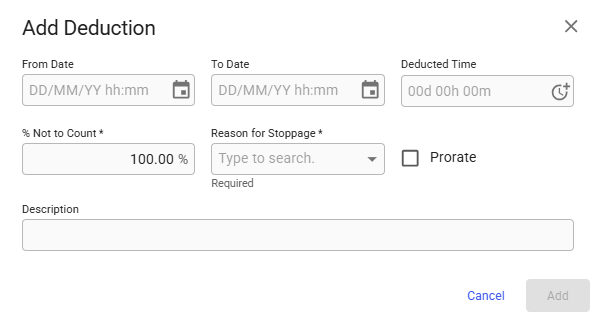
Add Deduction Modal
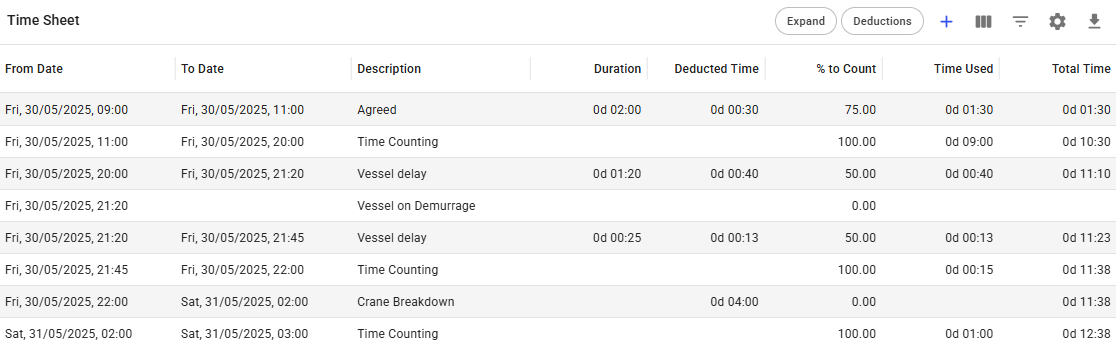
Collapsed View of Time Sheet
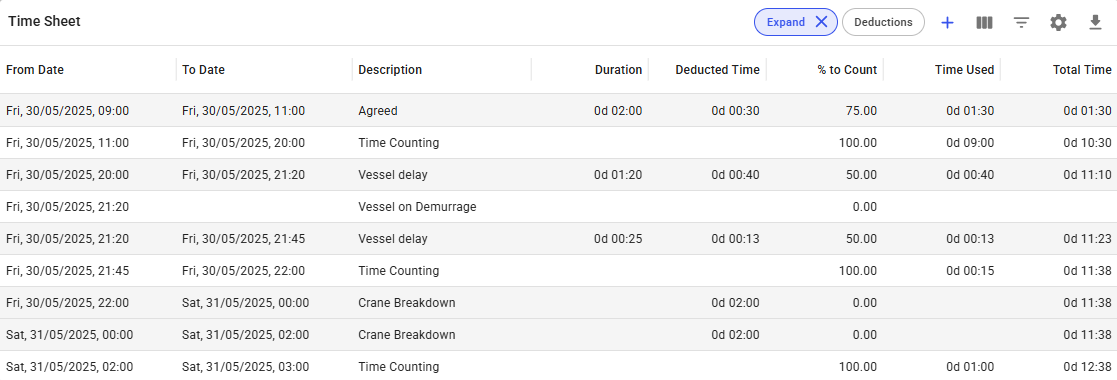
Detailed View of Time Sheet

Time Sheet with deductions filter active