> For the complete documentation index, see [llms.txt](https://docs.dataloy.com/llms.txt). Markdown versions of documentation pages are available by appending `.md` to page URLs; this page is available as [Markdown](https://docs.dataloy.com/voyage-management-system/step-by-step-guides/alerts/webhook-subscriptions-1/create-webhook-subscription.md).
# Creating a Webhook Subscription
Create Webhook Subscription Dialog
1. Open the **Webhooks** module in the **Alerts** section.
2. Click **Create Webhook Subscription** in the top right corner.
3. Fill in the required fields (marked with \*) for each step in the dialogue.
4. Click **Create**.
### Types of Webhook Subscriptions
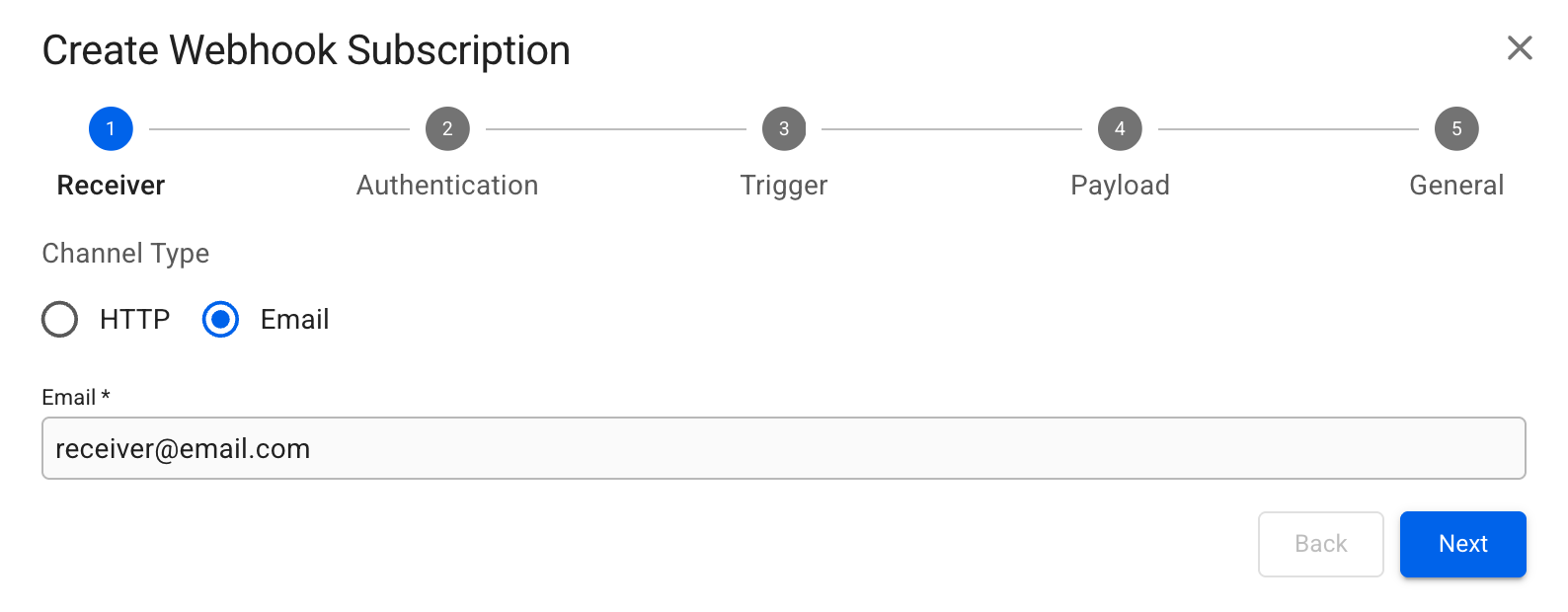
The VMS supports two types of webhook subscriptions: HTTP and Email.
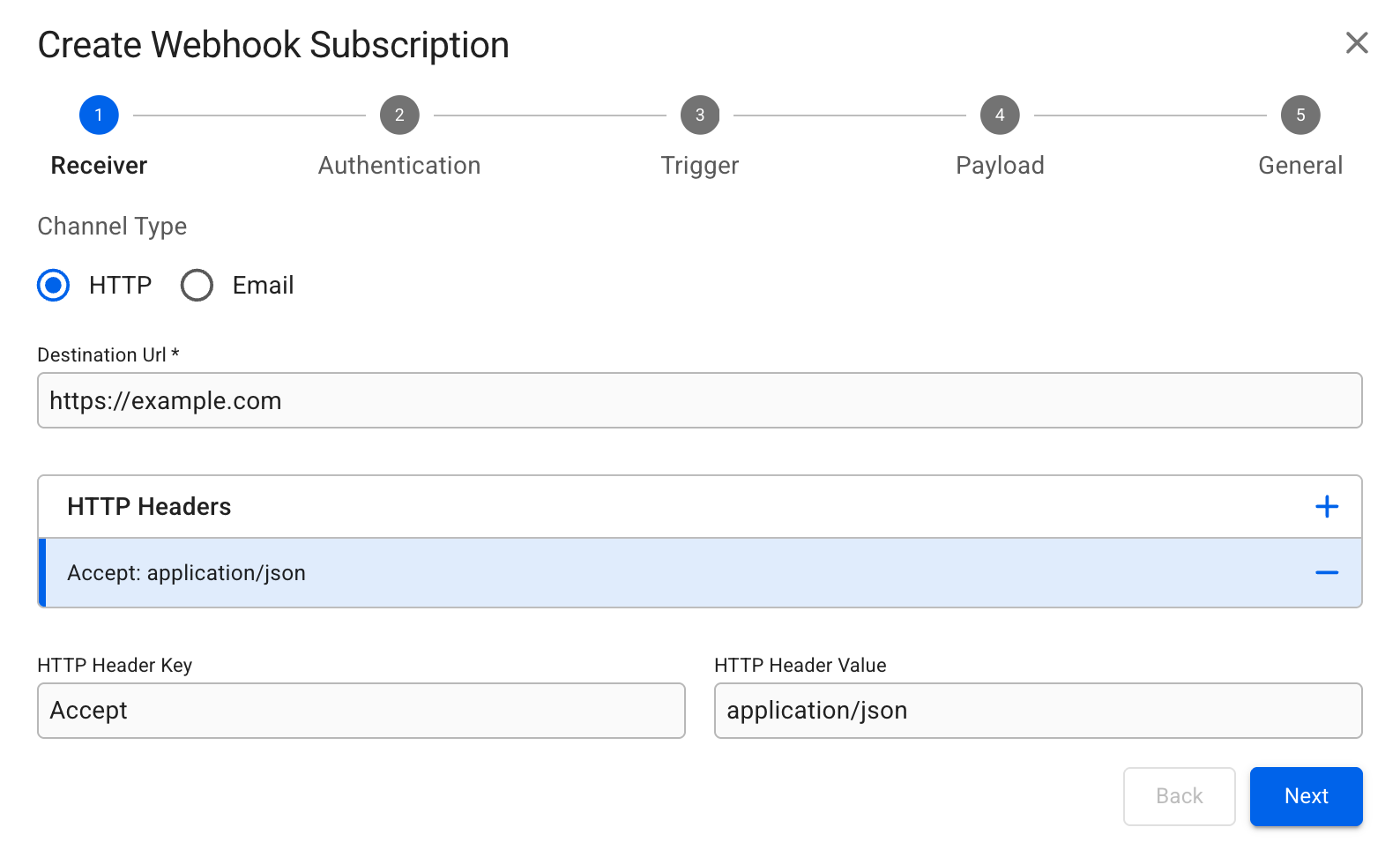
Below are illustrations and detailed descriptions of the fields required to create a new Webhook Subscription for each type.
## Receiver
{% tabs %}
{% tab title="HTTP" %}
### Configuring the URL and HTTP Headers
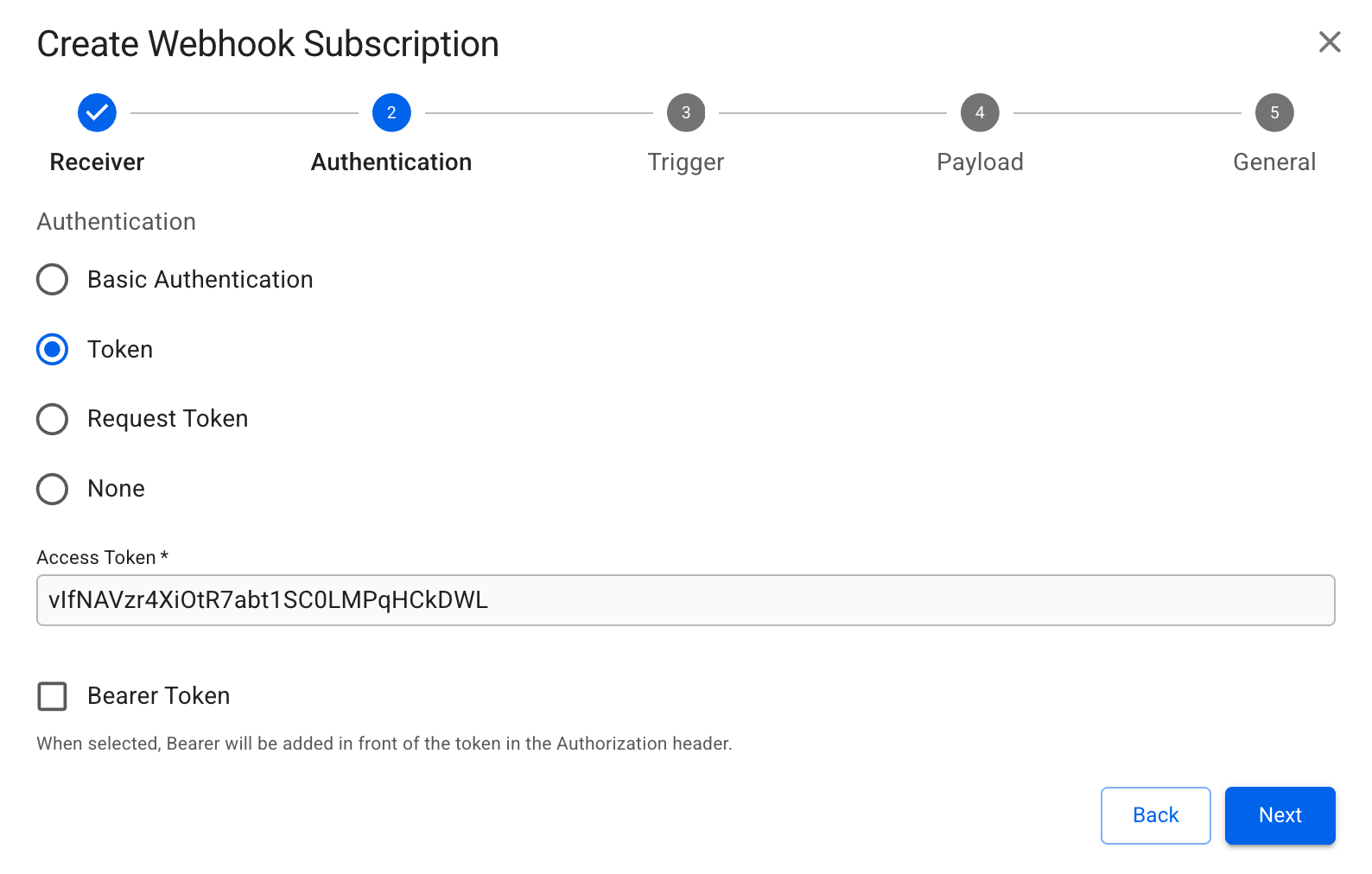
### Authentication Configuration
Set up authentication using basic user-password or OAuth-based methods.
{% hint style="info" %}
**Basic Authentication** requires filling out a `Username` and `Password` for the endpoint. **Request Token** requires filling out an `Access Token Request Url` and an `Access Token Request Body` , with the other fields being optional.
{% endhint %}
{% endtab %}
{% tab title="Email" %}
{% hint style="info" %}
No authentication configuration is required for email.
{% endhint %}
{% endtab %}
{% endtabs %}
## Trigger
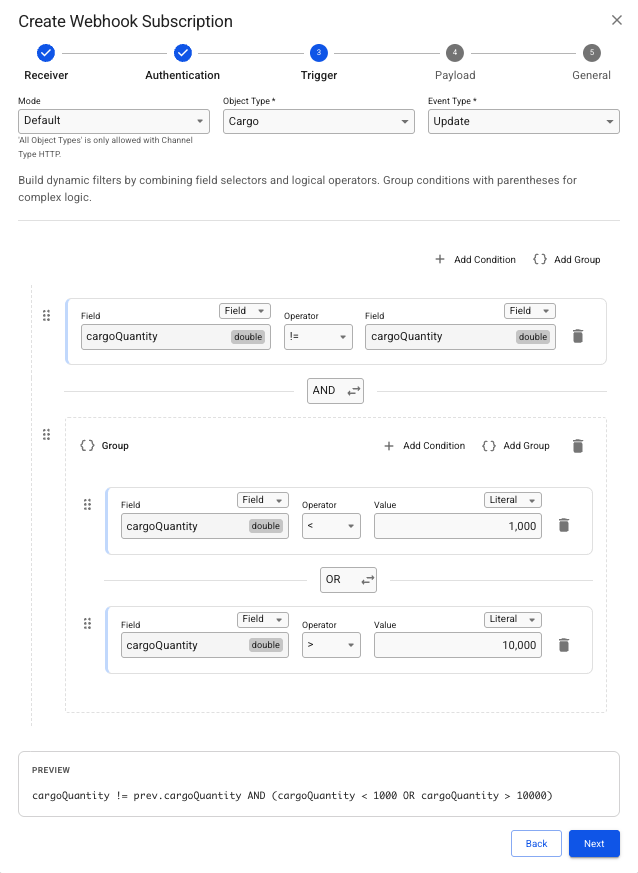
The Trigger step allows you to define the specific conditions that must be met for a webhook to be sent to your receiver. By using dynamic filters, you can ensure you only receive data that is relevant to your workflow.
There are three different operational modes of the trigger. The types are Default, Alert Script and All Object Types.
{% tabs %}
{% tab title="Default" %}
#### 1. Basic Event Selection
* Object Type: Choose the data entity you want to monitor (e.g., Cargo).
* Event Type: Specify the action that initiates the check (e.g., Create, Update, or Delete).
#### 2. Building Filter Conditions
Filters allow you to narrow down events based on specific field values. You can combine multiple conditions using logical operators.
**Creating a Condition**
To add a new rule, click **+ Add Condition**. Each condition consists of:
* Field: Select the specific attribute you want to evaluate (e.g., `cargoQuantity`).
* Source: Choose whether to evaluate the Current value (the value after the change) or the Previous value (the value before the change).
* Operator: Choose a logical comparison such as:
* `=` (Equal to)
* `!=` (Not equal to)
* `<` (Less than)
* `>` (Greater than)
* Comparison Type: Decide if you are comparing the field against another Field, a static Literal value, or a Variable.
> Example from Screenshot:
>
> The filter is set to trigger only if the `cargoQuantity` has changed from its previous state (Current != Previous) AND the new quantity is either less than 1000 or greater than 10 000.
#### 3. Advanced Logic & Grouping
For more complex requirements, you can use the **AND/OR** between conditions to combine:
* **AND**: The condition and the preceding one must be true.
* **OR**: At least one of the conditions is true.
* A preview of the **AND/OR** grouping can be shown by hovering over that button.
* **Add Group**: Click this to nest a set of conditions. This is useful for creating `(A and B) OR (C and D)` style logic.
* **Expression Preview**: Located at the bottom of the screen, this text box shows the raw logic string generated by your UI selections. Use this to double-check that your filters match your intent.
#### 4. Reordering
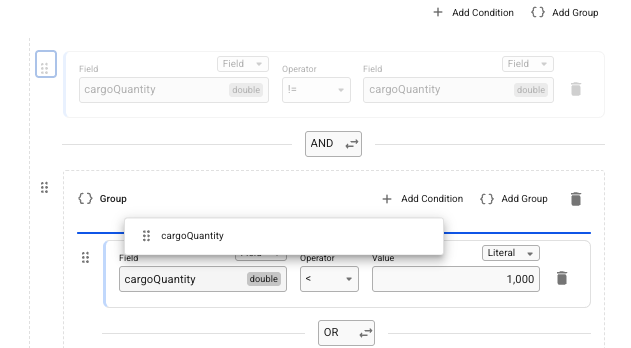
Conditions and Groups can be dragged and dropped from the handle to shift the ordering of conditions and groups.
{% endtab %}
{% tab title="Alert Script" %}
Easily set up by selecting a pre-existing alert script. Ensure the script is already created in the **Alert Scripts** module under **Alerts**, and it should include its own configurable object type and event type triggers.
{% endtab %}
{% tab title="All Object Types" %}
The **All Object Types** mode requires little configuration, and it will create a webhook that monitors all object types for a given event type. This mode is **only allowed for a HTTP Receiver**.
{% hint style="warning" %}
This mode creates a webhook for all object types, which may flood the server with notifications. Most use cases will be covered by **Default** webhooks.
{% endhint %}
{% endtab %}
{% endtabs %}
## Payload
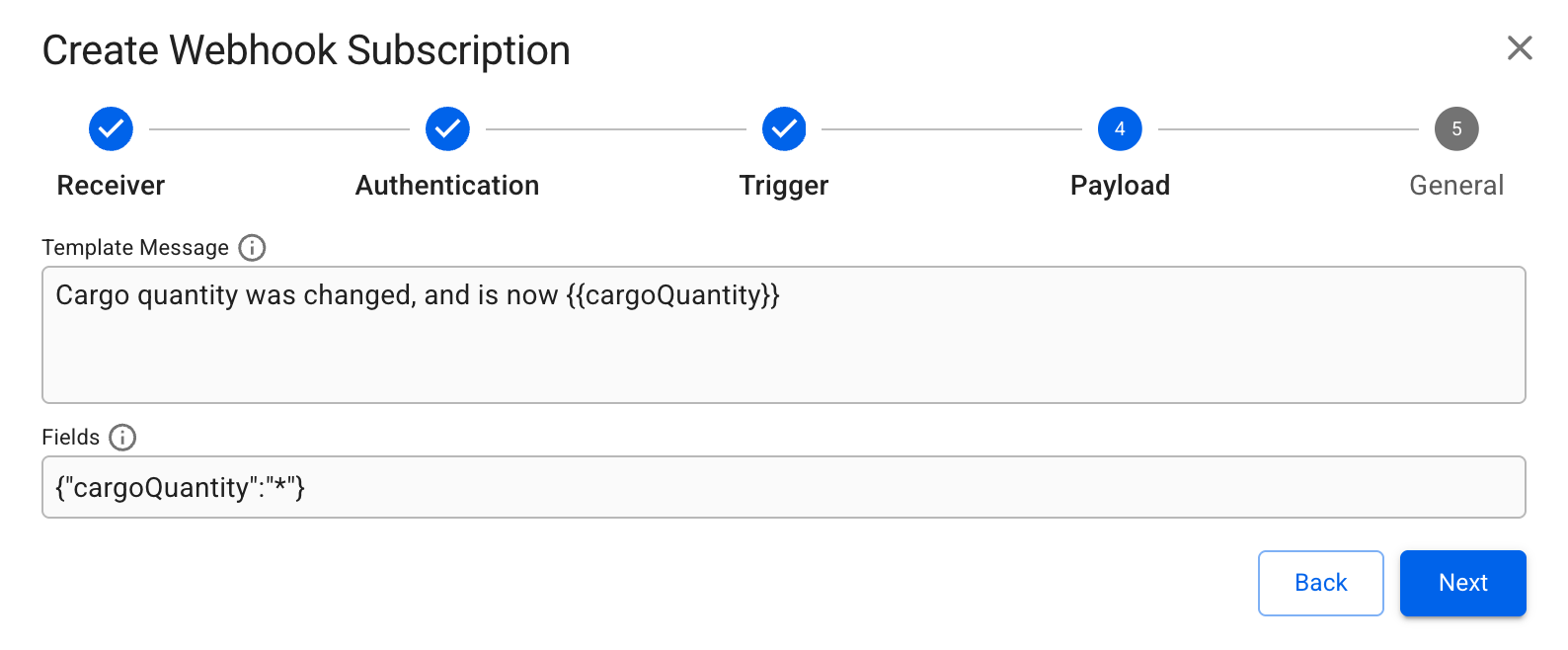
**Template Message** and **Fields** are optional. **Template Message** allows for a custom message where field values from the object can be inserted as variables in the notification message.
To access the fields, type `{{`, which opens a menu with options to navigate and select any available fields, including sub-object fields.
{% hint style="info" %}
**Fields** limit what fields should be returned in the notification and can look like this {"fieldName1":"\*","fieldName2":"\*"}. Read more about how to specify **Fields** [here](https://api.dataloy.com/dataloy-rest-api/adjust-number-of-fields-to-be-returned-from-a-request).
{% endhint %}
## General
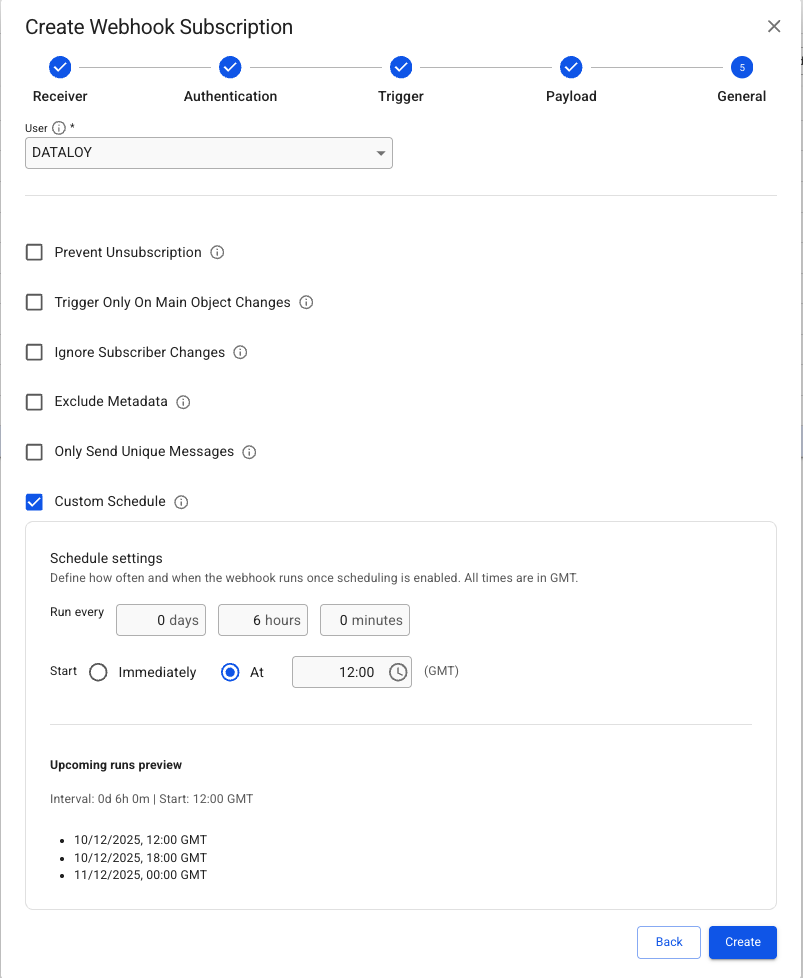
All options are optional except **User**, which must be selected. This should in most cases be set to the user intended to receive the notification. As the permissions of that **User** decides the access to objects when the notification is sent. Failing notifications could be due to the **User** not having the right access.
Additional behavior modifiers can be enabled here, such as preventing unsubscribing, limiting triggers to main object changes, or excluding metadata from the payload.
When the Trigger uses an Alert Script, the General step also includes scheduling. This allows you to set the start time for when the Webhook begins running and the interval between each run.\
\
The description icon (**i)** can be hovered over to reveal additional information about their function.
---
# Agent Instructions
This documentation is published with GitBook. GitBook is the documentation platform designed so that both humans and AI agents can read, navigate, and reason over technical content effectively. Learn more at gitbook.com.
## Querying This Documentation
If you need additional information that is not directly available in this page, you can query the documentation by asking a question.
Perform an HTTP GET request on the following URL with the `ask` and `goal` query parameters:
```
GET https://docs.dataloy.com/voyage-management-system/step-by-step-guides/alerts/webhook-subscriptions-1/create-webhook-subscription.md?ask=&goal=
```
`ask` is the immediate question: it should be specific, self-contained, and written in natural language.
`goal` is what the user is ultimately trying to achieve, the reason they need the answer. Sharing it helps GitBook give you a better, more relevant answer. A goal is most helpful when it describes the outcome the user wants rather than restating the question. For example, with `ask=how do I create an API token`, a goal like `automate deployments from our CI pipeline` lets GitBook tailor the answer to that use case.
The response will contain a direct answer to the question and relevant excerpts and sources from the documentation.
Use this mechanism when the answer is not explicitly present in the current page, you need clarification or additional context, or you want to retrieve related documentation sections.
 in the top right corner.
3. Fill in the required fields (marked with \*) for each step in the dialogue.
4. Click **Create**.
### Types of Webhook Subscriptions
The VMS supports two types of webhook subscriptions: HTTP and Email.
Below are illustrations and detailed descriptions of the fields required to create a new Webhook Subscription for each type.
## Receiver
{% tabs %}
{% tab title="HTTP" %}
### Configuring the URL and HTTP Headers
in the top right corner.
3. Fill in the required fields (marked with \*) for each step in the dialogue.
4. Click **Create**.
### Types of Webhook Subscriptions
The VMS supports two types of webhook subscriptions: HTTP and Email.
Below are illustrations and detailed descriptions of the fields required to create a new Webhook Subscription for each type.
## Receiver
{% tabs %}
{% tab title="HTTP" %}
### Configuring the URL and HTTP Headers