> For the complete documentation index, see [llms.txt](https://docs.dataloy.com/llms.txt). Markdown versions of documentation pages are available by appending `.md` to page URLs; this page is available as [Markdown](https://docs.dataloy.com/voyage-management-system/step-by-step-guides/voyages/maintain-voyages/emission-settlement.md).
# Emission Settlement
**Emission settlements** for a voyage are viewable from the "Emission Settlement" tab in the voyage drawer. This tab, which is only visible after a voyage has been **nominated**, features one collapsible section per **emission settlement type**, or in other words, per **emission regulation**. In each section, the user is invited to add actual quantity and price data to keep their **emission regulation costs** per voyage accurate.
For a nominated or higher voyage, the Profit & Loss Summary section in the Voyage's Overview tab will use the **Actual** values from this tab, otherwise the **Estimated** ones. These are also displayed under Analysis overview of the voyage.
Read below for the current emission regulations currently displayed in VMS. Both of these sections are collapsible.
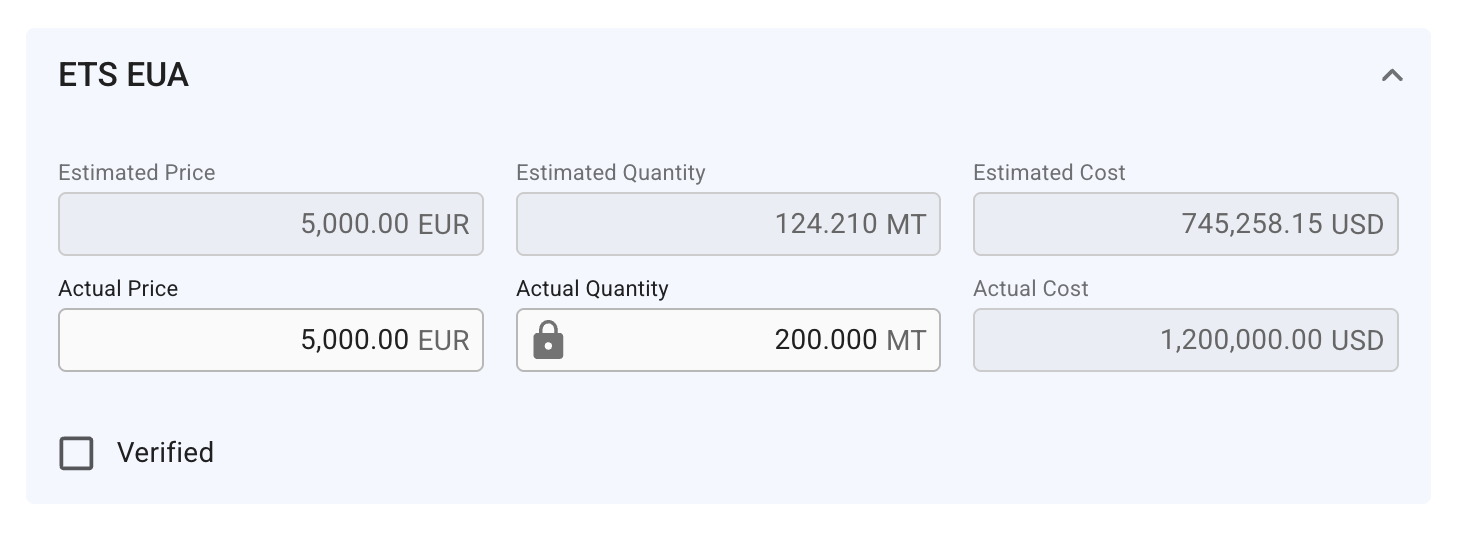
## ETS EUA section
Left-most section of Emission Settlement tab
All the "Estimated" fields are using previous calculations for EU ETS. The "Actual" fields are calculated in similar ways, but only from Nominated or higher status. Actual Quantity is synched with the Estimated Quantity, until you *lock* it (it also automatically happen if you input a different value into the field). Actual Cost is calculated as `(Actual Price in correct currency * Actual Quantity)`.
Read "Synched Features" paragraph below for more information.
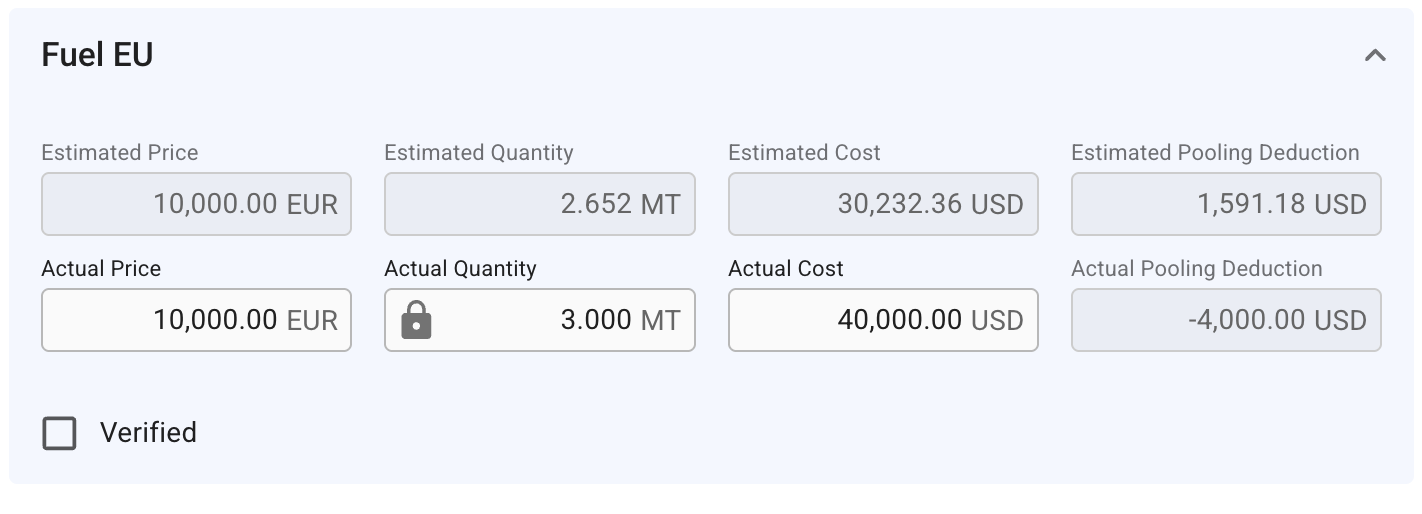
## Fuel EU section
Right-most section of Emission Settlement tab
Follows the same calculations as mentioned in the above paragraph. Additionally, you can here input the Actual Cost field however you like. This won't impact the Actual Price or Quantity, but it will impact the Actual Pooling Deduction field. This field is calculated as `(Actual Price in correct currency * Actual Price) - Actual Cost`. You can compare this value to the Estimated Pooling Deduction.
## Synched features
* Clicking the *lock* icon in the Actual Quantity field de-synchronises the value from the Estimated Quantity value
* *Unlocking* it will reset this field to the previous stored value
* Checking the "Verified" checkbox locks the Actual Quantity, and disables the field for editing
* **NOTE** that both emission regulations are using **EUR** (Euro) as currency for calculating the Price, while the Cost is always in the **voyage currency**, so the appropriate Exchange Rate for EUR is used in this calculation
Applies for both the emission regulations.
## Related documentations
If you are curious to learn more about topics such as Fuel EU, Emission Pools, etc., here are some related links:
* [Voyage - Maintain Voyages - Overview - Profit/Loss Summary](/voyage-management-system/step-by-step-guides/voyages/maintain-voyages/overview/profit-loss-summary.md)
* [Master Data - EU ETS Compliance - Fuel EU - Deductions](/voyage-management-system/step-by-step-guides/master-data/eu-ets-compliance/fuel-eu.md#deductions)
* [Master Data - Emission Pools](/voyage-management-system/step-by-step-guides/master-data/emission-pool.md)
---
# Agent Instructions
This documentation is published with GitBook. GitBook is the documentation platform designed so that both humans and AI agents can read, navigate, and reason over technical content effectively. Learn more at gitbook.com.
## Querying This Documentation
If you need additional information that is not directly available in this page, you can query the documentation by asking a question.
Perform an HTTP GET request on the following URL with the `ask` and `goal` query parameters:
```
GET https://docs.dataloy.com/voyage-management-system/step-by-step-guides/voyages/maintain-voyages/emission-settlement.md?ask=&goal=
```
`ask` is the immediate question: it should be specific, self-contained, and written in natural language.
`goal` is what the user is ultimately trying to achieve, the reason they need the answer. Sharing it helps GitBook give you a better, more relevant answer. A goal is most helpful when it describes the outcome the user wants rather than restating the question. For example, with `ask=how do I create an API token`, a goal like `automate deployments from our CI pipeline` lets GitBook tailor the answer to that use case.
The response will contain a direct answer to the question and relevant excerpts and sources from the documentation.
Use this mechanism when the answer is not explicitly present in the current page, you need clarification or additional context, or you want to retrieve related documentation sections.