# Speed & Consumption

### How to locate vessel Speed & Consumption information?

1. Open the **Vessels** module in the core menu in the top left corner.
2. Find your selected vessel.

Access Speed and Consumption data from the top tab menu. This page provides tools for precise vessel consumption configuration:

* Define the consumption of boilers and generators for main and auxiliary engines.
* Override the default consumption for a bunker category during ballast or laden passages.
* Identify the default ballast and laden speed and consumption.
* Define the speed category of any of the ballast and laden passages.
* Specify the bunker categories used by the vessel.

***

## Overview

<details open>

<summary><strong>Example of vessel configuration</strong></summary>

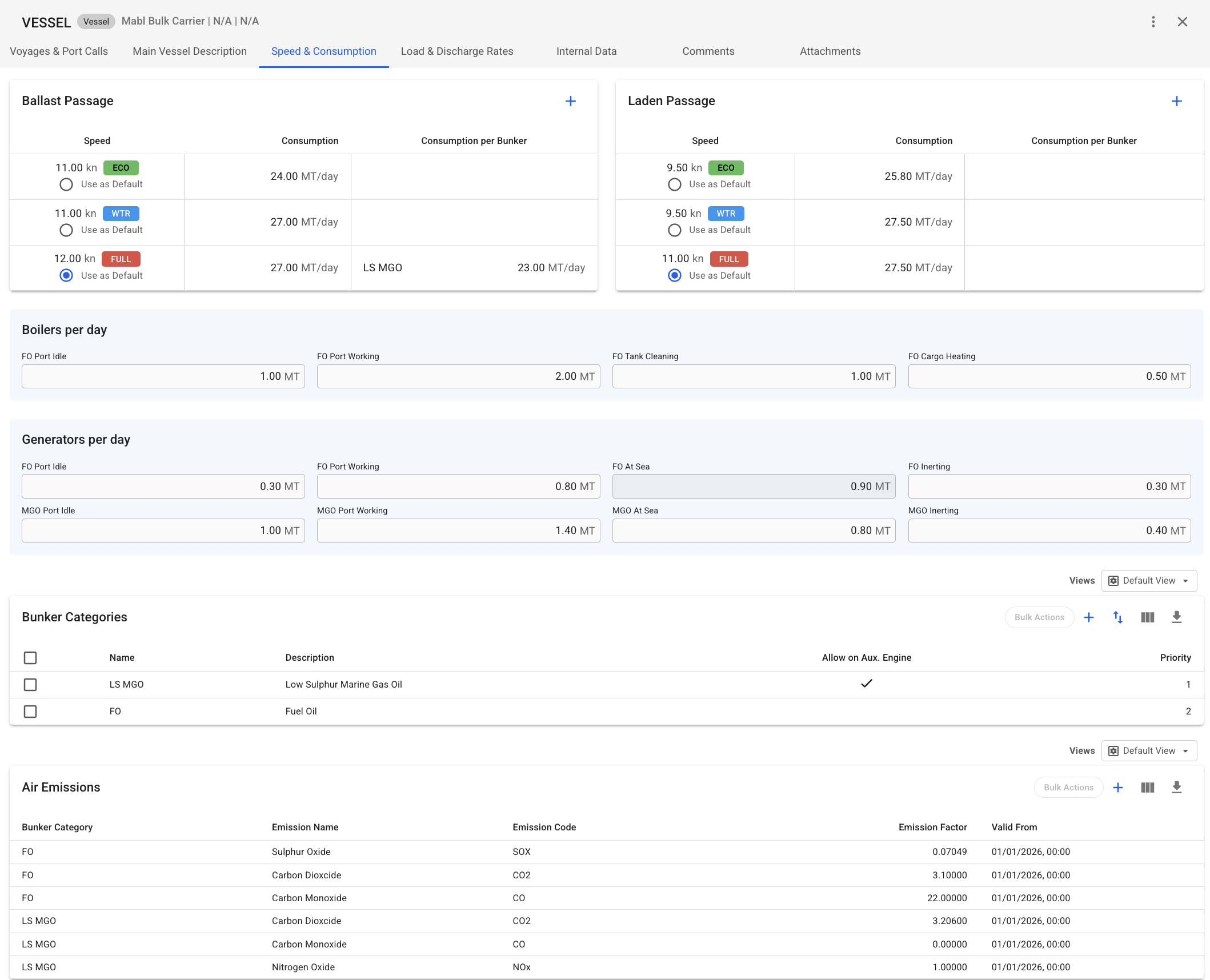
<figure><img src="https://2019030016-files.gitbook.io/~/files/v0/b/gitbook-x-prod.appspot.com/o/spaces%2FWoySkL2wtBxvxqGI8yWa%2Fuploads%2FQKWbm6EEX0DubfOpqroG%2Fimage.png?alt=media&#x26;token=c43e80b4-aac6-40be-bc28-db5824a1c361" alt=""><figcaption><p>Figure 1. Vessel speed and consumption configuration</p></figcaption></figure>

</details>

### Ballast and Laden Passage Speed

<figure><img src="https://2019030016-files.gitbook.io/~/files/v0/b/gitbook-x-prod.appspot.com/o/spaces%2FWoySkL2wtBxvxqGI8yWa%2Fuploads%2Ff6R7Ct4wgljw0AUio1k1%2Fimage.png?alt=media&#x26;token=1f36f9dc-29c2-4416-986a-2aae6e38b0b0" alt=""><figcaption><p>Figure 2. Ballast and Laden passages</p></figcaption></figure>

The top two cards display the Ballast and Laden speeds (see Figure 2) along with their corresponding fuel consumption for the selected vessel. These cards also allow specifying different consumption values for any bunker category. This configuration is used as the default for all voyages of the vessel, but it can be adjusted for each voyage in the Voyage module.

A new passage configuration can be added by clicking the + icon. The added options will also be available in the Voyage, and Port Call module for all voyages of the vessel.

For example, the vessel shown in Figure 1 has the following configuration:

There are three Ballast consumption options for this vessel:

* **ECO**: 24 MT/day at 11 knots for any bunker category
* **WTR**: 27 MT/day at 12 knots for any bunker category
* **FULL**: 27 MT/day at 12 knots for any bunker category (selected)

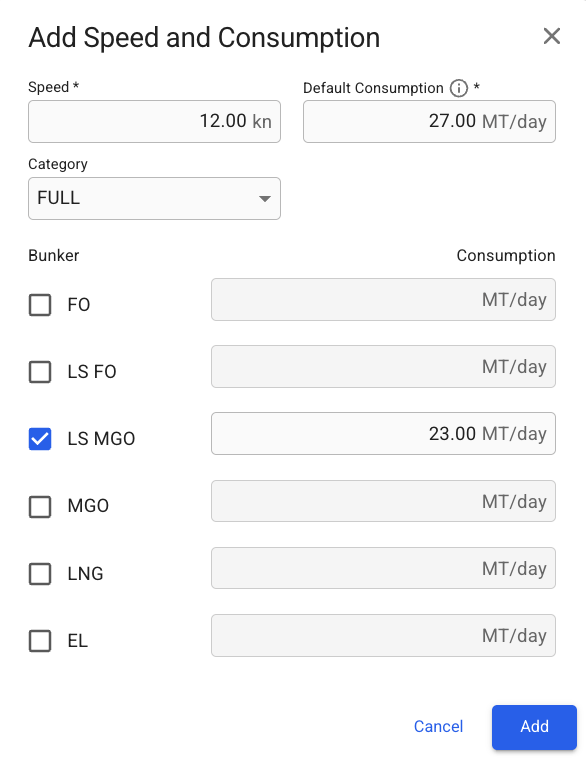
For the **FULL** speed category, the consumption for the **LS MGO** bunker category is **23 MT/day** at the same speed. Figure 3 illustrates how the Ballast Passage speed and consumption are configured in the create modal.

<figure><img src="https://2019030016-files.gitbook.io/~/files/v0/b/gitbook-x-prod.appspot.com/o/spaces%2FWoySkL2wtBxvxqGI8yWa%2Fuploads%2F1hHyzSDl3TSiAPIvMccy%2Fimage.png?alt=media&#x26;token=2e37d5b3-0765-49de-a04a-7a6597cd6175" alt="" width="293"><figcaption><p>Figure 3. Ballast Passage Speed configuration</p></figcaption></figure>

There are three Laden consumption options for this vessel:

* **ECO**: 9.5 knots at 25.8 MT/day for any bunker category
* **WTR**: 9.5 knots at 27.5 MT/day for any bunker category
* **FULL**: 11 knots at 27.5 MT/day for any bunker category (selected)

{% hint style="info" %}
Speed categories allow users to define custom tags (such as ECO, WTR, and FULL) to categorise different speed and consumption profiles. They are used for classification and selection only and do not affect calculation logic.

The available categories and their definitions are configured by your organisation’s administrator and can be managed in the **Master Data →** [**Speed Categories**](https://docs.dataloy.com/voyage-management-system/step-by-step-guides/master-data/speed-categories) module.
{% endhint %}

### Boilers and Generators overview

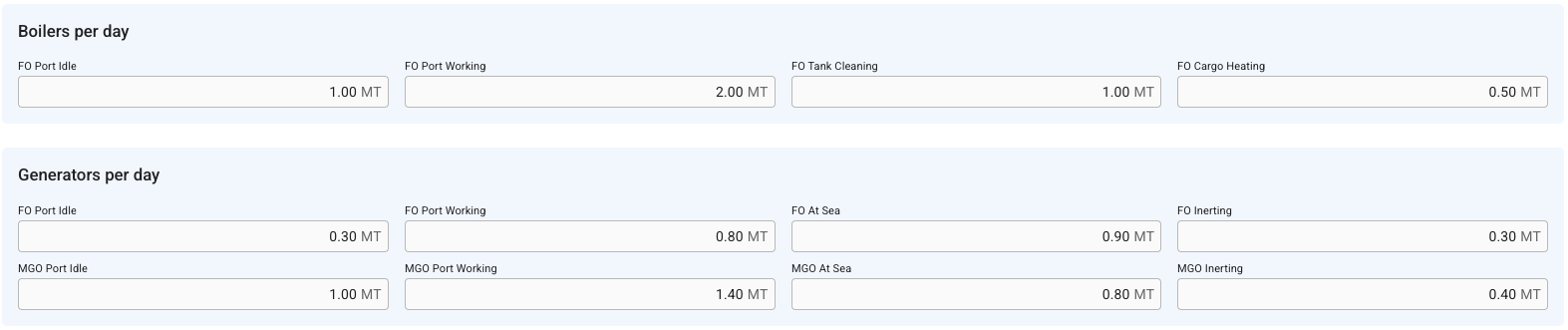
<figure><img src="https://2019030016-files.gitbook.io/~/files/v0/b/gitbook-x-prod.appspot.com/o/spaces%2FWoySkL2wtBxvxqGI8yWa%2Fuploads%2FSekjRCgxuJvpRev1MMO9%2Fimage.png?alt=media&#x26;token=2feae8c6-c9a0-4a97-b02d-7a05004ff1d8" alt=""><figcaption><p>Figure 4. Boilers and Generators</p></figcaption></figure>

These sections specify the default parameters for extra consumption in port or at sea passages by FO and MGO. The defined consumption will be used for voyages created with this vessel but can be overridden for each voyage in the [voyage module](https://docs.dataloy.com/voyage-management-system/step-by-step-guides/voyages/maintain-voyages/overview/update-speed-and-consumption).

<table data-full-width="true"><thead><tr><th width="249">Field Name</th><th>Description</th><th>Additional notes</th></tr></thead><tbody><tr><td>FO Port Idle (boiler)</td><td>Voyage FO Port Idle = generator FO Port Idle + boiler FO Port Idle. For the <strong>main</strong> engine bunker category, estimates idle consumption between ARR–BRT, extra days, and UBRT–DEP as <code>duration × FO Port Idle</code>.</td><td>Also used to calculate BRT–UBRT interval consumption for <strong>not loading, discharging, or ship-to-ship</strong> port calls.</td></tr><tr><td>FO Port Working/Discharging (boiler)</td><td>Voyage FO Port Working/Discharging = generator FO Port Working/Discharging + boiler FO Port Working/Discharging. For the <strong>main</strong> engine bunker category, calculates working consumption per cargo port (for tankers: discharging ports only) as <code>loading days × FO working/discharging</code>.</td><td>“Discharging” applies only to tanker discharging cargo ports. For other vessel types, “Working” applies to all cargo ports.<br><br>Used for the BRT–UBRT loading interval <strong>only</strong> when <strong>loading, discharging, or ship-to-ship</strong> port calls.</td></tr><tr><td>FO Tank Cleaning</td><td>Adds <strong>main</strong> engine bunker category cleaning consumption at BRT as <code>cleaning days × FO tank cleaning</code>.</td><td>Added <strong>only</strong> to the <strong>first loading port call</strong>.<br>Cleaning days are set at the voyage level.</td></tr><tr><td>FO Cargo Heating</td><td>Adds <strong>main</strong> engine bunker category heating consumption at BRT as <code>heating days × FO Cargo Heating</code>.</td><td>Added <strong>only</strong> to the <strong>first loading port call</strong>.<br>Heating days are set at the voyage level.</td></tr><tr><td>Loading Consumption</td><td>For the <strong>auxiliary</strong> engine bunker category, estimates working consumption for each loading cargo port as <code>loading days × loading consumption</code>.</td><td>Calculated only for cargo ports where <strong>“Calculate Working Consumption”</strong> is enabled.<br>Available only when the voyage vessel type is <strong>“Tanker.”</strong></td></tr><tr><td>FO Port Idle (generator)</td><td>Voyage FO Port Idle = generator FO Port Idle + boiler FO Port Idle. For the <strong>main</strong> engine bunker category, estimates idle consumption between ARR–BRT, extra days, and UBRT–DEP as <code>duration × FO Port Idle</code>.</td><td>Also used to calculate BRT–UBRT interval consumption for <strong>not</strong> loading, discharging, or ship-to-ship port calls.</td></tr><tr><td>FO Port Working/Discharging (generator)</td><td>Voyage FO Port Working/Discharging = generator FO Port Working/Discharging + boiler FO Port Working/Discharging. For the <strong>main</strong> engine bunker category, calculates working consumption per cargo port (for tankers: discharging ports only) as <code>loading days × FO working/discharging</code>.</td><td>“Discharging” applies only to tanker discharging cargo ports. For other vessel types, “Working” applies to all cargo ports.<br><br>Used for the BRT–UBRT loading interval <strong>only</strong> when <strong>loading, discharging, or ship-to-ship</strong> port calls.</td></tr><tr><td>FO At Sea</td><td>Additional consumption added to the <strong>main</strong> engine at-sea voyage consumption.</td><td>Used together with the selected speed’s consumption.</td></tr><tr><td>FO Inerting</td><td>Adds <strong>main</strong> engine bunker category inerting consumption at BRT as <code>inerting days × FO Inerting</code>.</td><td>Not available on TC In.<br>Added <strong>only</strong> to the <strong>first loading port call</strong>.<br>Inerting days are set at the voyage level.</td></tr><tr><td>MGO Port Idle</td><td>For the <strong>auxiliary</strong> engine bunker category, calculates idle consumption between ARR–BRT, extra days, and UBRT–DEP as <code>duration × MGO Port Idle</code>.</td><td>Also used to calculate BRT–UBRT interval consumption for <strong>not loading, discharging, or ship-to-ship port</strong> calls.</td></tr><tr><td>MGO Port Working/Discharging</td><td>For the <strong>auxiliary</strong> engine bunker category, calculates working consumption per cargo port (for tankers: discharging ports only) as <code>loading days × MGO working/discharging</code>.</td><td><p>“Discharging” applies only to tanker discharging cargo ports. For other vessel types, “Working” applies to all cargo ports. <br></p><p>Used for the BRT–UBRT loading interval <strong>only</strong> when <strong>loading, discharging, or ship-to-ship</strong> port calls.</p></td></tr><tr><td>MGO at Sea</td><td>Additional <strong>auxiliary</strong> engine consumption at sea. Example: when burning FO + LS MGO at sea, FO is the primary consumption outside ECA, and LS MGO is added using this field and the at-sea distance.</td><td>Used together with the selected speed’s consumption.</td></tr><tr><td>MGO Inerting</td><td>Adds <strong>auxiliary</strong> engine bunker category inerting consumption at BRT as <code>inerting days × MGO Inerting</code>.</td><td>Not available on TC In.<br>Added <strong>only</strong> to the <strong>first loading port call</strong>.<br>Inerting days are set at the voyage level.</td></tr></tbody></table>

### Bunker Categories

<figure><img src="https://2019030016-files.gitbook.io/~/files/v0/b/gitbook-x-prod.appspot.com/o/spaces%2FWoySkL2wtBxvxqGI8yWa%2Fuploads%2FeqGvJ0X8b6Q3tVaHX5QP%2Fimage.png?alt=media&#x26;token=3851acd0-2ad0-456a-9961-cdb800d6b20a" alt=""><figcaption><p>Figure 5. Bunker Categories</p></figcaption></figure>

You can customize the default bunker categories used by the vessel and determine the order in which they are applied.

{% hint style="danger" icon="triangle-exclamation" %}
Important notice: Changes to vessel bunker categories will affect **all** **open** voyages for that vessel. If the selected vessel categories do not align with the consumption data on existing voyages, both consumption categories and emission calculations may change. Modify vessel bunker categories carefully and consider the voyages that may be affected by the update. Close any voyages that you do not want to be affected by this change.
{% endhint %}

For example, for an Open Loop vessel it may be allowed to use FO, FO LS, and LS MGO in North America. If the vessel has no specific configuration, Dataloy will prioritize FO as the default option. However, this can be changed by defining Vessel Bunker Categories and assigning LS MGO priority 1 and FO priority 2\*. In this case, Dataloy VMS will compare the bunker categories allowed in the area with the vessel’s configured categories and select the highest-priority match - in this scenario, LS MGO. If the vessel is configured without a bunker category allowed in a specific area, the first-priority bunker category defined for that area will be used.

The bunker category priorities can be adjusted using the “Re-sequence” function located in the top-right corner of the Bunker Categories section.

### Air Emissions

<figure><img src="https://2019030016-files.gitbook.io/~/files/v0/b/gitbook-x-prod.appspot.com/o/spaces%2FWoySkL2wtBxvxqGI8yWa%2Fuploads%2FsMDxZCweQfuKVrngP9lm%2Fimage.png?alt=media&#x26;token=5d012772-4da7-4525-961c-b6193fa4476a" alt=""><figcaption><p>Figure 6. Air Emissions</p></figcaption></figure>

Allows you to specify emission factors for bunker categories, including Carbon Dioxide, Nitrogen Oxide, Particulate Matter, Sulfur Oxide, and Carbon Monoxide. These factors will be used in emission calculations for all voyages of the vessel.