# Vessel Name History

Whenever the name of a vessel is changed, the previous name is saved to the vessel name history.

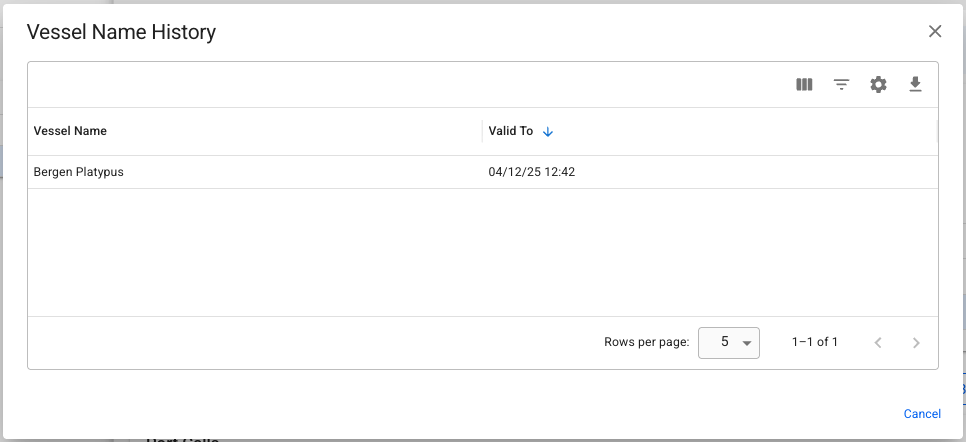
To view the history, click the *More* (<img src="https://content.gitbook.com/content/WoySkL2wtBxvxqGI8yWa/blobs/UFC0FaF4v1wAAYRlDsxa/trippeldot.png" alt="" data-size="line">) button in the top right of the vessel drawer, and select *Vessel Name History*. This will bring up a small modal, listing all the names the vessel has been sailing under.

<figure><img src="https://content.gitbook.com/content/WoySkL2wtBxvxqGI8yWa/blobs/vtM69IUeYDEU1uhjKdkh/image.png" alt=""><figcaption><p>This vessel was sailing under the name Bergen Platypus until 04.12.2025</p></figcaption></figure>

#### Ex-names and voyages

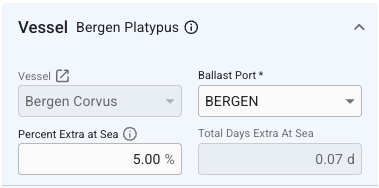
Changing the vessel name will also update voyages with status *Nominated* or *Operational*. In the event the vessel has changed names after the voyage was set to *Operationally Closed* (or any later statuses), a small notice with the ex-name will be displayed in the vessel section when viewing those voyages later.

<figure><img src="https://content.gitbook.com/content/WoySkL2wtBxvxqGI8yWa/blobs/Nu0heCMtBrNKf4RILAfn/image.png" alt=""><figcaption><p>Bergen Corvus, ex-Bergen Platypus, as seen in the voyage drawer. </p></figcaption></figure>
#### Using ex-names for filtering and searching

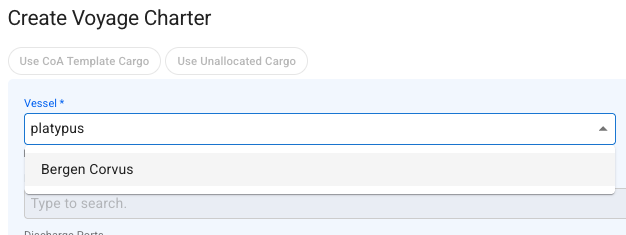
It is possible to filter and search for a vessel by her ex-name in most of the modules of the system. Search results will return the vessel's current name, even if you searched using an ex-name.

<figure><img src="https://content.gitbook.com/content/WoySkL2wtBxvxqGI8yWa/blobs/fbASU9tMwXCJU0rlBnB1/image.png" alt=""><figcaption><p>Searching for a vessel in a selector using an ex-name.</p></figcaption></figure>