> For the complete documentation index, see [llms.txt](https://docs.dataloy.com/llms.txt). Markdown versions of documentation pages are available by appending `.md` to page URLs; this page is available as [Markdown](https://docs.dataloy.com/voyage-management-system/step-by-step-guides/chartering/time-charter-contracts/maintain-time-charter-contracts/duration-and-rates/tc-duration-details.md).
# TC Duration Details
A TC contract is built around one or more Durations, each representing a defined period with its respective terms during which a vessel can be employed.
Durations are listed in the Durations panel of the TC Contract. Each is numbered sequentially, and the **Duration** field states applicable timeframe of the TC Duration. A TC Duration can be firm or Optional. Optional durations are not committed upfront, they can be declared or forfeited once the decision is made
## Creating a Duration
1. **Click the** **-icon**, the Create Duration modal opens
2. **Enter the duration details** ( see fields below).
3. **Save**. The new duration appears as a numbered row in the Durations list
Here, you can add inn various values for both the TC's duration and the duration's rates. You can create TC rates at the bottom **Rate** table.
When connecting a duration to a Market Index, you will automatically get the last updated date of it's Market Index Values in GMT:
## Edit a Duration
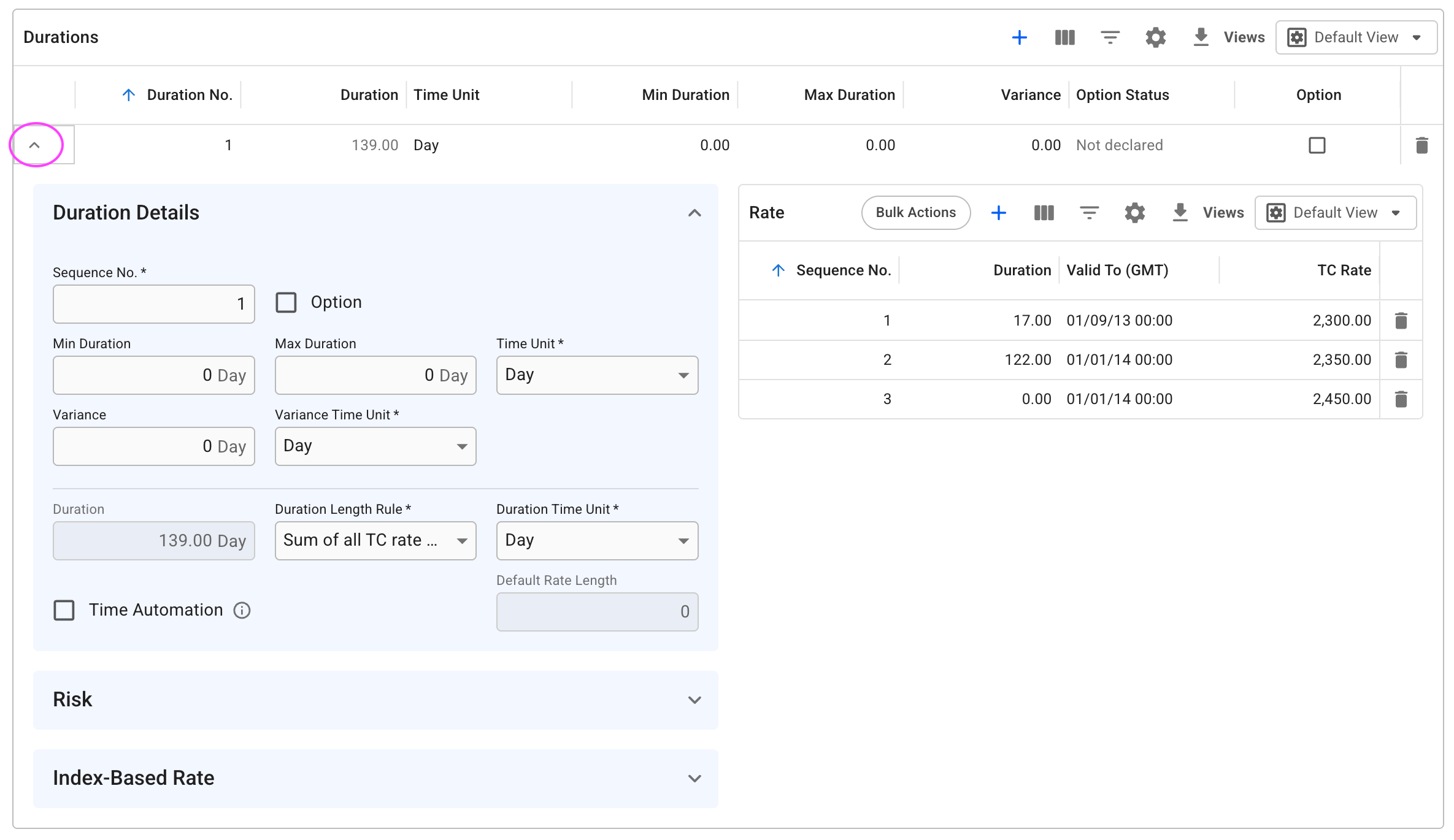
Double-click any field on a duration row to edit it inline. To access the full set of fields, click the **expand icon** on the row. This opens the Duration Details section along with the Rate list.
Expanded view of Durations list
### Duration Details Fields
| Field | Description |
| ------------------------ | ------------------------------------------------------------------------------------------------------------------------------------------------------------------------------------------------ |
| **Option** | Tick to mark this duration as an option period. Enables the Option Status field. |
| **Option Status** | The declaration state of the option: *Declared*, *Forfeited*, or *Not Declared*. Defaults to Not Declared. Must be updated manually. |
| **Minimum Duration** | The minimum agreed charter period length. |
| **Maximum Duration** | The maximum agreed charter period length. |
| **Variance** | The permitted +/− tolerance on the duration. |
| **Rate Unit** | The unit in which hire rates are expressed, either be **per day (/day)** or **per month (/month).** |
| **Duration** | Total duration length |
| **Duration Length Rule** |
Determines how the total duration length is calculated. Defaults to Sum of all TC Rates. When Time Automation is enabled, defaults to Maximum Duration + Variance.
|
| **Duration Time Unit** | The time unit of the Duration field. Can be Day or Month. This also the TimeUnit of the TC Rates. |
#### Time Automation
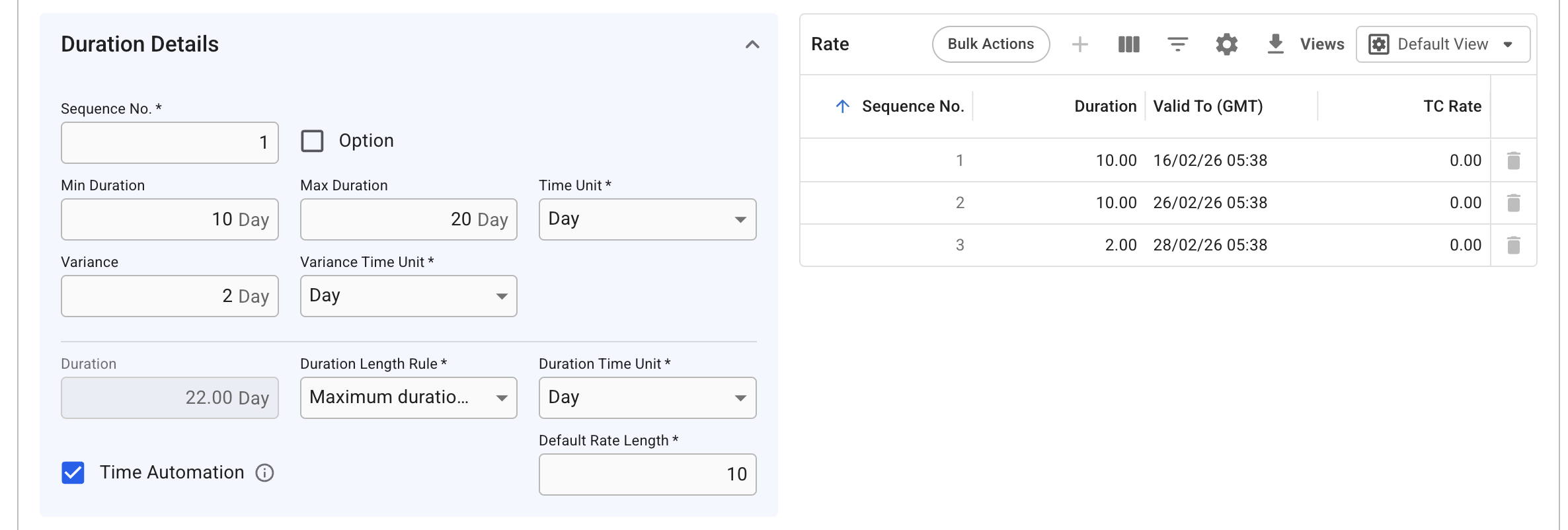
Time Automation generates TC rate rows automatically based on a default rate length and the total Duration, so they do not need to be created manually.
#### Enabling Time Automation
Tick the **Time Automation** checkbox in the bottom section of Duration Details. This:
* Enables the **Default Rate Length** field.
* Sets the Duration Length Rule to **Maximum Duration + Variance** (can still be overridden).
* Generates TC rate rows automatically to fill the calculated duration.
> **Important:** Changing the Default Rate Length deletes all existing TC rate rows and regenerates them. Confirm the correct value before making changes.
#### How Rate Generation Works
Rates are created to fill the full duration length. If Duration is 22 days and Default Rate Length is set to 10 days, three rows are generated: two of 10 days each, and a third of 2 days for the remainder.
Adjusting Minimum, Maximum, or Variance fields updates both the calculated duration length and the generated rate rows automatically.
Duration Details section, Time Automation enabled
{% hint style="warning" %}
When enabling Time Automation, it will no longer be possible to create, delete or edit the sequence of the TC rates.
{% endhint %}
The Valid To date is based on:
* For TC Out contracts: Delivery date in TC contract or the delivery port call's ETA date of voyage if nomnated.
* For TC In contracts: the voyage start date of the first linked nominated voyage
### Risk section
Below this section, is the Risk section. Here, a **TC Benchmark Index** mapped to a [Market Index](/voyage-management-system/step-by-step-guides/chartering/market-indices.md) and **Exposure Duration** can be selected to report and process the dimension:
Risk section
### TC Rates
Fixed TC rates can be inserted directly in the Rate-grid. \
TC Rate can also calculated[ automatically based on an index](/voyage-management-system/step-by-step-guides/chartering/time-charter-contracts/maintain-time-charter-contracts/duration-and-rates/index-based-hire-rate.md).
---
# Agent Instructions
This documentation is published with GitBook. GitBook is the documentation platform designed so that both humans and AI agents can read, navigate, and reason over technical content effectively. Learn more at gitbook.com.
## Querying This Documentation
If you need additional information that is not directly available in this page, you can query the documentation by asking a question.
Perform an HTTP GET request on the following URL with the `ask` and `goal` query parameters:
```
GET https://docs.dataloy.com/voyage-management-system/step-by-step-guides/chartering/time-charter-contracts/maintain-time-charter-contracts/duration-and-rates/tc-duration-details.md?ask=&goal=
```
`ask` is the immediate question: it should be specific, self-contained, and written in natural language.
`goal` is what the user is ultimately trying to achieve, the reason they need the answer. Sharing it helps GitBook give you a better, more relevant answer. A goal is most helpful when it describes the outcome the user wants rather than restating the question. For example, with `ask=how do I create an API token`, a goal like `automate deployments from our CI pipeline` lets GitBook tailor the answer to that use case.
The response will contain a direct answer to the question and relevant excerpts and sources from the documentation.
Use this mechanism when the answer is not explicitly present in the current page, you need clarification or additional context, or you want to retrieve related documentation sections.