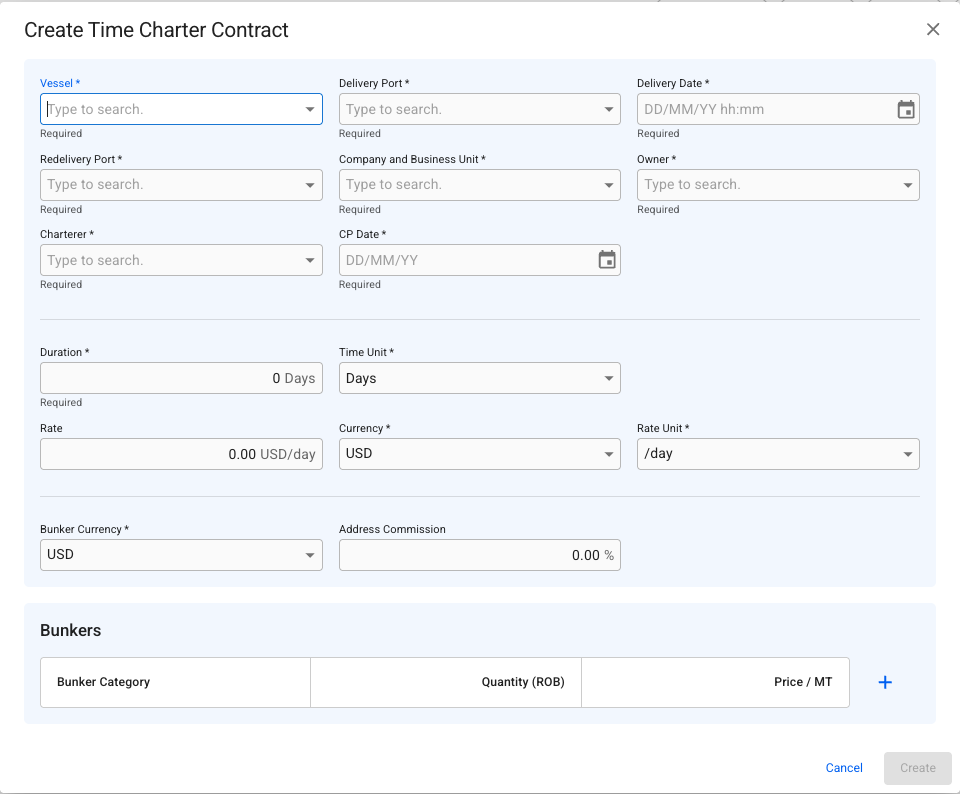
Create Time Charter Contract modal
 icon.
3. Select **Create Time Charter Contract.**
The **Create Time Charter Contract** modal opens. The modal is draggable — hover over the title bar to reposition it and see information behind it.
**3.** Enter the required fields.
| Field | Description | Required |
| ------------------------ | -------------------------------------------------------------------------------------------------------------------------------------------------------------------------------------------------------------------------------------------------------- | -------- |
| **Vessel** | The vessel to be hired. | ✅ |
| **Delivery Port** | The port where the vessel is delivered to the charterer. | ✅ |
| **Delivery Date** | The date the vessel is delivered. | ✅ |
| **Redelivery Port** | The port where the vessel is redelivered to the owner at the end of the charter. | ✅ |
| **Company** | The internal company under which this contract is recorded. | ✅ |
| **Business Unit** | The business unit within the company. | ✅ |
| **Owner** | The vessel owner counterpart. | ✅ |
| **Charterer** | The charterer counterpart. | ✅ |
| **CP Date** | The charter party date — the date the contract was agreed. | ✅ |
| **Duration** | The numeric length of the charter period. | ✅ |
| **Duration Measurement** | The unit of the duration — Days or Months. When set to Days, the Rate Unit is automatically fixed to `/day` and cannot be changed. | ✅ |
| **Rate** | The hire rate agreed in the contract. | ✅ |
| **Rate Unit** | The time unit against which the hire rate is expressed — `/day` or `/month`. Defaults to match the Duration Measurement. When Duration Measurement is Days, or when Index-based Hire is enabled, this field is set to `/day` and locked. See note below. | ✅ |
| **Rate Currency** | The currency of the hire rate. | ✅ |
| **Bunker Currency** | The currency used for bunker cost recording on this contract. | ✅ |
| **Bunkers** | The Delivery and Redelivery Bunker Terms per Bunker Category | |
> **Note:** Rate Unit and Duration Measurement can differ. For example, a contract may have a duration expressed in months but a hire rate quoted per day. In this case, set Duration Measurement to Months and Rate Unit to `/day`. All hire calculations and invoicing will use the Rate Unit, not the Duration Measurement.
> **Important:** If Index-based Hire is enabled on the contract, Rate Unit is automatically set to `/day` and the field is disabled. This cannot be overridden.
**4.** Click **Create.**
The contract is created and opens in the Time Charter Contract drawer, where further details — including TC Duration periods, hire periods, and commissions — can be added.
### The Create Modal:
icon.
3. Select **Create Time Charter Contract.**
The **Create Time Charter Contract** modal opens. The modal is draggable — hover over the title bar to reposition it and see information behind it.
**3.** Enter the required fields.
| Field | Description | Required |
| ------------------------ | -------------------------------------------------------------------------------------------------------------------------------------------------------------------------------------------------------------------------------------------------------- | -------- |
| **Vessel** | The vessel to be hired. | ✅ |
| **Delivery Port** | The port where the vessel is delivered to the charterer. | ✅ |
| **Delivery Date** | The date the vessel is delivered. | ✅ |
| **Redelivery Port** | The port where the vessel is redelivered to the owner at the end of the charter. | ✅ |
| **Company** | The internal company under which this contract is recorded. | ✅ |
| **Business Unit** | The business unit within the company. | ✅ |
| **Owner** | The vessel owner counterpart. | ✅ |
| **Charterer** | The charterer counterpart. | ✅ |
| **CP Date** | The charter party date — the date the contract was agreed. | ✅ |
| **Duration** | The numeric length of the charter period. | ✅ |
| **Duration Measurement** | The unit of the duration — Days or Months. When set to Days, the Rate Unit is automatically fixed to `/day` and cannot be changed. | ✅ |
| **Rate** | The hire rate agreed in the contract. | ✅ |
| **Rate Unit** | The time unit against which the hire rate is expressed — `/day` or `/month`. Defaults to match the Duration Measurement. When Duration Measurement is Days, or when Index-based Hire is enabled, this field is set to `/day` and locked. See note below. | ✅ |
| **Rate Currency** | The currency of the hire rate. | ✅ |
| **Bunker Currency** | The currency used for bunker cost recording on this contract. | ✅ |
| **Bunkers** | The Delivery and Redelivery Bunker Terms per Bunker Category | |
> **Note:** Rate Unit and Duration Measurement can differ. For example, a contract may have a duration expressed in months but a hire rate quoted per day. In this case, set Duration Measurement to Months and Rate Unit to `/day`. All hire calculations and invoicing will use the Rate Unit, not the Duration Measurement.
> **Important:** If Index-based Hire is enabled on the contract, Rate Unit is automatically set to `/day` and the field is disabled. This cannot be overridden.
**4.** Click **Create.**
The contract is created and opens in the Time Charter Contract drawer, where further details — including TC Duration periods, hire periods, and commissions — can be added.
### The Create Modal:
Create Time Charter Contract modal