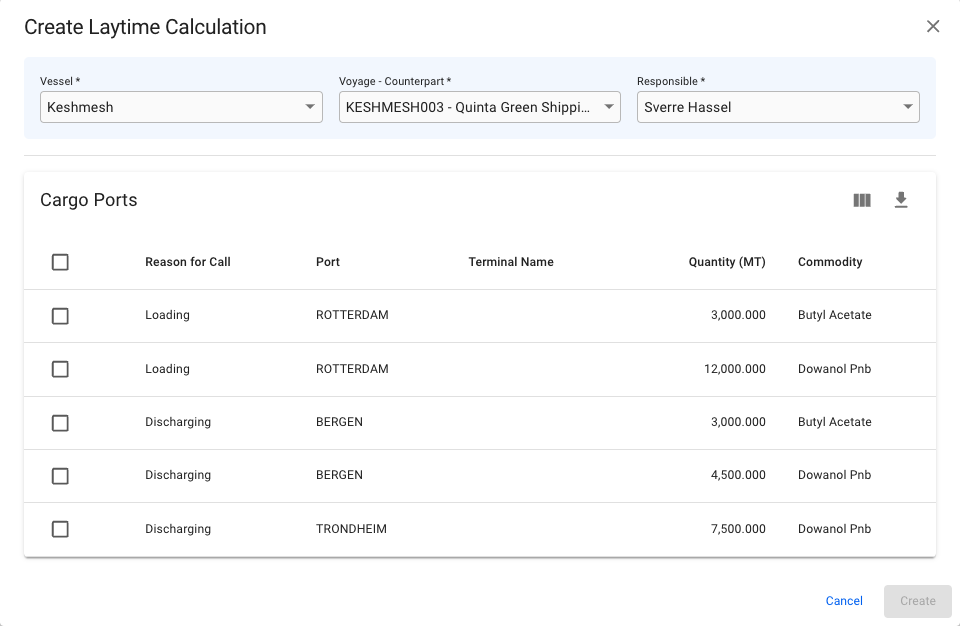
Vessel, voyage and counterpart selected. Cargo ports available for selection.
 in the top right corner.
3. Fill in all required fields listed below in the Create New Laytime Calculation window.
4. Click **Create**.
### **Required fields**
| *Vessel \** | Used to filter *Vessels* |
| ----------------------- | --------------------------------------------------- |
| *Voyage - Counterpart* | Combines the voyage reference and cargo counterpart |
| *Responsible Charterer* | Responsible charterer, default to the current user |
| *Cargo Ports* | Cargo Ports to be included in the calculations |
\* Only available when not creating a laytime calculation from the voyage drawer.
{% hint style="info" %}
Field Conditions
Each field narrows down the next choice. Once a Vessel has been selected, the Voyage - Counterpart field will be enabled. With both Vessel and Voyage - Counterpart selected, the related cargo ports will appear underneath.
At least one cargo port MUST be chosen.
{% endhint %}
in the top right corner.
3. Fill in all required fields listed below in the Create New Laytime Calculation window.
4. Click **Create**.
### **Required fields**
| *Vessel \** | Used to filter *Vessels* |
| ----------------------- | --------------------------------------------------- |
| *Voyage - Counterpart* | Combines the voyage reference and cargo counterpart |
| *Responsible Charterer* | Responsible charterer, default to the current user |
| *Cargo Ports* | Cargo Ports to be included in the calculations |
\* Only available when not creating a laytime calculation from the voyage drawer.
{% hint style="info" %}
Field Conditions
Each field narrows down the next choice. Once a Vessel has been selected, the Voyage - Counterpart field will be enabled. With both Vessel and Voyage - Counterpart selected, the related cargo ports will appear underneath.
At least one cargo port MUST be chosen.
{% endhint %}
Vessel, voyage and counterpart selected. Cargo ports available for selection.