# Schedule

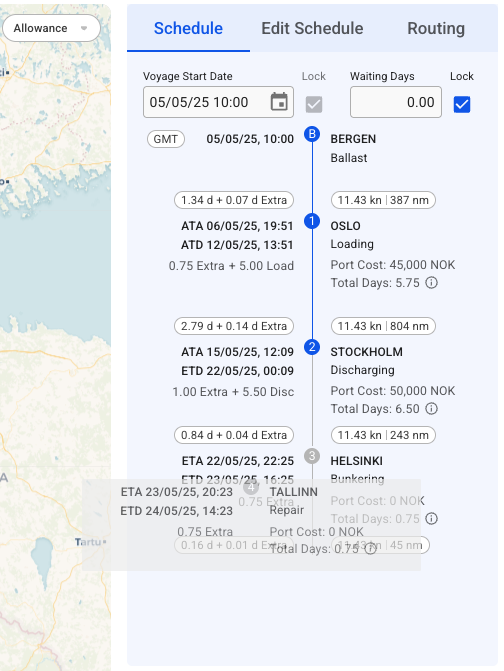
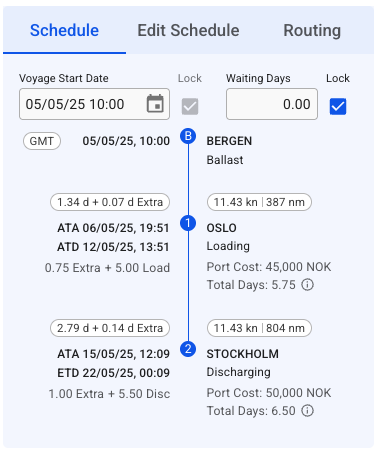
The *Voyage schedule (Figure 1)* visualization may be found on the right-hand side of a voyage drawer.&#x20;

This section is highly customizable: for example, you can change the voyage start date, lock it, update the port call sequence, and edit port calls by hovering over a port call box.

<figure><img src="/files/wNfmXxim57kLkbMqVNPk" alt=""><figcaption><p>Figure 1. Voyage Schedule</p></figcaption></figure>

The *Schedule Timeline* is a fully interactive module. Each port represents a draggable block - if you reorder the blocks with not-fixed port calls *(Figure 2)*, you will update the port call sequence on the opened voyage correspondingly:

<figure><img src="/files/7ZYZ7FRDts28ym2UR0Zr" alt=""><figcaption><p>Figure 2. Schedule Drag'n'Drop</p></figcaption></figure>

Next, each *Port Call* block is clickable, and it brings up a [Port Call](/release-8.25/voyage-management-system/step-by-step-guides/port-calls.md) drawer.

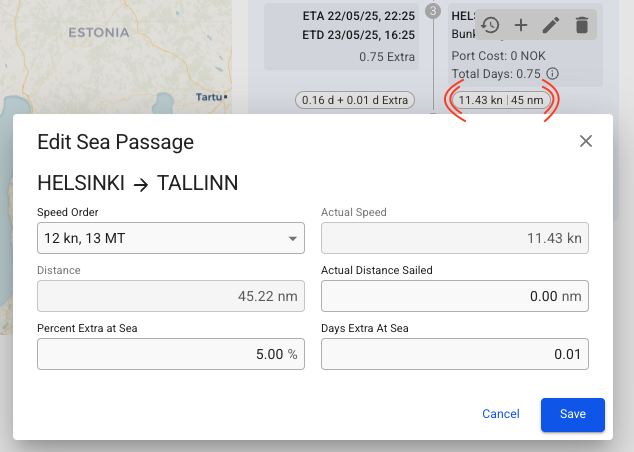
The small ovals inside of each *Port Call* block are called chips and include a piece of related information: *Days at Sea + Extra Days at Sea*, *Actual Speed*, and *Distance between Ports*. Every oval is clickable and allows editing corresponding sea passages *(Figure 3)*.

<figure><img src="/files/rpPe0TkokWZehUZlmGh0" alt=""><figcaption><p>Figure 3. Edit Sea Passage</p></figcaption></figure>

Moreover, the Port Call blocks include a small hover actions toolbar that provides the following actions on the voyage schedule sequence: show Port Cost history overview, create new Port Call to the current schedule, edit the selected Port Call, or delete the Port Call.

#### Hover Toolbar

When hovering the mouse over a port call in the schedule, a toolbar in the upper right will appear.

* [View](/release-8.25/voyage-management-system/step-by-step-guides/voyages/maintain-voyages/overview/schedule/find-a-port-call.md) and [maintain](/release-8.25/voyage-management-system/step-by-step-guides/voyages/maintain-voyages/overview/schedule/maintain-port-calls.md) port costs for the selected port.
* To *insert* a port call before or after the port call you are editing, click the **Create** <img src="/files/-M23YHZZ2QMC5s1NFheI" alt="" data-size="original"> button and select **Before** or **After.** A window to create a new port call then pops up.
* To *edit* a port call, click the **Edit** <img src="/files/-MKZNQlOdWyBxPRGIfjj" alt="" data-size="original"> button.
* To *delete* a port call, click the **Delete** <img src="/files/-MJWK7hDUGsty-xRwbxc" alt="" data-size="original">button.
* To *change* the order of port calls, simply *hover over* a port call to move it into place.
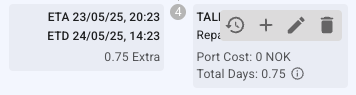
<figure><img src="/files/Ji6xkfLgrfxWlCkZ9oNS" alt=""><figcaption><p>Figure 4. Schedule Port Call action tooltip</p></figcaption></figure>

### Edit Port Call

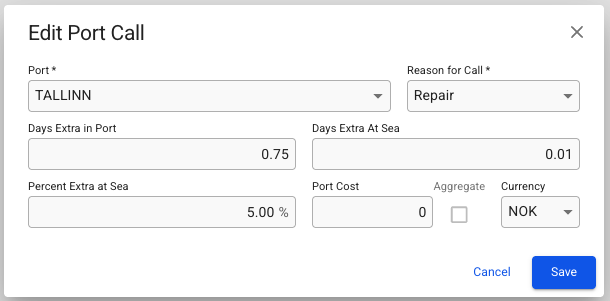
To edit a port call in the schedule, click the pencil icon in the action tooltip. A popup modal then shows with editable essential port call details *(Figure 5)*.

<figure><img src="/files/9YDo4kuxWQLFFEsvwW0y" alt=""><figcaption><p>Figure 5. Edit Port Call action</p></figcaption></figure>

{% hint style="info" %}
Note that the port can only be changed if the Arrival-, Berthed-, and Departure Date are unfixed. If any of these dates are fixed, the port selector will only show available terminals on the currently selected port.
{% endhint %}


---

# Agent Instructions: Querying This Documentation

If you need additional information that is not directly available in this page, you can query the documentation dynamically by asking a question.

Perform an HTTP GET request on the current page URL with the `ask` query parameter:

```
GET https://docs.dataloy.com/release-8.25/voyage-management-system/step-by-step-guides/voyages/maintain-voyages/overview/schedule.md?ask=<question>
```

The question should be specific, self-contained, and written in natural language.
The response will contain a direct answer to the question and relevant excerpts and sources from the documentation.

Use this mechanism when the answer is not explicitly present in the current page, you need clarification or additional context, or you want to retrieve related documentation sections.