# Create Time Charter Out

### Steps:

1. Open the **Voyages** module from the menu on the left.
2. On the top right corner, click the <img src="/files/-M23aB95JDSUt7kYOdWo" alt="" data-size="line"> icon.
3. Select **Create Time Charter Out**.
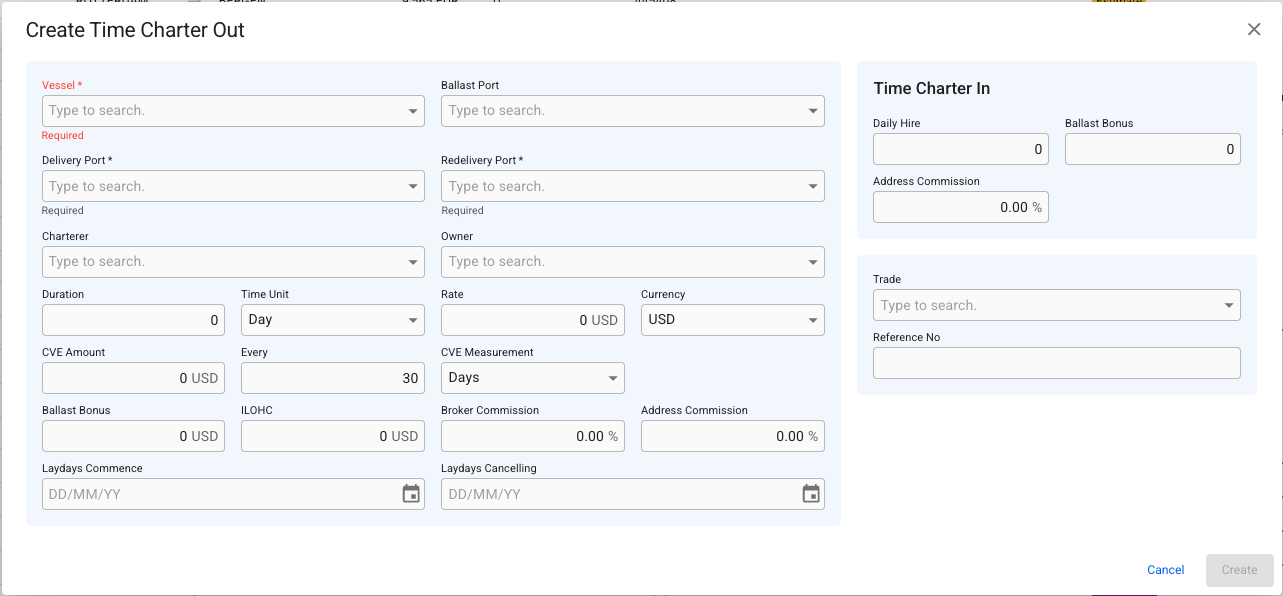
4. In the modal, you can **fill in** the required fields and **add** any additional information about the new TC voyage.&#x20;
5. After you have filled in, you can click **Create**.

<figure><img src="/files/9ZQqj4VqOLWYTsvaqIhY" alt=""><figcaption><p>Create Time Charterer Out modal</p></figcaption></figure>

When choosing a Vessel, the Ballast Port, Owner and Currency fields will be automatically filled out with the vessels last port call, owner and default voyage currency.

The Currency field in the create modal is used for both Hire currency, as well as Bunkers and CVE currency.&#x20;

#### Trade

In the trade field a combination of Route, Trade and Pattern can be selected to ensure trade is set properly. When changing to a different option, the cargoes on the voyage will be updated with the same trade.


---

# Agent Instructions: Querying This Documentation

If you need additional information that is not directly available in this page, you can query the documentation dynamically by asking a question.

Perform an HTTP GET request on the current page URL with the `ask` query parameter:

```
GET https://docs.dataloy.com/release-8.25/voyage-management-system/step-by-step-guides/voyages/create-voyage/create-time-charter-out.md?ask=<question>
```

The question should be specific, self-contained, and written in natural language.
The response will contain a direct answer to the question and relevant excerpts and sources from the documentation.

Use this mechanism when the answer is not explicitly present in the current page, you need clarification or additional context, or you want to retrieve related documentation sections.
