# Vessel Name History

Whenever the name of a vessel is changed, the previous name is saved to the vessel name history.

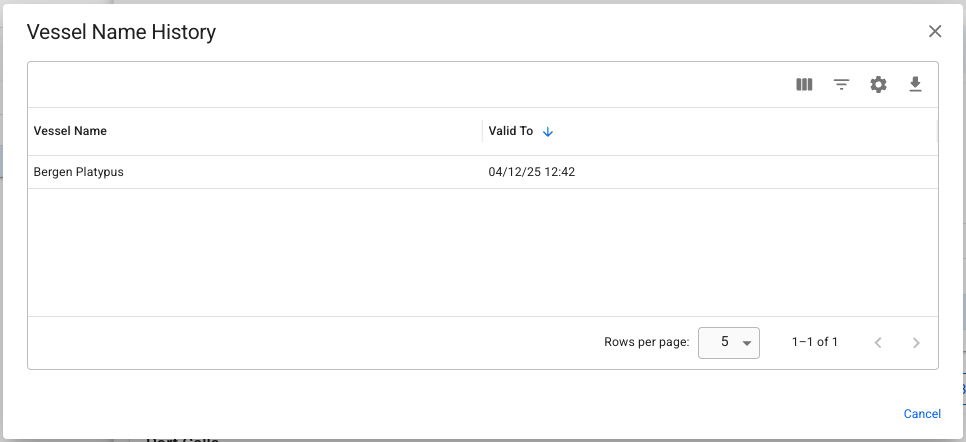
To view the history, click the *More* (<img src="/files/3egWRdjEv06jHpJQAdSq" alt="" data-size="line">) button in the top right of the vessel drawer, and select *Vessel Name History*. This will bring up a small modal, listing all the names the vessel has been sailing under.

<figure><img src="/files/nTUJn0CH5PAD1PiY7mxH" alt=""><figcaption><p>This vessel was sailing under the name Bergen Platypus until 04.12.2025</p></figcaption></figure>

#### Ex-names and voyages

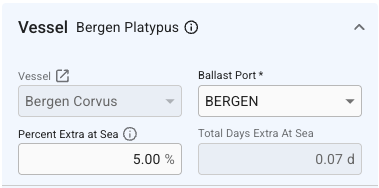
Changing the vessel name will also update voyages with status *Nominated* or *Operational*. In the event the vessel has changed names after the voyage was set to *Operationally Closed* (or any later statuses), a small notice with the ex-name will be displayed in the vessel section when viewing those voyages later.

<figure><img src="/files/B0005EvJkJihGBKHNTl0" alt=""><figcaption><p>Bergen Corvus, ex-Bergen Platypus, as seen in the voyage drawer. </p></figcaption></figure>
#### Using ex-names for filtering and searching

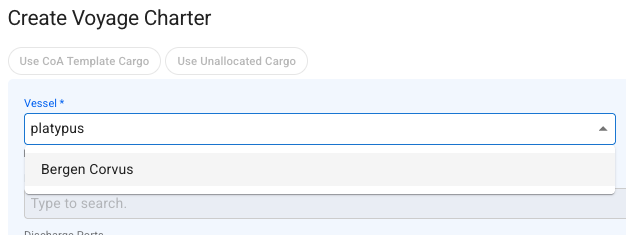
It is possible to filter and search for a vessel by her ex-name in most of the modules of the system. Search results will return the vessel's current name, even if you searched using an ex-name.

<figure><img src="/files/jLC4sIM19RxLRln2NOXI" alt=""><figcaption><p>Searching for a vessel in a selector using an ex-name.</p></figcaption></figure>


---

# Agent Instructions: Querying This Documentation

If you need additional information that is not directly available in this page, you can query the documentation dynamically by asking a question.

Perform an HTTP GET request on the current page URL with the `ask` query parameter:

```
GET https://docs.dataloy.com/release-8.25/voyage-management-system/step-by-step-guides/vessels/vessel-name-history.md?ask=<question>
```

The question should be specific, self-contained, and written in natural language.
The response will contain a direct answer to the question and relevant excerpts and sources from the documentation.

Use this mechanism when the answer is not explicitly present in the current page, you need clarification or additional context, or you want to retrieve related documentation sections.