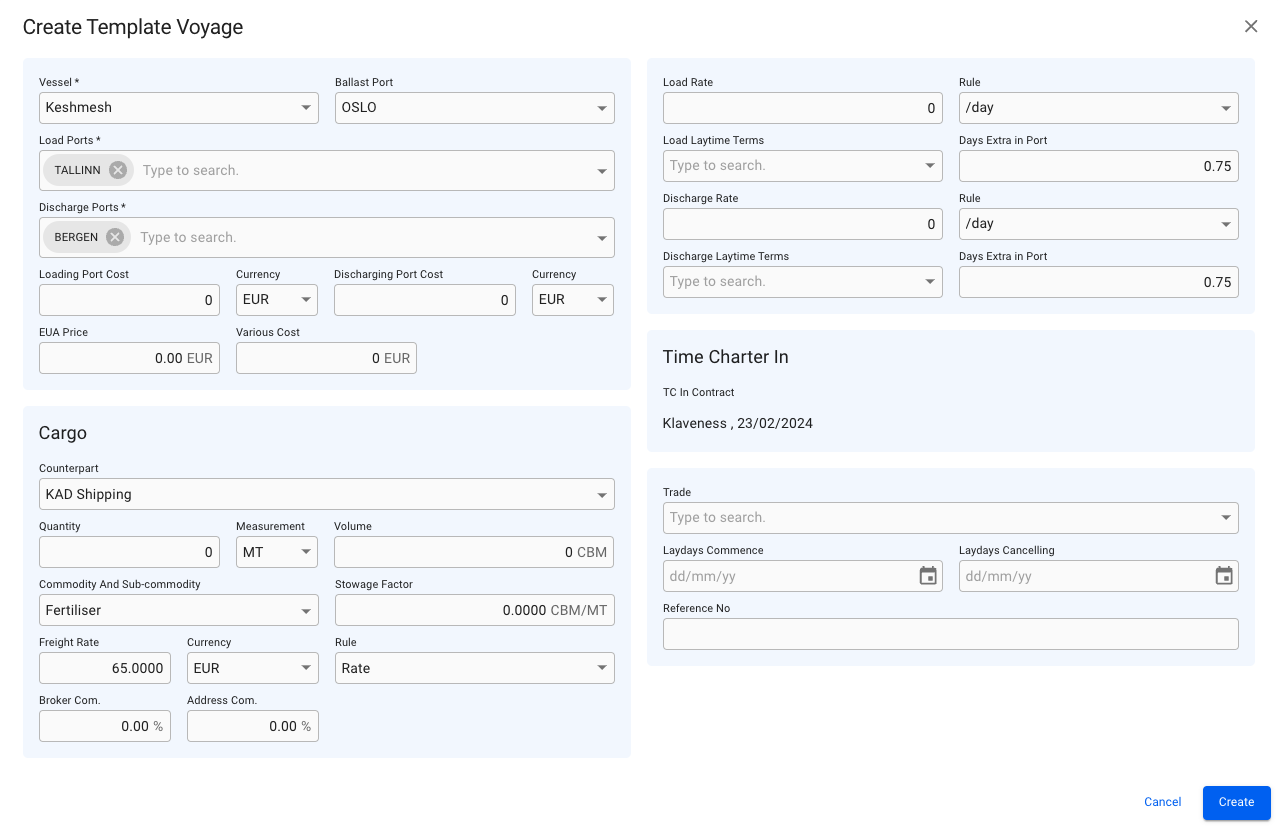
Create Template Voyage Modal
 in the top right corner
4. Fill in all required fields listed in the Create Template Voyage window
5. Click **Create**
Visit: [Broken mention](broken://pages/-Mkat8-rN4b0nxYL63S6).
### From Contract of Affreightment (CoA) drawer
1. Open the **Contracts of Affreightment** module in the *Chartering* section
2. Click on a CoA to open the drawer, and navigate to the *Template Voyages* tab
3. Click **Create** in the top right corner
4. Fill in all required fields listed in the Create Template Voyage window
5. Click **Create**
Visit: [Maintain a CoA](/release-8.25/voyage-management-system/step-by-step-guides/chartering/contracts-of-affreightment/maintain-contracts-of-affreightment.md#template-voyages).
### From Voyage Drawer
1. Open **Voyage** module
2. Stay on Voyages tab
3. Open one of the voyages to open up the Voyage drawer
4. Open secondary actions 
1. NOTE: only available for Estimate voyages!
5. Select "Convert to template..." option and select your options
6. Click **Confirm**
Visit: [Converting Voyage to Template](/release-8.25/voyage-management-system/step-by-step-guides/voyages/maintain-voyages/voyage-secondary-actions/converting-voyage-to-template.md).
### **From Voyages List**
1. Open the **Voyages** module
2. Click on Template Voyage tab
3. Click **Create** in the top right corner
4. Fill in all required fields listed in the Create Template Voyage window
5. Click **Create**
### Create Template Voyage Modal
**Required fields**
| Field | Description |
| -------------- | ------------------------------- |
| Vessel | Vessel the voyage will be using |
| Load Port | First loading port |
| Discharge Port | Last discharge port |
{% hint style="warning" %}
Creates a template voyage with default status *Estimate.*
{% endhint %}
in the top right corner
4. Fill in all required fields listed in the Create Template Voyage window
5. Click **Create**
Visit: [Broken mention](broken://pages/-Mkat8-rN4b0nxYL63S6).
### From Contract of Affreightment (CoA) drawer
1. Open the **Contracts of Affreightment** module in the *Chartering* section
2. Click on a CoA to open the drawer, and navigate to the *Template Voyages* tab
3. Click **Create** in the top right corner
4. Fill in all required fields listed in the Create Template Voyage window
5. Click **Create**
Visit: [Maintain a CoA](/release-8.25/voyage-management-system/step-by-step-guides/chartering/contracts-of-affreightment/maintain-contracts-of-affreightment.md#template-voyages).
### From Voyage Drawer
1. Open **Voyage** module
2. Stay on Voyages tab
3. Open one of the voyages to open up the Voyage drawer
4. Open secondary actions 
1. NOTE: only available for Estimate voyages!
5. Select "Convert to template..." option and select your options
6. Click **Confirm**
Visit: [Converting Voyage to Template](/release-8.25/voyage-management-system/step-by-step-guides/voyages/maintain-voyages/voyage-secondary-actions/converting-voyage-to-template.md).
### **From Voyages List**
1. Open the **Voyages** module
2. Click on Template Voyage tab
3. Click **Create** in the top right corner
4. Fill in all required fields listed in the Create Template Voyage window
5. Click **Create**
### Create Template Voyage Modal
**Required fields**
| Field | Description |
| -------------- | ------------------------------- |
| Vessel | Vessel the voyage will be using |
| Load Port | First loading port |
| Discharge Port | Last discharge port |
{% hint style="warning" %}
Creates a template voyage with default status *Estimate.*
{% endhint %}
Create Template Voyage Modal