# Tiered Demurrage/Despatch Rate

Demurrage rate tiers and despatch rate tiers allow you to define different charges based on cargo duration. Instead of applying flat rates, you can create multiple tiers where:

* **Demurrage tiers** specify charges when cargo exceeds laytime
* **Despatch tiers** specify credits when cargo clears before laytime expires

This creates aligned financial incentives: **charterers are penalized for delays and rewarded for faster operations**.

#### How tiered rates are applied

Tiered rates follow the same aggregation rules as static rates. How the tiers are applied depends on whether the laytime calculation is reversible or non-reversible:

* If the laytime calculation is **reversible**, the tiered rates are applied to the **total laytime used across all cargo ports**
* If the laytime calculation is **non-reversible**, the tiered rates are applied **separately for each cargo port**

<details>

<summary><strong>Examples of Tiered Demurrage and Despatch Calculations</strong></summary>

### Tiered demurrage rates

#### Scenario

| Parameter       | Value  |
| --------------- | ------ |
| Laytime allowed | 3 days |
| Time used       | 7 days |
| Time lost       | 4 days |

#### Demurrage rate tiers

| From (Days) | Up to (Days) | Rate            |
| ----------- | ------------ | --------------- |
| 0           | 2            | $8,000 per day  |
| 2           | 4            | $12,000 per day |
| 4           | ∞            | $16,000 per day |

#### Calculation

| Tier range | Days applied | Rate    | Amount  |
| ---------- | ------------ | ------- | ------- |
| 0-2        | 2 days       | $8,000  | $16,000 |
| 2-4        | 2 days       | $12,000 | $24,000 |
| 4+         | 0 days       | $16,000 | $0      |

**Total demurrage:** $40,000

***

### Tiered despatch rates

#### Scenario

| Parameter       | Value  |
| --------------- | ------ |
| Laytime allowed | 3 days |
| Time used       | 2 days |
| Time saved      | 1 day  |

#### Despatch rate tiers

| From (Days) | Up to (Days) | Rate           |
| ----------- | ------------ | -------------- |
| 0           | 2            | $4,000 per day |
| 2           | ∞            | $6,000 per day |

#### Calculation

| Tier | Days applied | Rate   | Amount |
| ---- | ------------ | ------ | ------ |
| 0-2  | 1 day        | $4,000 | $4,000 |
| 2+   | 0 days       | $6,000 | $0     |

**Total despatch credit:** $4,000

</details>

<br>

### Set Tiered Rates

1. On demurrage or despatch rate field, click the <img src="https://1604153402-files.gitbook.io/~/files/v0/b/gitbook-x-prod.appspot.com/o/spaces%2F7R7IFboJW2JabvnivFfc%2Fuploads%2F9cqqhn6GAazTGllcCn2I%2Fimage.png?alt=media&#x26;token=57aef2a4-1230-44b9-ba2d-7ea5a893c208" alt="" data-size="line"> icon to set the tiered rate.&#x20;

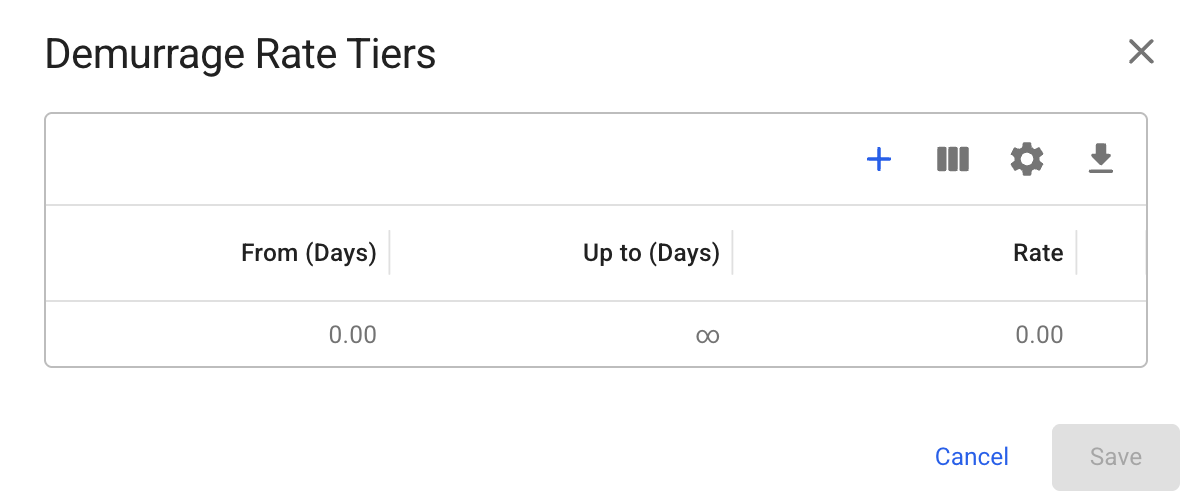
<figure><img src="https://1604153402-files.gitbook.io/~/files/v0/b/gitbook-x-prod.appspot.com/o/spaces%2F7R7IFboJW2JabvnivFfc%2Fuploads%2FHSkEizsNVbEWUyAmp8CU%2Fimage.png?alt=media&#x26;token=8bfcb220-f90e-4b8a-8407-6adf4aa61bf7" alt=""><figcaption><p>Fig. 1: Demurrage Rate Tiers modal with empty tiers</p></figcaption></figure>

2. To proceed, click the <img src="https://1604153402-files.gitbook.io/~/files/v0/b/gitbook-x-prod.appspot.com/o/spaces%2F7R7IFboJW2JabvnivFfc%2Fuploads%2FbygR5WPAnEFQTpyBxskv%2Fimage.png?alt=media&#x26;token=57bdf23e-8d97-4fce-b7b9-2749ac563720" alt="" data-size="line"> button. then enter a value in the **Up to (Days)** field to define the upper limit of the rate.
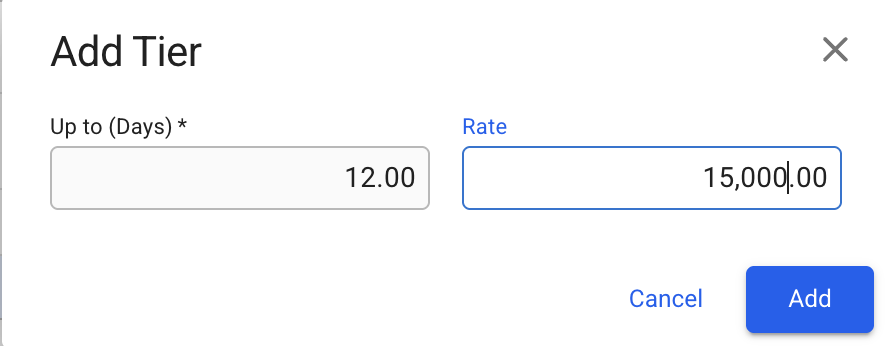
<figure><img src="https://1604153402-files.gitbook.io/~/files/v0/b/gitbook-x-prod.appspot.com/o/spaces%2F7R7IFboJW2JabvnivFfc%2Fuploads%2F0f56BHZEtLp4Z1FCTdnt%2Fimage.png?alt=media&#x26;token=57803d55-ab7d-4a48-a7fa-8e6bccbfa223" alt=""><figcaption><p>Figure 2.1: Add Tier modal</p></figcaption></figure>

<figure><img src="https://1604153402-files.gitbook.io/~/files/v0/b/gitbook-x-prod.appspot.com/o/spaces%2F7R7IFboJW2JabvnivFfc%2Fuploads%2Fg66Hyg3wbe5Mw0MWJTYy%2Fimage.png?alt=media&#x26;token=87af68c7-2b8e-4ec2-8ef9-bb1a9d243591" alt=""><figcaption><p>Figure 2.2: Initial tiered demurrage rates after 'Add' button is clicked</p></figcaption></figure>

3. Once a row is added, the grid becomes editable. You can directly modify the **Days** and **Rate** fields, or remove a tier by clicking <img src="https://1604153402-files.gitbook.io/~/files/v0/b/gitbook-x-prod.appspot.com/o/spaces%2F7R7IFboJW2JabvnivFfc%2Fuploads%2FFW1aCzEIvzAp78iDcmd8%2Fimage.png?alt=media&#x26;token=bd99b8db-b3b9-468b-9af2-be88212601f4" alt="" data-size="line">.&#x20;

{% hint style="info" %}
Edit fields by clicking on them. Navigation within the grid is possible using the arrow keys, and fields can be edited by typing directly
{% endhint %}

{% hint style="info" %}
The system automatically sets the row with the largest **Up to (Days)** value as the final tier and extends its **From (Days)** value to infinity. This is automatically updated whenever the largest **Up to (Days)** value changes.
{% endhint %}
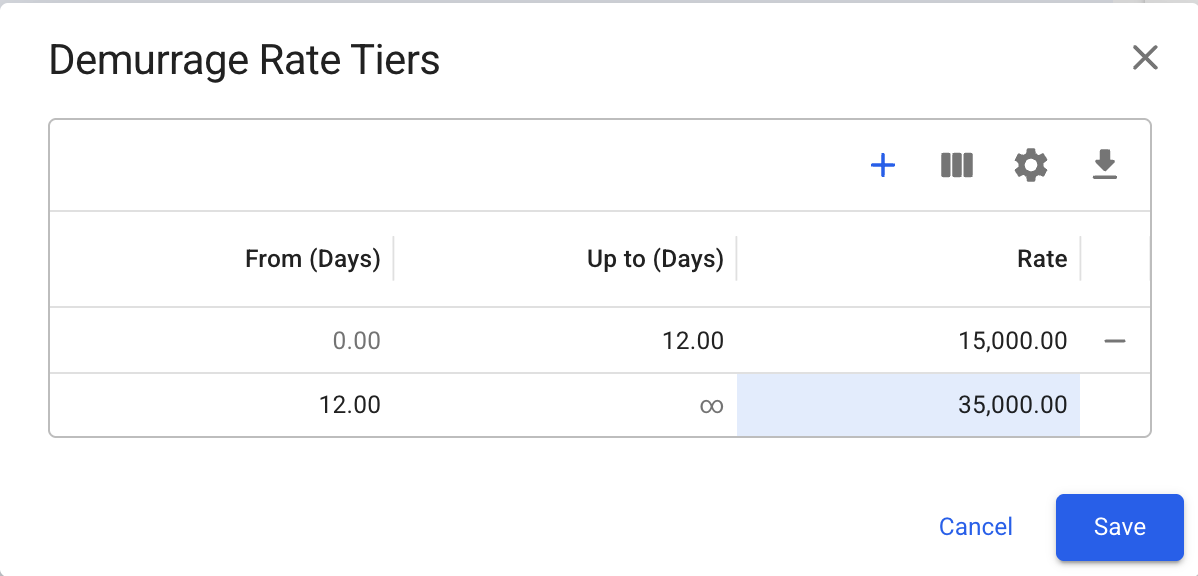
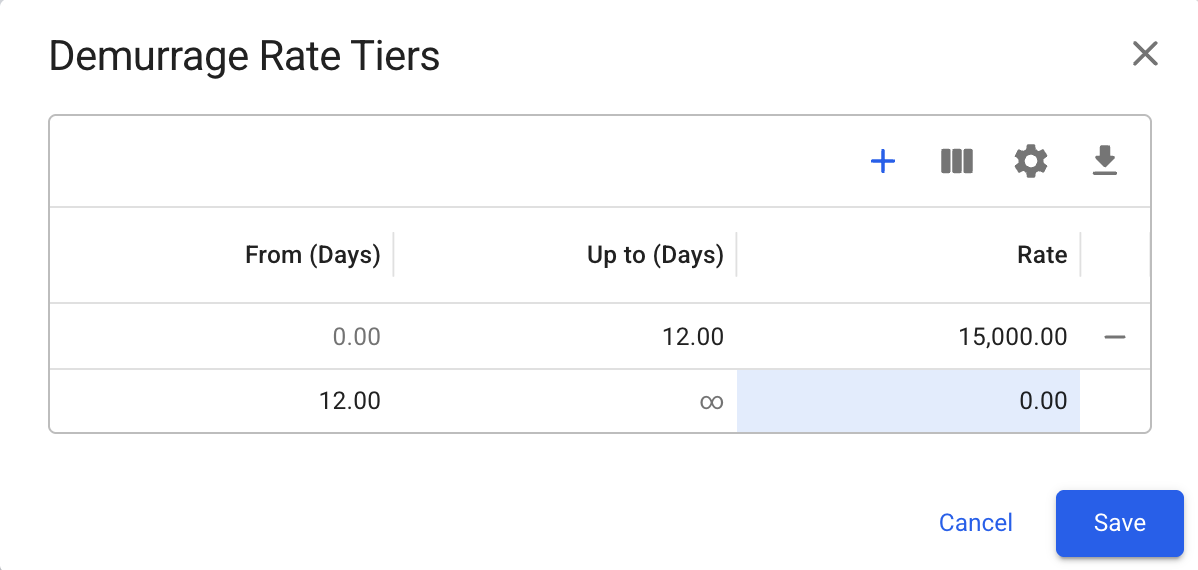
<figure><img src="https://1604153402-files.gitbook.io/~/files/v0/b/gitbook-x-prod.appspot.com/o/spaces%2F7R7IFboJW2JabvnivFfc%2Fuploads%2FFHaTx5B1O3IuV87Vod4f%2Fimage.png?alt=media&#x26;token=48083d4c-2092-449b-8724-469701c7e6f6" alt=""><figcaption><p>Figure 3.1: Modified the rate of the last row to 35,000</p></figcaption></figure>

Repeat step 2 to add new row.

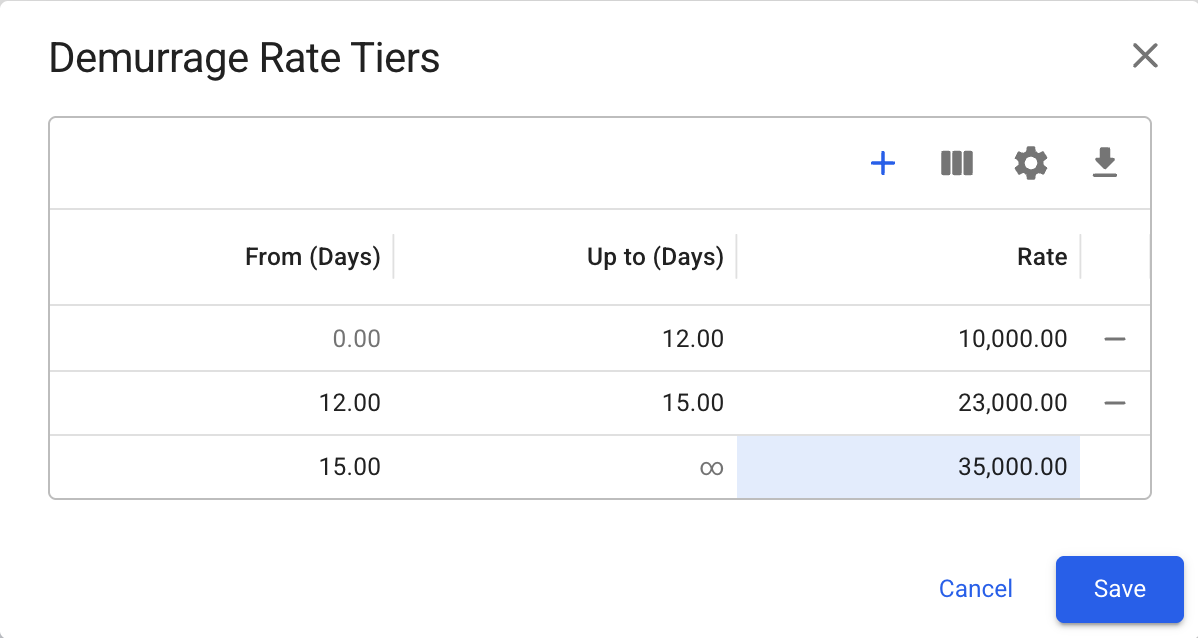
<figure><img src="https://1604153402-files.gitbook.io/~/files/v0/b/gitbook-x-prod.appspot.com/o/spaces%2F7R7IFboJW2JabvnivFfc%2Fuploads%2FF82EJNvGd8WN66hzaJEK%2Fimage.png?alt=media&#x26;token=8d012340-5331-4bfa-8d35-cb127588ee50" alt=""><figcaption><p>Figure 3.2: Grid state after adding an additional row, illustrating how the last row’s From Days value is automatically updated when a new maximum Up to (Days) value is defined</p></figcaption></figure>

{% hint style="info" %}
The Rate Tiers modal follows these rules:

* The first tier always starts at **0**, and the last tier always ends at **infinity**.
* **From Days** and **Up to Days** cannot have the same value.
* The **Up to Days** value must be greater than the corresponding **From Days** value.
* Updating **Up to Days** automatically updates the **From Days** value of the next tier.
* Changing the **From Days** value of the last tier to a value smaller than the **From Days** values of previous tiers will delete the affected previous tier(s).
* The **Rate** field is not bound by any rules and must be set individually for each tier.
  {% endhint %}

4. Click <img src="https://1604153402-files.gitbook.io/~/files/v0/b/gitbook-x-prod.appspot.com/o/spaces%2F7R7IFboJW2JabvnivFfc%2Fuploads%2FSxDcJ7pS05muuVPLhkFH%2Fimage.png?alt=media&#x26;token=92967301-0088-40ef-8ed4-0df9d24679c5" alt="" data-size="line"> to finalize the tiered rates. <br>

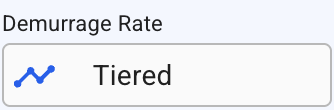
   <figure><img src="https://1604153402-files.gitbook.io/~/files/v0/b/gitbook-x-prod.appspot.com/o/spaces%2F7R7IFboJW2JabvnivFfc%2Fuploads%2FWVM4uxqi5Zzz4wz2hnAv%2Fimage.png?alt=media&#x26;token=8ff77bd3-7a7e-40b4-9b6c-ca59b244ed4e" alt=""><figcaption><p>Figure 4: Demurrage/Despatch Rate fields with set tiered rates</p></figcaption></figure>

The rate fields will be shown as 'Tiered', with the icon highlighted accordingly.<br>

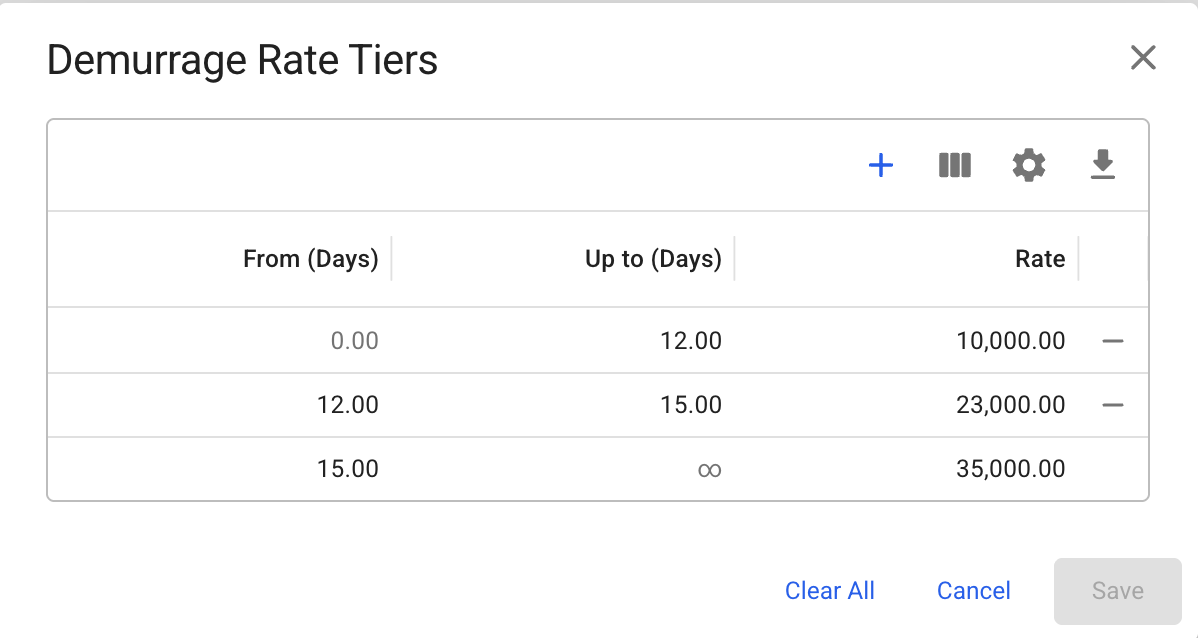
5. Clicking <img src="https://1604153402-files.gitbook.io/~/files/v0/b/gitbook-x-prod.appspot.com/o/spaces%2F7R7IFboJW2JabvnivFfc%2Fuploads%2FDRHZhi52EC8OYGOH9U96%2Fimage.png?alt=media&#x26;token=b9e53a4d-5968-414d-8109-c3de09e27625" alt="" data-size="line"> will open the Demurrage/Despatch Rate Tiers modal displaying the existing tiered rates. Here you can add, edit, or delete individual tiers. You may also **remove** **all** the tiered rates by clicking <img src="https://1604153402-files.gitbook.io/~/files/v0/b/gitbook-x-prod.appspot.com/o/spaces%2F7R7IFboJW2JabvnivFfc%2Fuploads%2FF6kXnn1EInVTG0X4Ub3R%2Fimage.png?alt=media&#x26;token=1bb08ffb-55b3-45df-a481-fbe4fd64296e" alt="" data-size="line"> button and confirming the action.

<figure><img src="https://1604153402-files.gitbook.io/~/files/v0/b/gitbook-x-prod.appspot.com/o/spaces%2F7R7IFboJW2JabvnivFfc%2Fuploads%2F7wk3AyOjkBX8HJW6lsat%2Fimage.png?alt=media&#x26;token=3668dba9-9960-4558-870a-86057e53955d" alt=""><figcaption><p>Figure 5: Existing demurrage tiered rates</p></figcaption></figure>

{% hint style="info" %}
Tiered rates operate independently. Therefore, adding tiered demurrage rates does not affect or apply to tiered despatch rates.
{% endhint %}