# Time Sheet

The Cargo Port panel contains a list of all deductions (not-to-count periods).

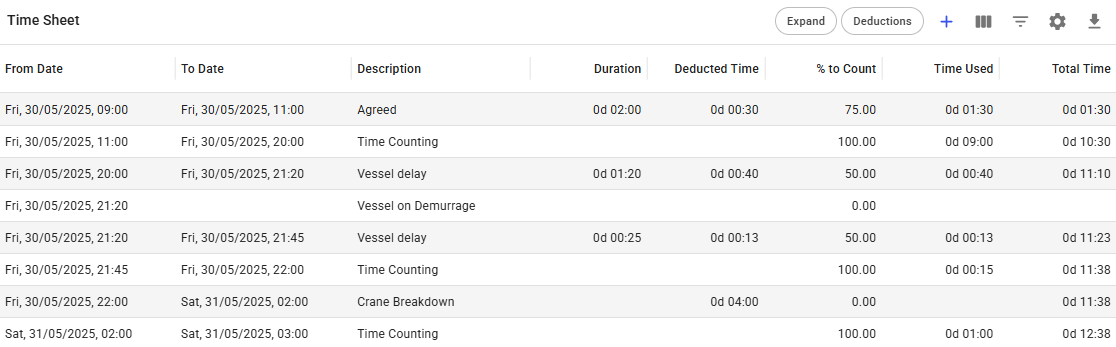
The grid displays **Time to Count** and **Duration** values. These values are **calculated automatically** whenever a deduction is added or updated. **Duration** represents the total of time used and deducted time.

<figure><img src="https://content.gitbook.com/content/7R7IFboJW2JabvnivFfc/blobs/D4xO0vhnjIb3xBIbbnKA/image.png" alt=""><figcaption><p>Time Sheet Grid</p></figcaption></figure>

## **Adding a new deduction**

1. Click the create icon <img src="https://content.gitbook.com/content/7R7IFboJW2JabvnivFfc/blobs/gM9A4cpAhDHs0DJAVqz3/create-24px.svg" alt="" data-size="line"> on top of the grid.&#x20;
2. In the **Add Deduction** window, fill in all required fields.
3. Click **Create**.

The deduction is immediately applied and the Time to Count and Duration values are recalculated.

| Fields              | Description                                                                  |
| ------------------- | ---------------------------------------------------------------------------- |
| From Date           | Start of deduction (not to count period)                                     |
| To Date             | End of deduction (not to count period)                                       |
| Deducted Time       | Amount of time to deduct                                                     |
| % Not to Count      | Percentage specifying the % of time not to count                             |
| Reason for Stoppage | The reason for the stoppage                                                  |
| Prorate             | Applies the deduction proportionally across applicable laytime calculations. |
| Description         | Additional description for the deduction (not to count)                      |

<figure><img src="https://content.gitbook.com/content/7R7IFboJW2JabvnivFfc/blobs/ESiMafc6CIvA03dgF93p/image.png" alt=""><figcaption><p>Add Deduction Modal</p></figcaption></figure>

## **Editing a deduction**

1. Click on the row for the Deduction you wish to edit.
   * The selected row, and the rows which share the same deduction (not to count), will all be highlighted in blue.
2. Change the fields in the Edit Deduction window.
3. Click **Save**.

## Time Sheet Grid Views

The Time Sheet grid can be displayed in two different views.

### **Collapsed View**

This is the **default** view of the Time Sheet grid. This view shows a *collapsed* view of the Time Sheet items, in which each item has a span of *laytime commenced* to *laytime completed*. The *stoppages* (deductions) added will be shown in their own separate rows highlighted in gray: &#x20;

<figure><img src="https://content.gitbook.com/content/7R7IFboJW2JabvnivFfc/blobs/CnuciWXHJ2UFOYwaZl6S/image.png" alt="Collapsed View of Timesheet"><figcaption><p>Collapsed View of Time Sheet</p></figcaption></figure>

Click the **Expand** icon ![](https://content.gitbook.com/content/7R7IFboJW2JabvnivFfc/blobs/ObMafuTiGxZcp9Nf4DYX/image.png) on the right to display all occurrences for each Time Sheet item.

### **Detailed View**&#x20;

This *detailed* view shows all the Time Sheet occurrences of the Laytime Calculation. Here, each item shows the list items day-by-day:

<figure><img src="https://content.gitbook.com/content/7R7IFboJW2JabvnivFfc/blobs/IDASXAPYivaYq7SHiyHc/image.png" alt=""><figcaption><p>Detailed View of Time Sheet</p></figcaption></figure>

By clicking on the the *Expand* icon  ![](https://content.gitbook.com/content/7R7IFboJW2JabvnivFfc/blobs/njzeqNQN5RWZm2ZLn5A8/image.png)  again on the right side, the list will go back to compress all the Time Sheet items into one-line time period.

## Filtering by Deductions

Use the **Deductions** filter to display only deduction (not-to-count) events in the Time Sheet grid.

1. Click the Deductions icon in the grid toolbar.
2. The Time Sheet grid is filtered to show only deduction entries.
3. All other Time Sheet events are hidden.

To remove the filter, click the **Deductions** icon again.

<figure><img src="https://content.gitbook.com/content/7R7IFboJW2JabvnivFfc/blobs/vOzvxs8CVZ5abkV85s2x/image.png" alt=""><figcaption><p>Time Sheet with deductions filter active</p></figcaption></figure>