> For the complete documentation index, see [llms.txt](https://docs.dataloy.com/llms.txt). Markdown versions of documentation pages are available by appending `.md` to page URLs; this page is available as [Markdown](https://docs.dataloy.com/release-8.19/voyage-management-system/step-by-step-guides/alerts/webhook-subscriptions-1/create-webhook-subscription.md).
# Creating a Webhook Subscription
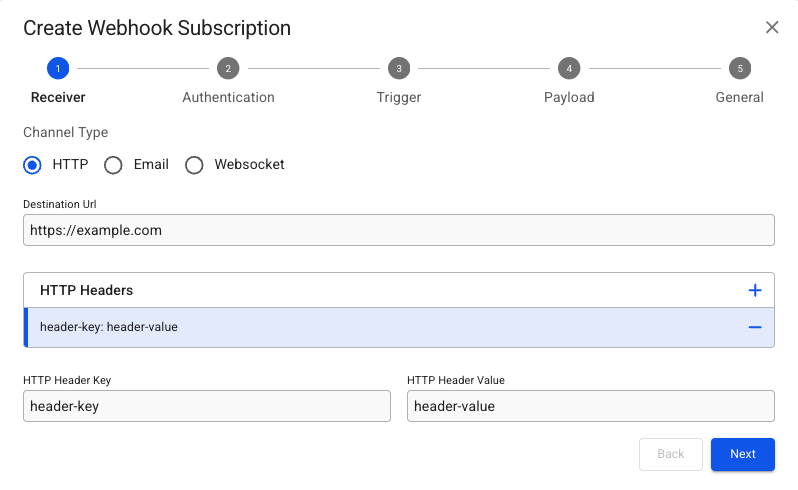
Create Webhook Subscription Dialog
1. Open the **Webhooks** module in the **Alerts** section.
2. Click **Create Webhook Subscription** in the top right corner.
3. Fill in the required fields (marked with \*) for each step in the dialogue.
4. Click **Create**.
### Types of Webhook Subscriptions
The VMS supports three types of webhook subscriptions: HTTP, Email, and Websocket.
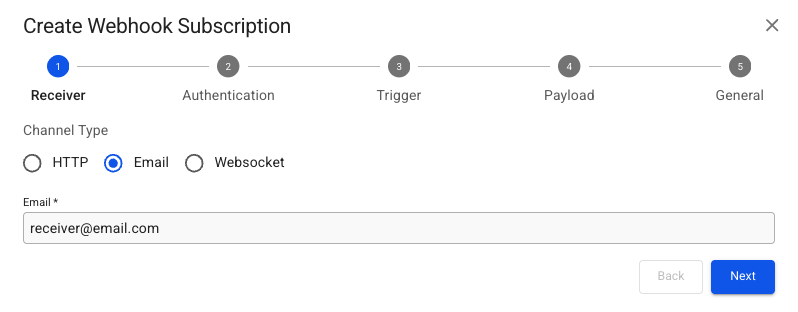
* **HTTP and Email**: These types send notifications as a HTTP request or as an email.
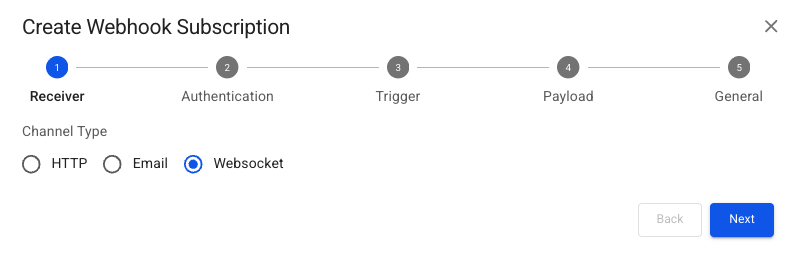
* **Websocket**: This type pushes notifications directly to users via VMS.
Below are illustrations and detailed descriptions of the fields required to create a new Webhook Subscription for each type.
## Receiver Step
{% tabs %}
{% tab title="HTTP" %}
{% hint style="info" %}
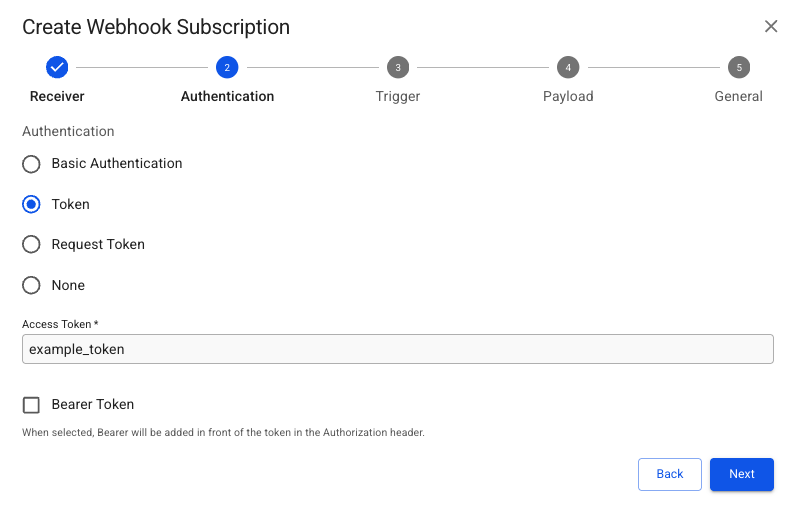
**Basic Authentication** requires filling out a `Username` and `Password` for the endpoint. **Request Token** requires filling out an `Access Token Request Url` and an `Access Token Request Body` , with the other fields being optional.
{% endhint %}
{% endtab %}
{% tab title="Email" %}
{% hint style="info" %}
No authentication configuration is required for email.
{% endhint %}
{% endtab %}
{% tab title="Websocket" %}
{% hint style="info" %}
No authentication configuration is required for websocket.
{% endhint %}
{% endtab %}
{% endtabs %}
## Trigger Step
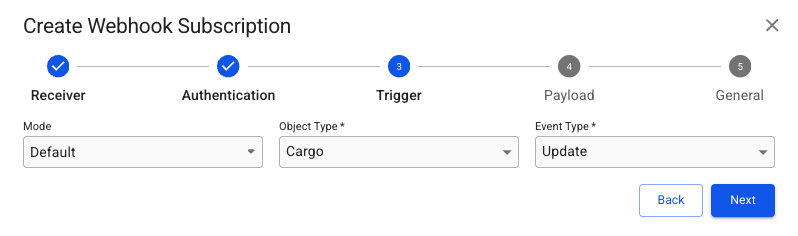
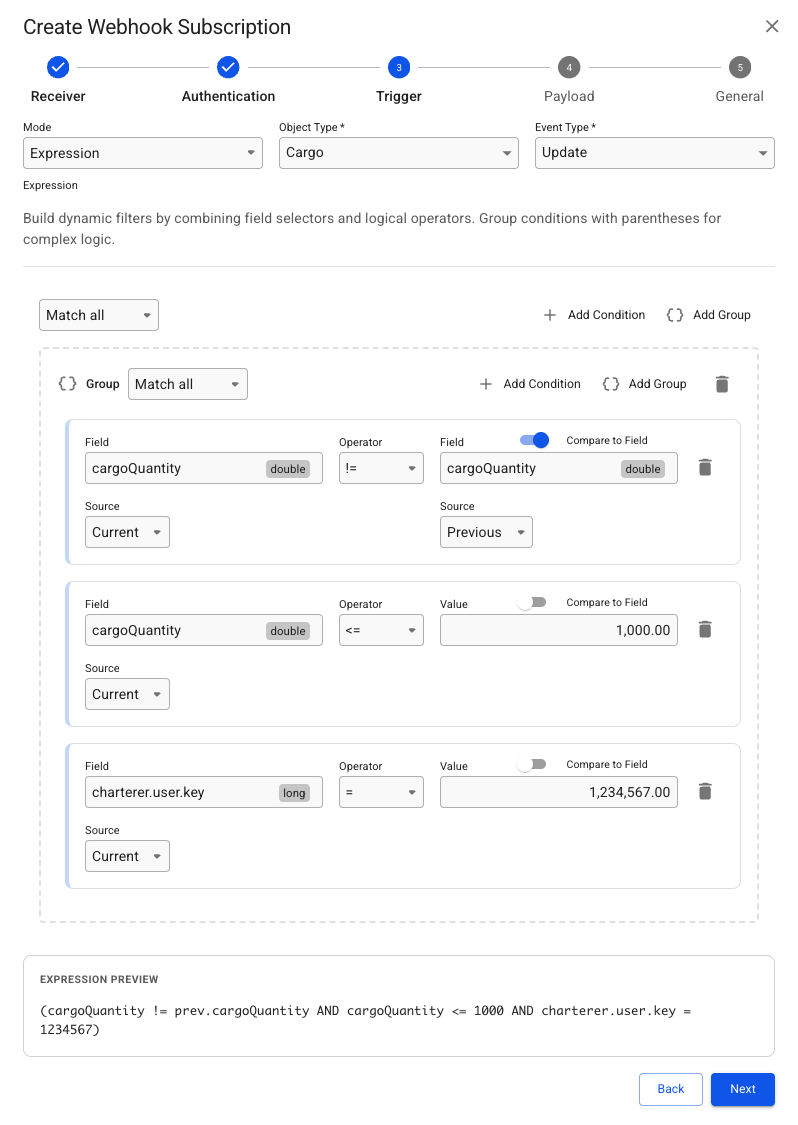
The Trigger specifies the condition that must be met to send a notification to the Receiver. Below are examples of various Webhook Subscription types, ranging from simple to more complex Trigger conditions.
{% tabs %}
{% tab title="Default" %}
**Default example:** will send notifications to the Receiver whenever a Cargo object your user has access to is updated.
{% endtab %}
{% tab title="Expression" %}
#### Example Expression
To trigger a notification in this example, multiple conditions must be satisfied:
* The `cargoQuantity` must be modified and be greater than or equal to 1000.
* The `charterer` key of the Cargo must match a specific user key.
These criteria ensure that notifications remain relevant and informative.
{% hint style="info" %}
The `Field` can be chosen using the field selector modal, similar to selection in lists. Conditions can be customized with the `Add Group` option, allowing multiple combinations of `AND` / `OR` conditions. A simplified preview of the conditions is shown at the bottom of the modal. A `Variable` can be selected to create conditions based on the subscribed user's ID, name, or email.
{% endhint %}
{% endtab %}
{% tab title="Alert Script" %}
Easily set up by selecting a pre-existing alert script. Ensure the script is already created in the **Alert Scripts** module under **Alerts**, and it should include its own configurable object type and event type triggers.
{% endtab %}
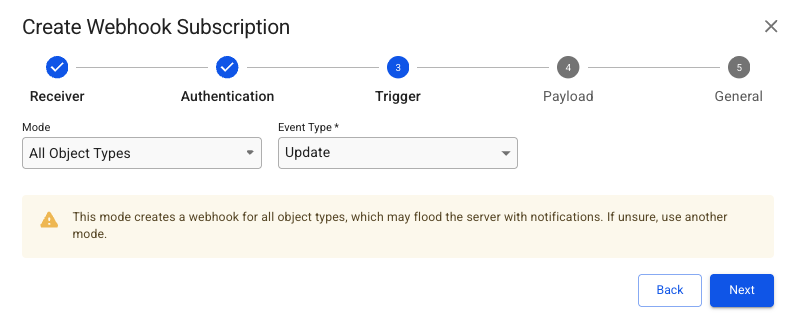
{% tab title="All Object Types" %}
**All Object Types example:** requires little configuration on the Trigger step, as it will create Webhooks for all Object Types for a given Event Type. This type is **only allowed for a HTTP Receiver** and should be thought through, as it may flood the server with notifications.
{% hint style="warning" %}
This mode creates a webhook for all object types, which may flood the server with notifications. Most use cases will be covered by **Default** and **Expression** Webhooks. If you are unsure, use one of these instead.
{% endhint %}
{% endtab %}
{% endtabs %}
## Payload Step
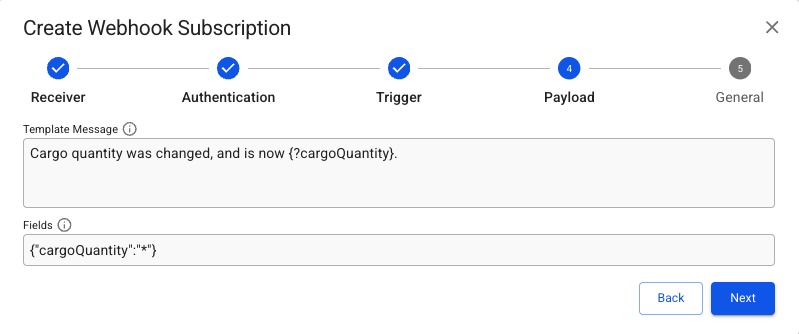
**Template Message** and **Fields** are optional. **Template Message** allows for a custom message where field values from the object can be inserted in the sent notification.
{% hint style="info" %}
**Fields** limit what fields should be returned in the notification and can look like this {"fieldName1":"\*","fieldName2":"\*"}. Read more about how to specify **Fields** [here](https://api.dataloy.com/dataloy-rest-api/adjust-number-of-fields-to-be-returned-from-a-request).
{% endhint %}
## General
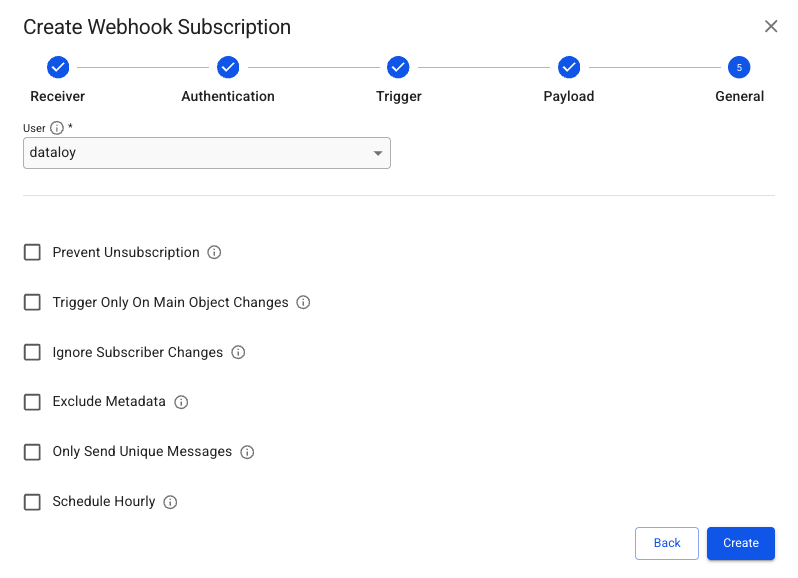
All options are optional except **User**, which must be selected. This should in most cases be set to the user intended to receive the notification. As the permissions of that **User** decides the access to objects when the notification is sent. Failing notifications could be due to the **User** not having the right access.\
\
The description icon (**i)** can be hovered over to reveal additional information about their function.
---
# Agent Instructions
This documentation is published with GitBook. GitBook is the documentation platform designed so that both humans and AI agents can read, navigate, and reason over technical content effectively. Learn more at gitbook.com.
## Querying This Documentation
If you need additional information that is not directly available in this page, you can query the documentation by asking a question.
Perform an HTTP GET request on the following URL with the `ask` and `goal` query parameters:
```
GET https://docs.dataloy.com/release-8.19/voyage-management-system/step-by-step-guides/alerts/webhook-subscriptions-1/create-webhook-subscription.md?ask=&goal=
```
`ask` is the immediate question: it should be specific, self-contained, and written in natural language.
`goal` is what the user is ultimately trying to achieve, the reason they need the answer. Sharing it helps GitBook give you a better, more relevant answer. A goal is most helpful when it describes the outcome the user wants rather than restating the question. For example, with `ask=how do I create an API token`, a goal like `automate deployments from our CI pipeline` lets GitBook tailor the answer to that use case.
The response will contain a direct answer to the question and relevant excerpts and sources from the documentation.
Use this mechanism when the answer is not explicitly present in the current page, you need clarification or additional context, or you want to retrieve related documentation sections.
 in the top right corner.
3. Fill in the required fields (marked with \*) for each step in the dialogue.
4. Click **Create**.
### Types of Webhook Subscriptions
The VMS supports three types of webhook subscriptions: HTTP, Email, and Websocket.
* **HTTP and Email**: These types send notifications as a HTTP request or as an email.
* **Websocket**: This type pushes notifications directly to users via VMS.
Below are illustrations and detailed descriptions of the fields required to create a new Webhook Subscription for each type.
## Receiver Step
{% tabs %}
{% tab title="HTTP" %}
in the top right corner.
3. Fill in the required fields (marked with \*) for each step in the dialogue.
4. Click **Create**.
### Types of Webhook Subscriptions
The VMS supports three types of webhook subscriptions: HTTP, Email, and Websocket.
* **HTTP and Email**: These types send notifications as a HTTP request or as an email.
* **Websocket**: This type pushes notifications directly to users via VMS.
Below are illustrations and detailed descriptions of the fields required to create a new Webhook Subscription for each type.
## Receiver Step
{% tabs %}
{% tab title="HTTP" %}