> For the complete documentation index, see [llms.txt](https://docs.dataloy.com/llms.txt). Markdown versions of documentation pages are available by appending `.md` to page URLs; this page is available as [Markdown](https://docs.dataloy.com/release-8.17/voyage-management-system/step-by-step-guides/voyages/maintain-voyages/voyage-analysis/intake-calculation.md).
# Voyage Intake Calculation
The intake calculator provides an overview of the vessel's intake capacity and key reduction factors for the voyage, allowing you to adjust and compare different loading scenarios.
To open the intake calculator, click on the  icon in the top right of the voyage drawer, and select "Voyage Intake Calculation". This will take you to the calculator page.
In the top of the voyage intake calculator, you will find two chips displaying the vessel and voyage reference. Clicking the vessel chip will open up the vessel drawer.
## Opening Balance section
The Opening Balance section shows bunkers onboard the vessel at the start of the voyage. These fields can be edited if any of the following conditions are met.
* The voyage has status **Estimate** or **Unallocated**
* The voyage has a **fixed start date**
* The voyage is the **first voyage** on the vessel
## Port Calls and intake graph
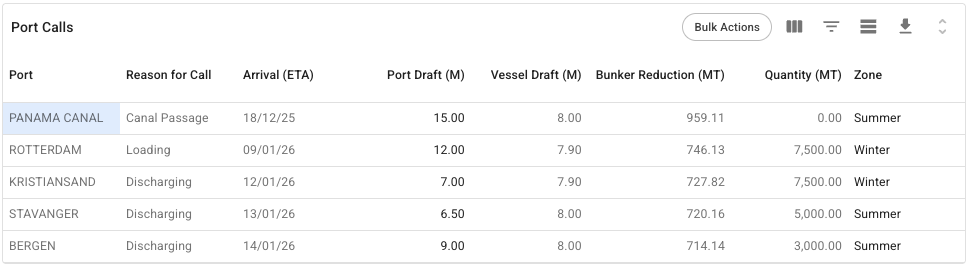
The Port Calls grid displays information about the voyage port calls, and allows you to specify the Port Draft and Zone of the individual port calls. Changing either of these values may have an impact on the intake calculation.
It is possible to set values for Port Draft and Zone in the Port Calls grid
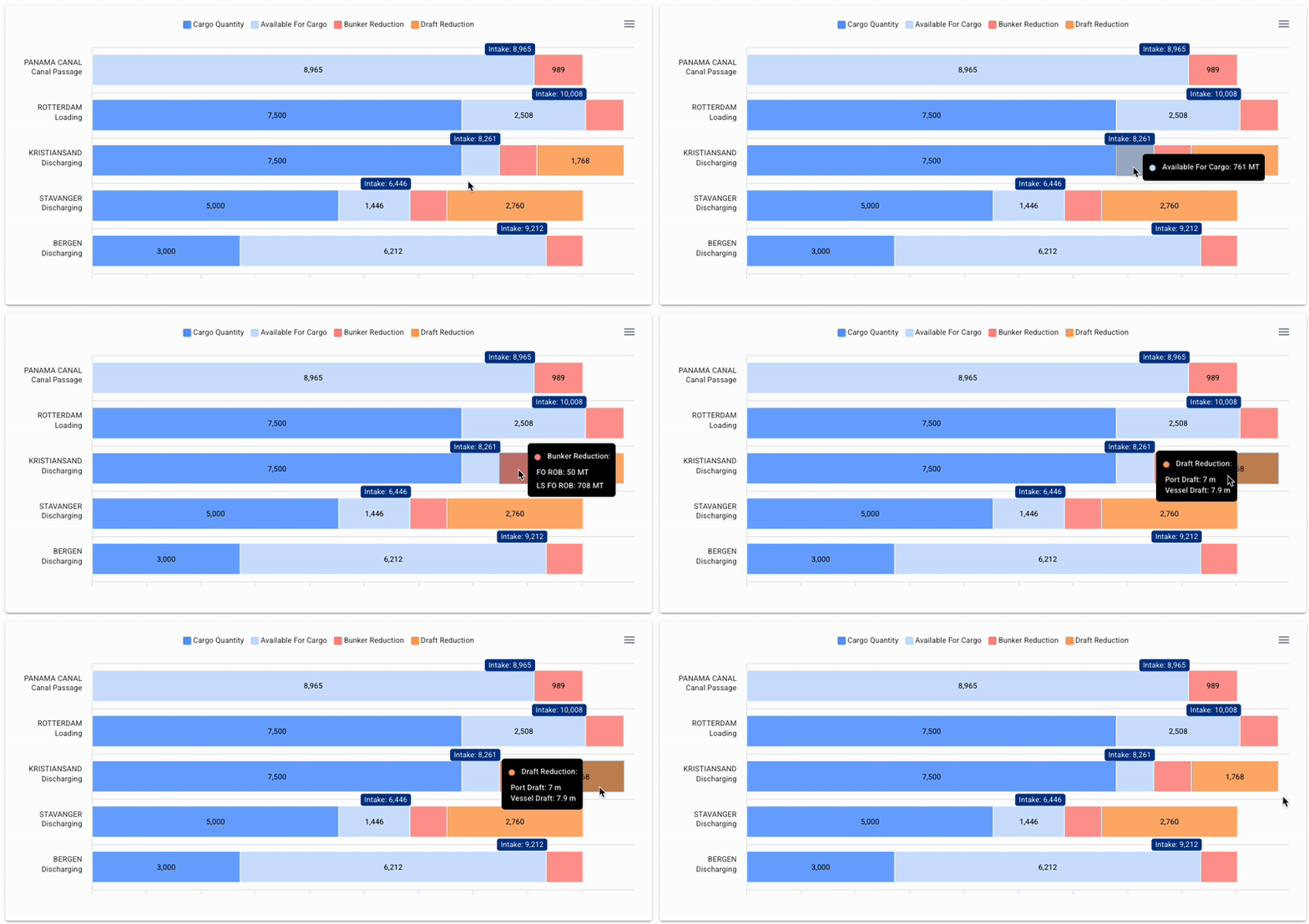
Below the grid, you will find a graph for the intake calculation, with a bar for each of the port calls in the voyage schedule. Each port call will have a small Intake-label, displaying the maximum intake. The x-axis is scaled to the maximum deadweight of the vessel, given the port zones in the schedule.
Additional information can be displayed by hovering over a segment in the bar chart.
Hovering over each segment will give you additional information
{% hint style="info" %}
The Bunker Reduction and Quantity numbers are defined using the reason for call of the port calls
* Loading port calls, the **departure** weight is used
* Discharge port calls, the **arrival** weight is used
{% endhint %}
## Loadline and Cubic Information
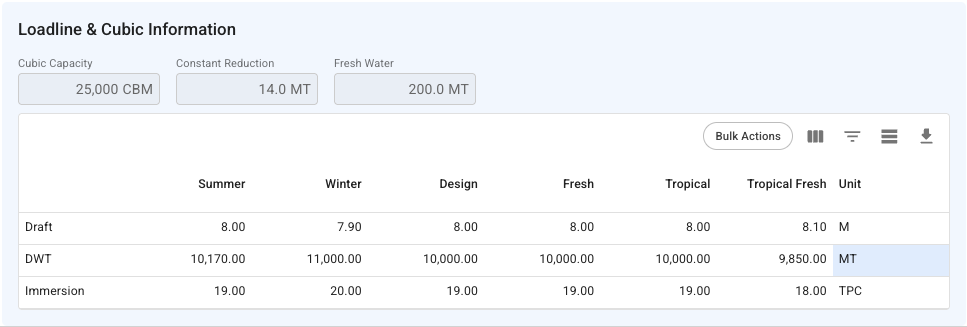
In the bottom of the Intake Calculator, you will find a section outlining the loadline and cubic information of the vessel. This section is for reference only.
---
# Agent Instructions
This documentation is published with GitBook. GitBook is the documentation platform designed so that both humans and AI agents can read, navigate, and reason over technical content effectively. Learn more at gitbook.com.
## Querying This Documentation
If you need additional information that is not directly available in this page, you can query the documentation dynamically by asking a question.
Perform an HTTP GET request on the current page URL with the `ask` query parameter, and the optional `goal` query parameter:
```
GET https://docs.dataloy.com/release-8.17/voyage-management-system/step-by-step-guides/voyages/maintain-voyages/voyage-analysis/intake-calculation.md?ask=&goal=
```
`ask` is the immediate question: it should be specific, self-contained, and written in natural language.
`goal` is optional and describes the broader end goal you are ultimately trying to accomplish on behalf of the user. GitBook uses it to tailor the answer towards what is most useful for that goal.
The response will contain a direct answer to the question and relevant excerpts and sources from the documentation.
Use this mechanism when the answer is not explicitly present in the current page, you need clarification or additional context, or you want to retrieve related documentation sections.