The board has two main areas- unallocated voyages (Voyage Commitments) on the left, and allocated voyages on the right.
Each element in the board represents either a voyage (unallocated), a voyage with cargo(s) (allocated), a vessel, a vessel open position card or a last port call card.
Vessel Open Position Card
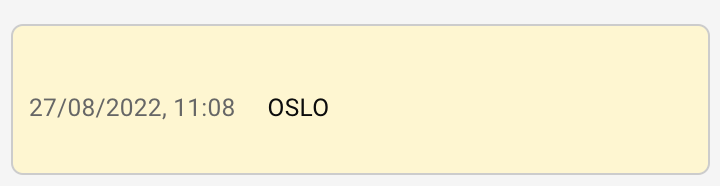
We call the yellow card on the vessel columns the vessel open position card. It displays the start of the schedule of each ship that is displayed on the board. You can click on the card to open the vessel open position drawer. For any scenario that is not the MASTER, you can edit the port and date of the vessel open position. This changes where your ship starts in the scenario and reschedules the consecutive voyages.
Voyage Card
Unallocated Voyage Card
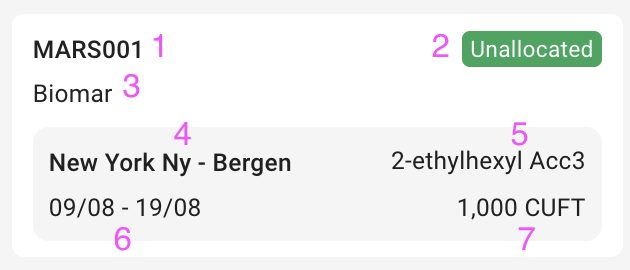
In the Voyage Commitments column, the left-most column of the board, we have a list of Unallocated Voyages with a new design:
Fields on the Unallocated Card, with the Performance Cargo
Reference
Fields
1
Voyage Reference
2
Voyage Status
3
Charterer
4
Port calls
5
Commodity
6
Laydays Start to End Dates
7
Quantity and Measurement Unit
Allocated Voyage Card
Header
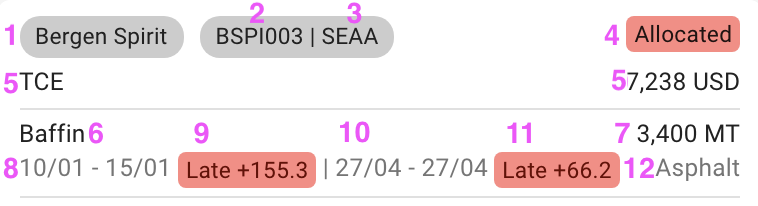
Fields on the Allocated Voyage Card header, with the Performance Cargo
Reference
Fields
Voyage:
1
Vessel
2
Voyage Reference
3
Trade Code
4
Voyage Status
5
TCE and Currency
Performance Cargo:
6
Charterer
7
Quantity and Measurement Unit
8
Laydays Start to End Dates
9
Days out of Laycan (Early/Late Indicator)
10
Arrival Window Start to End Dates
11
Days out of Arrival Window (Early/Late Indicator)
12
Commodity
Port Call Timeline
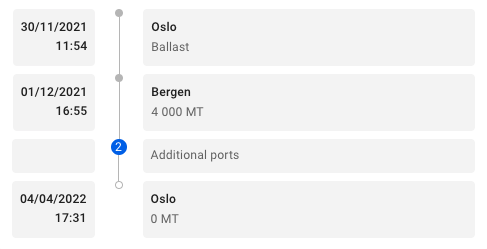
The Allocated Voyages Card also contains a detailed timeline:
Port Call Timeline
On the left side of the Voyage Card, all the arrival times are listed. The date and time listed for the Ballast Port is the voyage start date. On the right side of the timeline, the port names are listed, including the Ballast Port. The total cargo gross weight on board after the port call is listed under the port name.
Number of Displayed Ports
It is possible to change how many ports are listed at a time by using the settings. The minimum amount of ports that can be displayed is 3, the Ballast Port, the first load port and the last discharge port of a voyage. The number in the blue circle indicates how many ports are hidden.
Last Port Call Card
For each vessel we have a card with information about when it is next available. This can be found after the last voyage in a vessel's schedule.