# TC Voyages
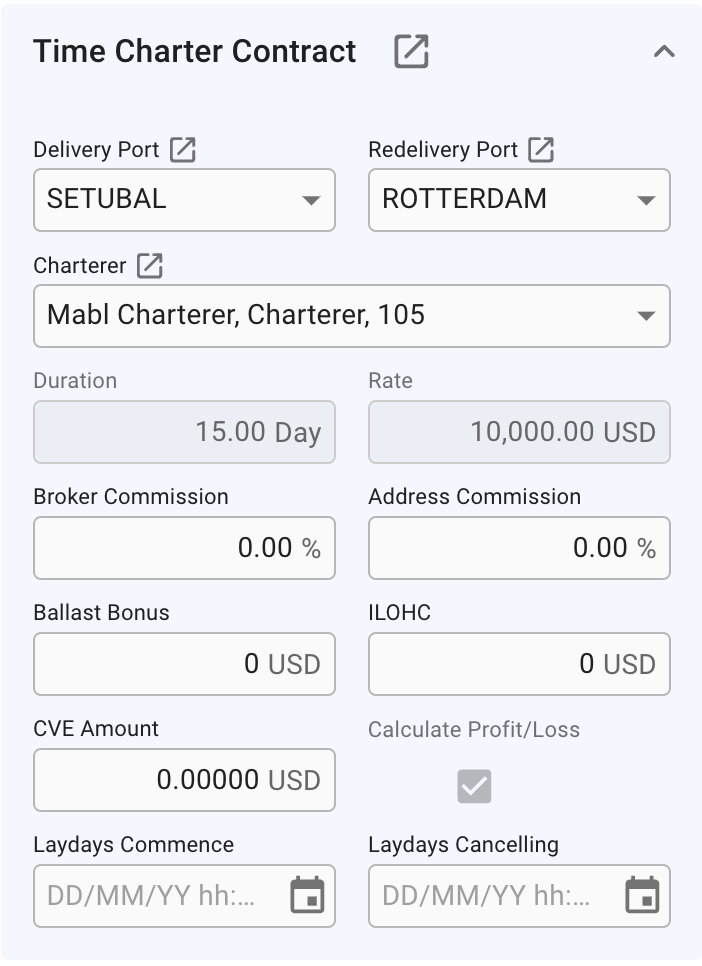
A **TC Voyage** will not have a **Cargo** Section on the **Overview** Tab like normal **Voyages**, but instead have a **Time Charter Contract** Section displaying the **Time Charter Contract**. In this section you can edit the most important fields on a **Time Charter** directly through the **Voyage Drawer** or click the -icon to **Open** the **Time Charter Contract Drawer.**
The **Delivery Port** and **Redelivery Port** fields display the port from the associated Port Call. When you enter a new port, the Port Call and TC Contract will be updated accordingly. Click the -icon to Open **Port Call Drawer.**
Time Charter Contract Section on Voyage Overview
Both **Duration** and **Rate** fields will be disabled if there exists more than one Duration on the Tc contract, or a Duration has multiple Rates.
The **Calculate Profit/Loss** checkbox is only available while the Voyage still has status **Estimate**, and will toggle calculation of profit/loss based on bunkers.
### Related pages:
* [Create TC Voyage](https://docs.dataloy.com/release-8.16/voyage-management-system/step-by-step-guides/voyages/create-voyage/create-time-charter-out)
* [Time Charter Contracts](https://docs.dataloy.com/release-8.16/voyage-management-system/step-by-step-guides/chartering/time-charter-contracts) and its subpages