# Converting Voyage to Template
**Can** be converted to template:
* Estimate Voyages
* Unallocated Voyages
**Cannot** be converted to template:
* Template Voyages
* Allocated Voyages
* Nominated Voyages
* Operational Voyages
* Operationally Closed Voyages
* Closed Voyages
* Invoiced Voyages
The voyage's type (TC, SPOT, COA) does not matter in regards to whether you're allowed to convert or not.
### How to Convert to Template
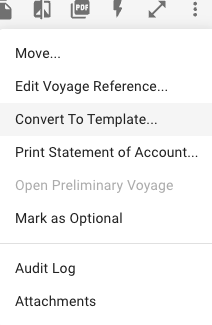
In order to convert a voyage to a template voyage one must open a voyage's drawer and click the secondary action menu in the top-right  and select the "Convert to Template...' action.
Secondary Action menu
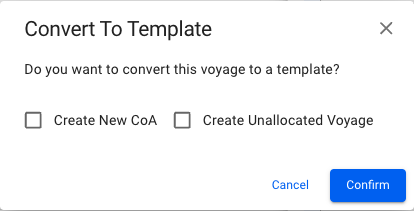
After selecting the action you will get a confirmation popup modal which allows you to select to 'Create New CoA' and 'Create Unallocated Voyage' when converting to template. When clicking the 'Confirm' button, you will be brought to the template voyage's drawer.
Convert to Template popup modal (SPOT example)
#### SPOT:
Both optional buttons will be available.
#### TC:
None of the optional buttons will be available.
#### CoA:
Both optional buttons will be available and the 'Create New CoA' button will be selected by default. If un-selecting this button, the template voyage will continue to use the old CoA instead of creating a new.