# Change Voyage Status
From the Voyage drawer it is possible to change the status of the voyage by using the status chip next to the reference no at the top of the drawer.
## "Forward" Status Transitions:
### **From Estimate to Allocated**
When changing status from estimate to Allocate, **no** modal will show. The same also happens from Estimate to Unallocated. You can check out the different requirements and validations below.
### **From Estimate or Allocated to Nominated**
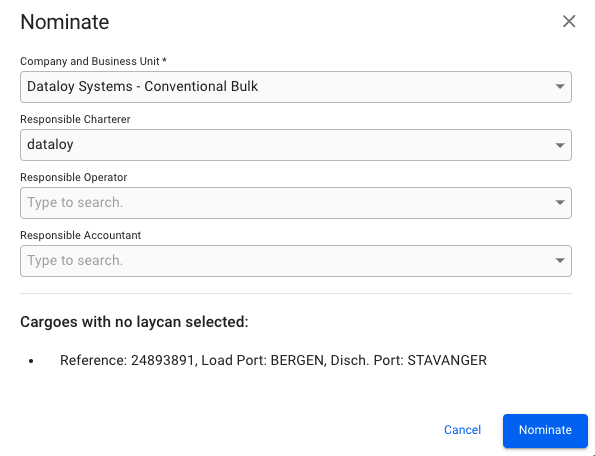
When changing status from Estimate to Nominated, the following modal will show:
Nominate Voyage Modal
If it's a TC voyage with missing Laycan on the TC, **you will have to** fill in the Laycan as well. Otherwise, you will get information at the bottom of the modal saying which cargoes does not have Laycans added, but you will be able to nominate.
As you can see, Company and Business Unit field is required. By default, what is selected on the voyage will display here, but you are free to change it. You can also add Responsible Charterer, Responsible Operator and Responsible Accountant, but these are not required.
The same also happens when changing from Allocated to Nominated.
{% hint style="info" %}
The nominating process will also change the *booking status* of all of the cargoes on the voyage to 'Clean Fix'.
{% endhint %}
You can check out the different requirements and validations below.
### Other
There are also other "forward" status transitions, like:
* Nominated -> Operational
* Operational -> Operationally Closed
* Operationally Closed -> Invoiced
* Operationally Closed -> Closed
* Invoiced -> Closed
{% hint style="info" %}
Some customers sometimes prefers other names of the mentioned statuses.
E.g. "Operationally Closed" can be called "Sailed" or "Demurrage Checked".
{% endhint %}
## "Backward" Status Transitions:
### From Nominated to Allocated
When changing to these statuses, **no** modal will show.
### From Allocated to Unallocated
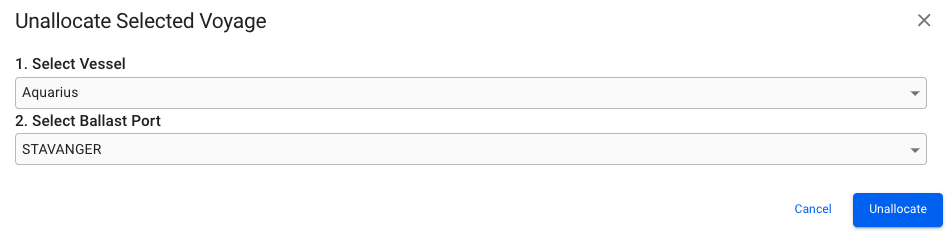
When changing status from Allocated to Unallocated, the following modal will show:
Unallocate Voyage Modal
You will be given the option to select a new Vessel and/or Ballast Port to change to, but not required for unallocating.
The same also happens when changing from Nominated to Estimate.
### From Unallocated to Estimate
When changing to these statuses, **no** modal will show.
### Other
There are also other "backward" status transitions, like:
* Operational -> Nominated
* Operationally Closed -> Operational
* Invoiced -> Operationally Closed
* Closed -> Invoiced
## Different Requirements and Validations:
### **Missing Fields**
**Required Values Must Be Set:**
* For each cargo: charterer
* For each cargo: commodity
-> This can be seen for most "forward" status transitions.
### **Update the Vessel Code**
Vessel code must be changed from its default assigned value. Open Vessel "Internal Data" to set a new code.
-> This can be seen for most "forward" status transitions.
### Change of Ballast Port
**Warning**
The ballast port on this voyage does not match the open position of this vessel. Do you want to \ the voyage with the start date locked?
-> This can be seen for most "forward" status transitions.
{% hint style="warning" %}
Through the API, there are some forward- and backward transitions that are not possible to set directly, e.g. NOM -> SCU, it has to be NOM -> SCH, then NOM -> SCU.
{% endhint %}
## Status Transition Snapshots
In the Voyage drawer, in the left-most P\&L Summary section, you have this **Analysis** button:
Analysis button to open up Analysis View
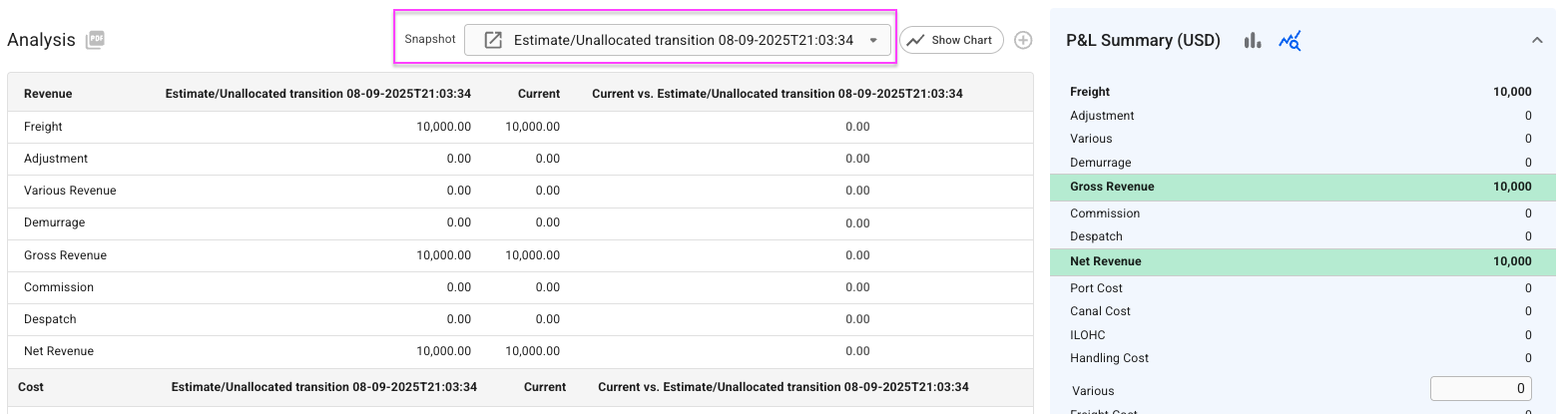
This is only enabled *after* Estimate status. In this [Analysis *view*](https://docs.dataloy.com/release-8.16/voyage-management-system/step-by-step-guides/voyages/maintain-voyages/overview/profit-loss-summary/analysis), you can display the voyage snapshots created, above the tables:
Top of the Analysis View section, voyage snapshots marked
From version 8.15, all [forward transitions](#forward-status-transitions) between 'Estimate' to 'Nominated' statuses gets a new voyage snapshot created. It will be in the format as shown in the above marked text, e.g. for transition Estimate -> Unallocated, it shows the text "Estimate/Unallocated" along with the created date and time (which is when you did the transition).
By default, you will be displayed the latest snapshot created as selected, but when opening the dropdown menu, the snapshots are listed in an ascending order, which you are free to choose from. Selecting a snapshot will automatically display the corresponding values in the below analysis tables:
Voyage Snapshot dropdown menu
In the above example, you can e.g. see two instances starting with "Estimate", meaning there has been a [backward transition](#backward-status-transitions) before that last instance, **but we don't create snapshots for those**.
You can also have multiple instances of the same transition, which then usually occurs at different dates and/or times.
### Preliminary
We still create 'Preliminary' snapshots *from* when a voyage is set to 'Nominated' status, which remains if the status becomes higher (e.g. 'Operational'). This will both be displayed as default selected snapshot and is in the dropdown menu. Whenever the status changes away from Nominated (or higher) status, the Preliminary instance will disappear from the dropdown (while the other snapshots created will stay), as this is strictly only for Nominated and above statuses.
#### Daily Snapshots
The Daily Snapshots are still in order as is and is created every day, as usual. In [System Settings](https://docs.dataloy.com/release-8.16/voyage-management-system/step-by-step-guides/setup/system-settings), you can still specify the daily "Voyage Snapshot Creation Time" in GMT. This still applies for statuses that **are not** 'Estimate', 'Unallocated', 'Allocated' or 'Closed'.
### Open Snapshot Drawer
You can open a *Voyage Snapshot* drawer by clicking the  icon in front of the snapshot text. The statuses are "Closed" and "Snapshot" if a transition snapshot, or "Closed" and "Preliminary" if Nominated (or higher) snapshot.
Alternatively, in a Nominated (or higher) voyage, you can in the Overview tab click on  in top-right drawer, to select "Open Preliminary Voyage' secondary action.
### Create a Snapshot
You can manually create a snapshot by clicking the below button:
Create a Snapshot Voyage
You **cannot** create a snapshot when the voyage has status 'Estimate', 'Unallocated', 'Allocated' or 'Closed'.
{% hint style="info" %}
Read more about Status Transitions [here](https://docs.dataloy.com/release-8.16/voyage-management-system/step-by-step-guides/status-transitions).
{% endhint %}