# Schedule - Edit Schedule
## Managing Port Calls
### Edit Schedule
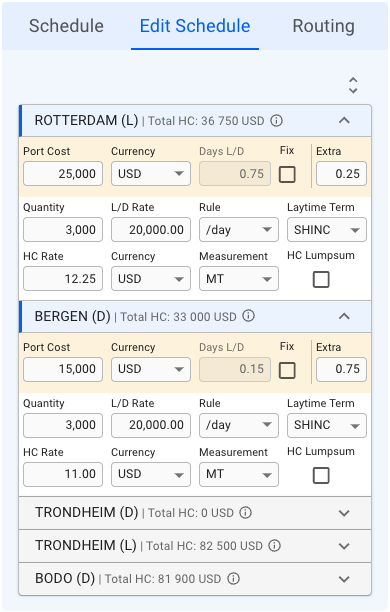
This list displays a more detailed view of all the port calls in the schedule:
The Port Call Edit Schedule
With this icon , you can either *expand* or *collapse* all of the port call items in the list (the list is expanded by default). You can also *open* and *close* the collapsable items, independent of each other, to view the detailed information.
#### Detailed Information
The first row, in yellow highlight, you can find the **Port Call's** *Port Cost*, *Currency*, *Days L/D, Fix* checkbox and *Extra* (days in port).
The next two rows, you can find the **Cargo Port's** *Quantity, L/D Rate, Rule, Laytime Term, HC Rate, (HC) Currency, (HC) Measurement* and *HC Lumpsum* checkbox.
All of these fields are *editable*. The cargo highlighted in **blue** in the Cargo List section will also have its port calls highlighted correspondingly in the Edit Schedule section, meaning, you are viewing the *selected cargo's* information.
**Additional Hover Information:**
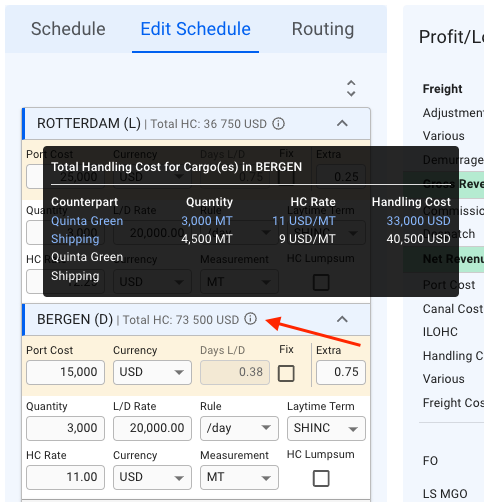
All of the collapsible headers are displaying the *Port Call Name, Reason for Call* and *Total Handling Cost (HC)*. Next to the last mentioned, there is an icon, which you can hover on to display additional information inside a tooltip:
Tooltip for Additional Total Handling Cost Information
This tooltip displays, per **Port Call**, the *Counterpart*, *Quantity*, *HC Rate* and *Handling Cost* for each of it's **Cargo Ports**. Again, with the *selected cargo* from the Cargo List section highlighted in **blue**.

 icon, which you can hover on to display additional information inside a tooltip: