# Widgets
## What are Widgets?
Widgets are components that allow you to integrate data from external APIs directly into Dataloy. These integrations must be configured by your system administrator before becoming available to users. Once configured, users can choose which widgets to display in their drawers based on their specific needs.
### Adding Widgets to Drawers
#### Step 1: Access Widget Selection
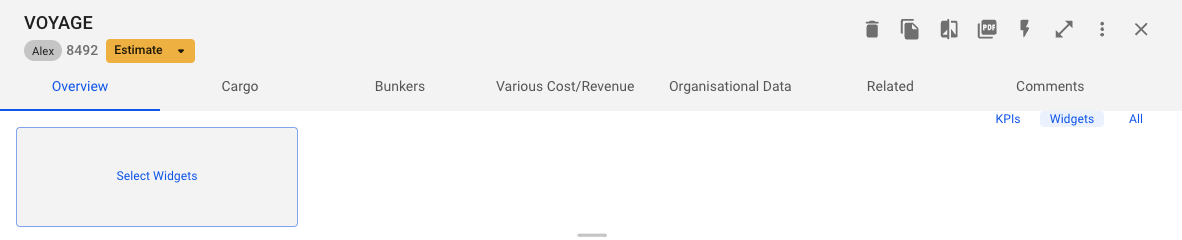
1. Navigate to any drawer
2. At the top of the drawer, you'll see three view options:
* KPIs
* Widgets
* All
3. Choos All or Widgets
4. Click on "Select Widgets" to open the widget selection modal
#### Step 2: Select Widgets
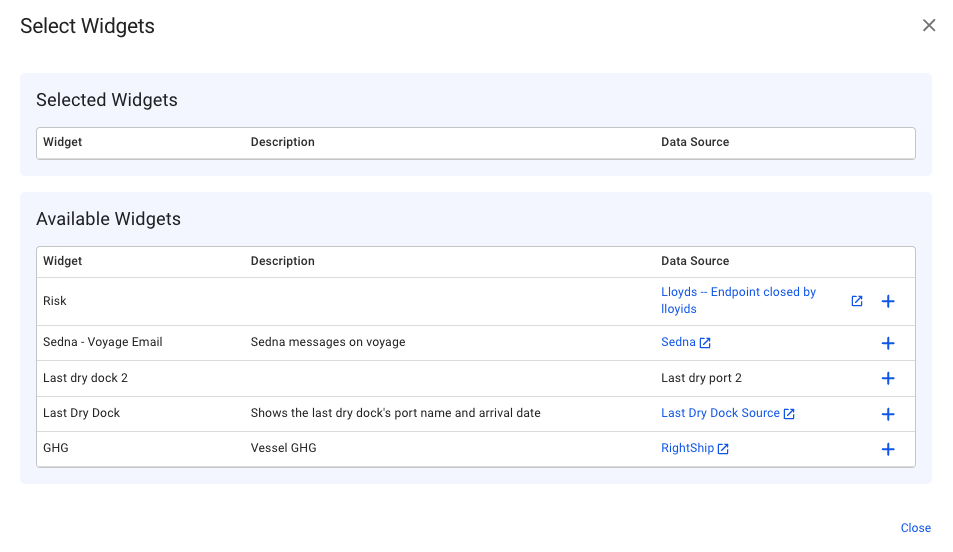
In the widget selection modal, you'll see:
* Currently selected widgets (if any)
* Available widgets list
To add a widget:
1. Browse the available widgets list
2. Click the (+) button next to any widget you want to add
3. The widget will be added to your drawer immediately
#### Step 3: View Your Widgets
After selecting your widgets, they will appear in the drawer.