# Use Handling Cost from Service Orders
## Where to find
The 'Use Handling Cost from Service Orders' can be found in these places:
* Port Call drawer -> [Overview tab](https://docs.dataloy.com/release-8.16/voyage-management-system/step-by-step-guides/port-calls/port-call-drawer/overview-and-bunkers) (editable)
* Port Call drawer -> [Service Order tab](https://docs.dataloy.com/release-8.16/voyage-management-system/step-by-step-guides/port-calls/port-call-drawer/view-port-services-orders-on-port-calls) (editable)
* Service Order drawer -> [Main Details tab ](https://docs.dataloy.com/release-8.16/voyage-management-system/step-by-step-guides/operations/service-orders/maintain-service-order)(non-editable)
{% hint style="warning" %}
The connected service order must be above 'Draft' status to enable this checkbox.
{% endhint %}
## **What is does**
Let's look at the example Cargo Port = Stavanger (L), which has the complimentary Port Call = Stavanger (L).
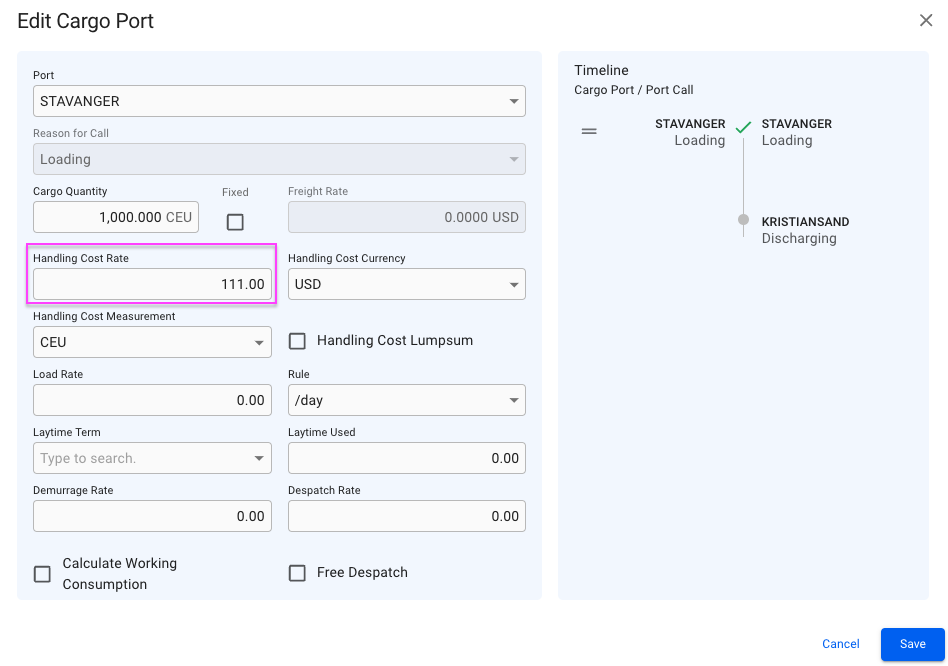
By default, the 'Use Handling Cost from Service Orders' checkbox is set to **false**. It will at the **false** state retrieve the value set in the 'Handling Cost Rate' field of the Stavanger Cargo Port, which you can set manually inside of the Edit Cargo Port modal:
Edit Cargo Port Modal
You can set it to **true** by following either one of the *first two options* listed within the "Where to find" section above. By setting it to the **true** state, a calculated value of the 'Handling Cost Rate' field of the Stavanger Port Call's Service Order Line is being used instead of the Handling Cost Rate value from the Stavanger Cargo Port.
This Handling Cost Rate value is useful when, for instance, working with the Service Order's [Handling Cost Allocation](https://docs.dataloy.com/release-8.16/voyage-management-system/step-by-step-guides/operations/service-orders/handling-cost-allocation) feature. **Make sure you have the below "Requirements" first!**
{% hint style="info" %}
Re**quirements:**
* a Cargo(es) with B/L Quantity, or Booked Quantity > 0
* a Cargo(es) with Weight Factor > 0
* a Cargo(es) with Handling Cost Rate > 0 on the Cargo Port(s)
Additionally, when ticking the 'Use Handling Cost from Service Orders' checkbox:
* a Service Order(s) with a Service Order Line(s) on the complimentary Port Call(s)
* this Service Order Line(s) needs to have
* a Service of type 'Handling Cost'
* an Amount (Estimated) > 0
* status above 'Draft'
{% endhint %}