# Overview

### **Main Details**

This section contains the most important information about the Downtime at a quick glance, such as the vessel, voyage and dates.

For any **non-deviation** downtime, the **Downtime Days** and **Percentage** fields are **editable**, allowing you to specify and invoice a partial downtime. For **deviation downtimes**, these fields are **automatically calculated** as a function of the additional sailing days of the deviation compared to a direct route.

![Main Details](https://content.gitbook.com/content/uZ9lzqgHX4JL1Df67xog/blobs/llkBwyGjvSoBbNV9DVy3/Skjermbilde%202025-03-06%20kl.%2018.24.53.png)

#### Converting a Downtime to a Deviation, and vice versa

Any downtime created using a port call from the voyage schedule that is not a canal passage, can be converted to a deviation. In order to do so, tick the **Deviation checkbox** in the **Main Details** section. A new window will pop up, allowing you to set the end port call of the deviation.

Any deviation can be converted to a downtime by unticking the **Deviation checkbox** in the **Main Details** section.&#x20;

{% hint style="info" %}
**Restrictions for Deviation Downtimes**

* End port call must come after the start port call
* There must be at least one port call in between the port calls
* Neither the start nor the end port call can be a canal passage
  {% endhint %}

### **Result Impact**&#x20;

In this section, there are two checkboxes that indicate whether the downtime cost should be deducted from the charterer and/or owner. The **Deduct from hire receivable (charterer)** checkbox is only active if the voyage is a **Time Charter**. These fields will also enable editing in the corresponding bunker consumption tables.

### **Port Details**

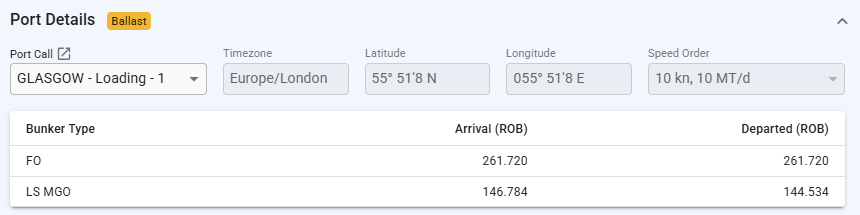
Non-deviation downtimes created by selecting a **Port Call** from the voyage schedule, will display some information about the port call, such as reason for call, speed order, and bunker ROBs in the Port Details section.&#x20;

For simpler downtimes created using Port. The section will display the port name and the timezone for that port, and both fields are uneditable. When the port is an **At Sea** port the timezone offset will be editable.

<div><figure><img src="https://content.gitbook.com/content/uZ9lzqgHX4JL1Df67xog/blobs/8jrQNptS78Vags0uqyTb/Skjermbilde%202025-01-29%20075305.png" alt="" width="563"><figcaption><p>Port Details when a Downtime has been created using the Scheduled <strong>Port Call</strong> option in the modal</p></figcaption></figure> <figure><img src="https://content.gitbook.com/content/uZ9lzqgHX4JL1Df67xog/blobs/UxdsLEfP7jYAo6YsMt6n/Skjermbilde%202025-03-06%20kl.%2017.55.00.png" alt=""><figcaption><p>Port Details when a Downtime has been created with an <strong>At Sea</strong> Port in the Other Ports option in the modal</p></figcaption></figure></div>

<figure><img src="https://content.gitbook.com/content/uZ9lzqgHX4JL1Df67xog/blobs/B3JRaA5Yve1QwWYN1s6r/image.png" alt=""><figcaption><p>Port Details when a Downtime has been created with a Port that is not At Sea</p></figcaption></figure>

### Deviation specific sections

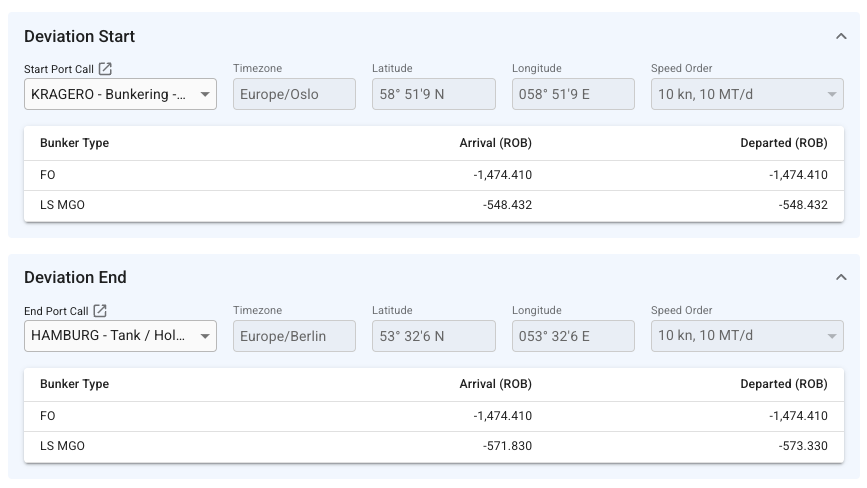
For Deviation downtimes, the Port Details section is split in two; **Deviation Start** and **Deviation End**. With the sole exception that you are not allowed to choose a canal passage as a port call, they are identical to the Port Details section.

<figure><img src="https://content.gitbook.com/content/uZ9lzqgHX4JL1Df67xog/blobs/Ahg882Cg9qaojUVvRzet/Skjermbilde%202025-03-06%20kl.%2018.35.51.png" alt="" width="563"><figcaption><p>Port Details for a Deviation</p></figcaption></figure>

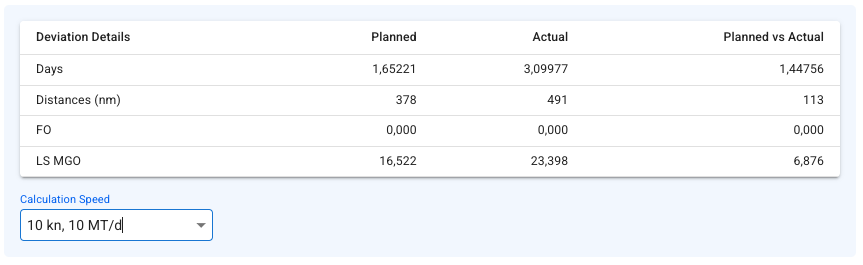
Below these, a table for **Deviation Details** is displayed. This table shows you the difference between a direct route between the start and end port call, and the actual voyage schedule. You can also specify a specific speed for the vessel.

<figure><img src="https://content.gitbook.com/content/uZ9lzqgHX4JL1Df67xog/blobs/vOn5G3znC87a2NFJ5FJu/Skjermbilde%202025-03-06%20kl.%2018.51.16.png" alt="" width="563"><figcaption><p>Deviation details table</p></figcaption></figure>

### **Bunker Consumption Tables**

Two tables show information about bunker consumption for the charterer and the owner/opex. Each table contains the bunker categories used in the voyage.

For non-deviation downtimes, the quantity and price can be **edited** when **Deduct from hire receivable/payable** is checked off in the **Results Impact section** by clicking on the row.

On **deviations**, the quantities is **automatically** calculated, and cannot be changed.

<figure><img src="https://content.gitbook.com/content/uZ9lzqgHX4JL1Df67xog/blobs/aZeWXtddFGJxyHoEALNI/image.png" alt="" width="563"><figcaption><p>Active Bunker Consumption Tables</p></figcaption></figure>