# Create Downtime

1. Open the **Downtime** module in the Operations section.
2. Click **Create Downtime** <img src="https://content.gitbook.com/content/uZ9lzqgHX4JL1Df67xog/blobs/1ydDqPILaXWojs1rrFAo/create-24px.svg" alt="" data-size="line"> in the top right corner.
3. Fill in all required fields listed below in the Create Downtime window.
4. Click **Create**.

<figure><img src="https://content.gitbook.com/content/uZ9lzqgHX4JL1Df67xog/blobs/dvVsRws2CqqYK2M7TPU7/image.png" alt=""><figcaption><p>Create Downtime Dialog</p></figcaption></figure>

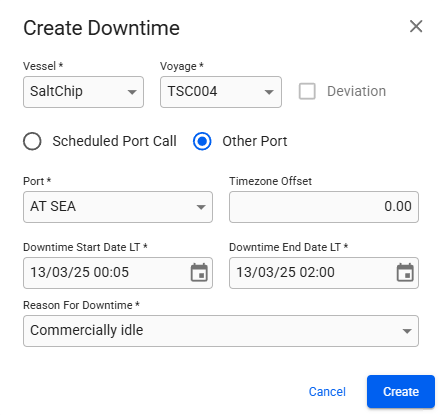
We differentiate between a downtime created using a port call in the voyage schedule (**Scheduled Port Call** option), and a downtime created with a port that is not in the schedule (**Other Port** option). When creating a downtime with the **Other Port** option, you can select any port including an **At Sea** port. When **At Sea** is selected you have to manually input the timezone offset.&#x20;

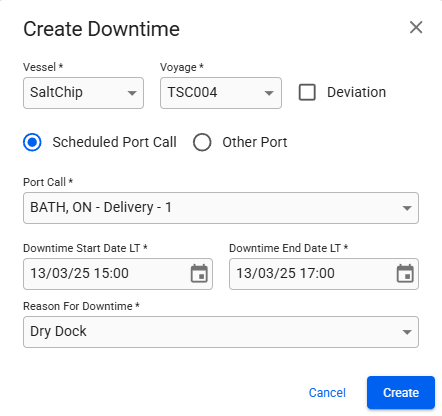
<div><figure><img src="https://content.gitbook.com/content/uZ9lzqgHX4JL1Df67xog/blobs/A32qIRtHl1xrCNdlaxrX/image.png" alt=""><figcaption><p>Creating a Downtime with an At Sea port</p></figcaption></figure> <figure><img src="https://content.gitbook.com/content/uZ9lzqgHX4JL1Df67xog/blobs/Hd6MjO9TFk1vaa6sEeGD/image%20(1).png" alt=""><figcaption><p>Creating a Downtime with a regular Port</p></figcaption></figure></div>

Note that you do not have to use the **Other Port** option and then select the **At Sea** port in the modal for any Downtime that happens at sea. You could also create an At Sea port call in the voyage schedule, and choosing it using the **Scheduled Port Call** option. The advantage to this is that the system will automatically calculate the right timezone for the position specified in the port call, and take any daylight savings time into consideration as well.

The **Port Call** option also allows you to create a Deviation Downtime, by checking the **Deviation** checkbox and choosing an end port call from the voyage schedule. All port calls between the start and end are considered part of the deviation.

A Deviation Downtime automatically sets the start- and end-date based on the port call departure and arrival events. It also calculates additional sailing days, distance and bunker consumptions compared to a direct route.

{% hint style="info" %}
**Restrictions for Deviation Downtimes**

* End port call must come after the start port call
* There must be at least one port call in between the port calls
* Neither the start nor the end port call can be a canal passage
  {% endhint %}

### Comparison table of different Downtime types

<table><thead><tr><th width="302.6328125" valign="top"></th><th width="96" align="center">Downtime</th><th width="90" align="center">Deviation</th><th width="120" align="center">At Sea</th><th width="95.3671875" align="center">Port Only</th></tr></thead><tbody><tr><td valign="top">Manually set start- and end-date</td><td align="center"><span data-gb-custom-inline data-tag="emoji" data-code="2705">✅</span></td><td align="center"><span data-gb-custom-inline data-tag="emoji" data-code="274c">❌</span></td><td align="center"><span data-gb-custom-inline data-tag="emoji" data-code="2705">✅</span></td><td align="center"><span data-gb-custom-inline data-tag="emoji" data-code="2705">✅</span></td></tr><tr><td valign="top">Manually set timezone offset</td><td align="center"><span data-gb-custom-inline data-tag="emoji" data-code="274c">❌</span></td><td align="center"><span data-gb-custom-inline data-tag="emoji" data-code="274c">❌</span></td><td align="center"><span data-gb-custom-inline data-tag="emoji" data-code="2705">✅</span></td><td align="center"><span data-gb-custom-inline data-tag="emoji" data-code="274c">❌</span></td></tr><tr><td valign="top">Automatically set timezone and position</td><td align="center"><span data-gb-custom-inline data-tag="emoji" data-code="2705">✅</span></td><td align="center"><span data-gb-custom-inline data-tag="emoji" data-code="2705">✅</span></td><td align="center"><span data-gb-custom-inline data-tag="emoji" data-code="274c">❌</span></td><td align="center"><span data-gb-custom-inline data-tag="emoji" data-code="2705">✅</span></td></tr><tr><td valign="top">Automatically set start- and end-date</td><td align="center"><span data-gb-custom-inline data-tag="emoji" data-code="274c">❌</span></td><td align="center"><span data-gb-custom-inline data-tag="emoji" data-code="2705">✅</span></td><td align="center"><span data-gb-custom-inline data-tag="emoji" data-code="274c">❌</span></td><td align="center"><span data-gb-custom-inline data-tag="emoji" data-code="274c">❌</span></td></tr><tr><td valign="top">Create using a port call from voyage schedule</td><td align="center"><span data-gb-custom-inline data-tag="emoji" data-code="2705">✅</span></td><td align="center"><span data-gb-custom-inline data-tag="emoji" data-code="2705">✅</span></td><td align="center"><span data-gb-custom-inline data-tag="emoji" data-code="274c">❌</span></td><td align="center"><span data-gb-custom-inline data-tag="emoji" data-code="274c">❌</span></td></tr><tr><td valign="top">Set a canal passage as port call</td><td align="center"><span data-gb-custom-inline data-tag="emoji" data-code="2705">✅</span></td><td align="center"><span data-gb-custom-inline data-tag="emoji" data-code="274c">❌</span></td><td align="center"><span data-gb-custom-inline data-tag="emoji" data-code="274c">❌</span></td><td align="center"><span data-gb-custom-inline data-tag="emoji" data-code="274c">❌</span></td></tr><tr><td valign="top">Calculate additional sailing days, distance and consumption compared to original route</td><td align="center"><span data-gb-custom-inline data-tag="emoji" data-code="274c">❌</span></td><td align="center"><span data-gb-custom-inline data-tag="emoji" data-code="2705">✅</span></td><td align="center"><span data-gb-custom-inline data-tag="emoji" data-code="274c">❌</span></td><td align="center"><span data-gb-custom-inline data-tag="emoji" data-code="274c">❌</span></td></tr><tr><td valign="top">Convert between Downtime and Deviation</td><td align="center"><span data-gb-custom-inline data-tag="emoji" data-code="2705">✅</span></td><td align="center"><span data-gb-custom-inline data-tag="emoji" data-code="2705">✅</span></td><td align="center"><span data-gb-custom-inline data-tag="emoji" data-code="274c">❌</span></td><td align="center"><span data-gb-custom-inline data-tag="emoji" data-code="274c">❌</span></td></tr></tbody></table>