# Delete Laytime Calculation
From version 6.39 users with the **Laytime Contributor** role have the option to delete Laytime Calculations.\
Deleting a Laytime Calcluation will run the Voyage business logic and re calculate things that have been changed by the Laytime Calculation.\
\
• Please notice that Fixed demurrage and Fixed Dispatch that were added in the laytime to all connected ports would **NOT** be deleted from the ports after the laytime was removed! \
\
To delete a Laytime Calculation you must first access the laytime calculation drawer, you can go about this in 2 ways:\
1\. Open the Voyage drawer that the Laytime Calculation is connected to -> Click on the Related tab -> Pick the Laytime Calculation you desire to delete from the Laytime Calculations list.\
2\. In the main VMS menu click on Operations -> Laytime Calculations -> Either use the quick filters to find the relevant Laytime Calculation or pick it out from the list.\
\
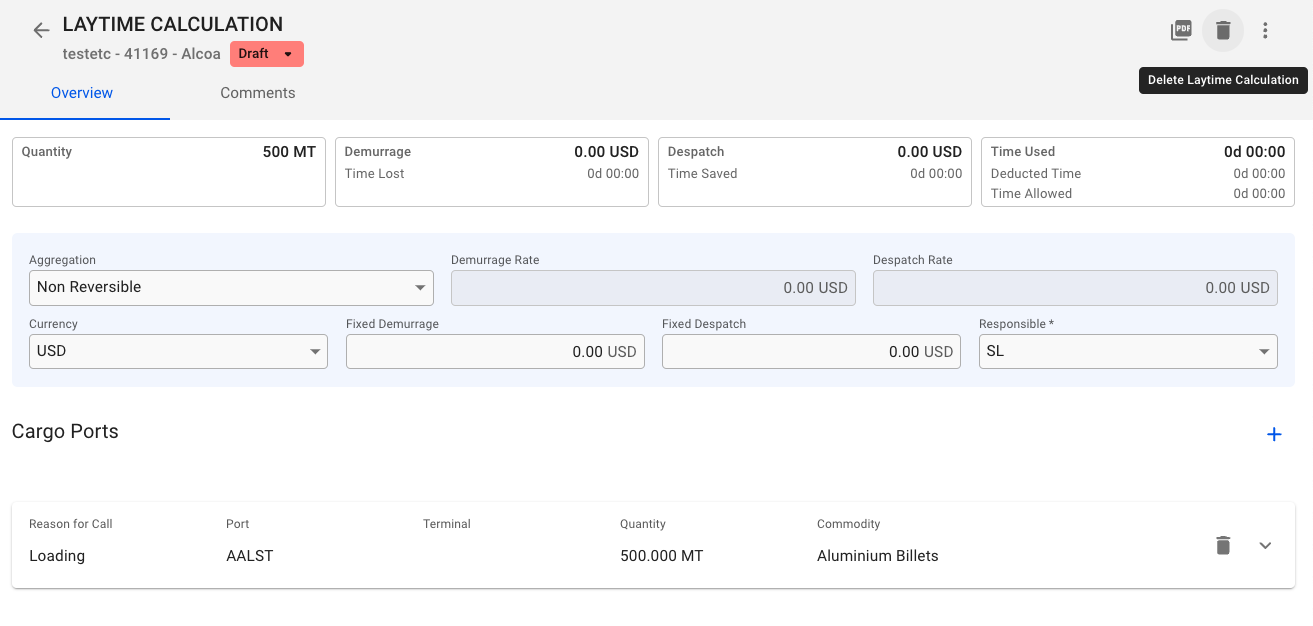
Once you are in the Laytime Calculation drawer you will see a new button was added:
Laytime Calculation deletion button
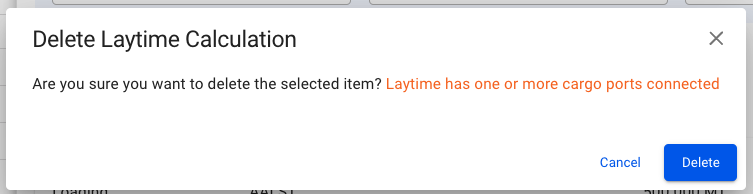
When clicking on the button you will be prompt to confirm/cancel the deletion, if there are any ports connected to the Laytime Calculation a notice will appear about it in the deletion modal:
Once you confirm all Laytime Events will be removed and only the events connected to Port Calls / Cargo Ports will remain and the Business Logic for Voyage would be run to re-calculate changed to the Voyage.