# Manage Vessel Classes
## Creating a new Vessel Class
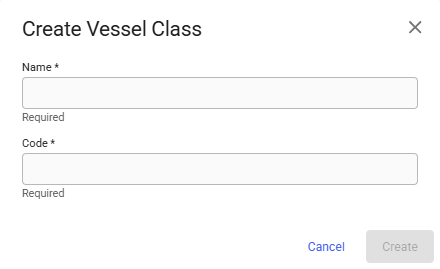
Click the  icon in the top right on the Vessel Classes list page to open the Create Vessel Class modal. To be able to create a Vessel Class you must supply a name and code. When a name and code has been filled in, the Create button will be enabled and clickable. Clicking on the button will then create a vessel class.
Create vessel class modal
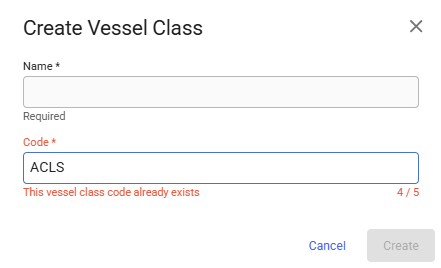
The code has to be unique, if you input a code that already exists you will get an error as seen below.
An existing code has been inputted
Note that code is also only in uppercase letters.
## Edit Vessel Class details - Vessel ClassDrawer
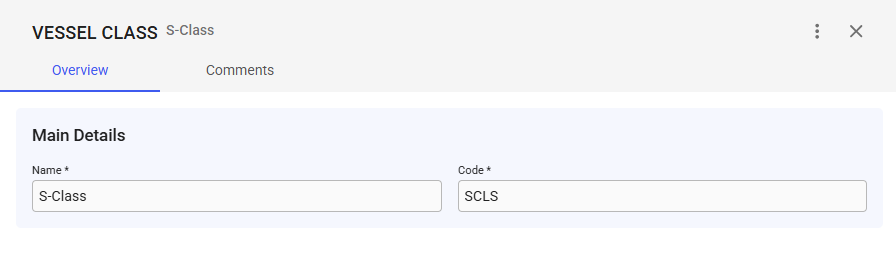
Clicking on the Vessel Class you want to change the details of in the Vessel Classes List will open the Vessel Class Drawer.
### Overview tab
The overview tab contains the main details section where the name and code of the vessel class are editable.
Vessel Class Drawer
Since the code has to be unique you will also get an error message when you try to input a code that is already in use on another Vessel Class.
Inputted vessel class code is already in use on another vessel class.
Code is in uppercase only letters here as well.
## Deleting a Vessel Class
A Vessel Class must first be disabled. Click the  button in the top right corner. Choose the "Disable" option. Click the  button again in the top right corner. Choose the "Delete" option. A confirmation modal will also show up, click Delete.