# Taxes

### Taxes List

In this list, you are able to view fields, such as *Description, Code, Category* and *GL Account:*

<figure><img src="https://content.gitbook.com/content/uZ9lzqgHX4JL1Df67xog/blobs/7FdoDFv9truyiTYmvJwO/image.png" alt=""><figcaption><p>Taxes list</p></figcaption></figure>

### Create a Tax

In the <img src="https://content.gitbook.com/content/uZ9lzqgHX4JL1Df67xog/blobs/1ydDqPILaXWojs1rrFAo/create-24px.svg" alt="" data-size="line">-action at the top-most left side of this view, you are able to create a new tax using this modal (the \* are the required fields):
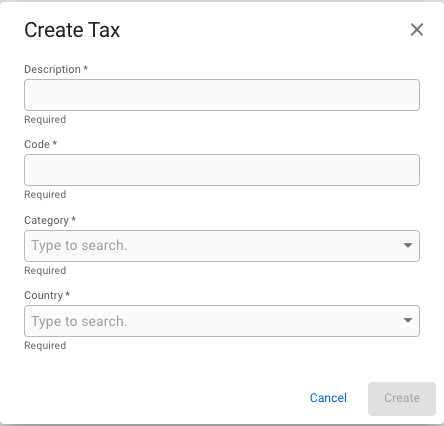
<figure><img src="https://content.gitbook.com/content/uZ9lzqgHX4JL1Df67xog/blobs/lVGjw0CdzgDR3z8doHl0/image.png" alt=""><figcaption><p>Create Tax modal</p></figcaption></figure>

### Edit a Tax

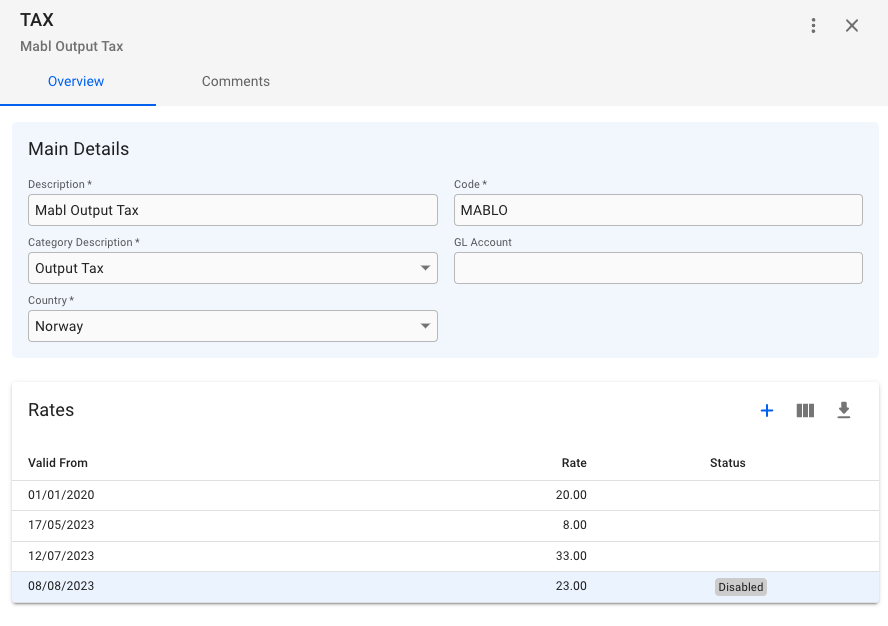
By clicking on one of the taxes on the rows, you open up a Tax drawer:

<figure><img src="https://content.gitbook.com/content/uZ9lzqgHX4JL1Df67xog/blobs/fMxo0xsUi16Q69o02KQm/image.png" alt=""><figcaption><p>Overview of Tax drawer</p></figcaption></figure>

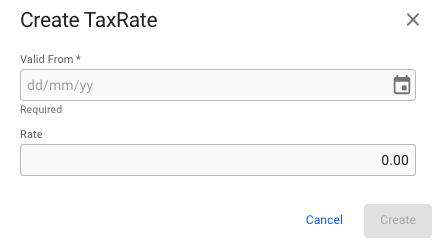
Here, you are able to edit the main details of the tax (all \* fields are required), and also create or edit various *Tax Rates* on the tax:

<img src="https://content.gitbook.com/content/uZ9lzqgHX4JL1Df67xog/blobs/6WOZ3bzP2cjn7MbPrB3l/image.png" alt="" data-size="original">![](https://content.gitbook.com/content/uZ9lzqgHX4JL1Df67xog/blobs/4mTMo4YjlZAxI20zDKyU/image.png)

If you uncheck the *Enabled* checkbox, the tax rate will get the status *Disabled* on the list.&#x20;

### Disable a Tax

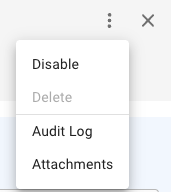
By clicking on the secondary actions button (the three dots on the top right), this menu will appear:

<figure><img src="https://content.gitbook.com/content/uZ9lzqgHX4JL1Df67xog/blobs/8y1EmWmNJcHo0B6EFGw1/image.png" alt=""><figcaption><p>Secondary Actions menu</p></figcaption></figure>

When *disabling* a tax, you are able to either *delete* the tax or *enable* it again. You can find the disable list of the taxes by filtering on *Disabled* on the Taxes List.&#x20;