# Additional Fields: Start and End Dates
From release 8.6, optional **Start Date** and **End Dates** have been added to [restricted areas](https://docs.dataloy.com/release-8.16/voyage-management-system/step-by-step-guides/master-data/restricted-areas). This ensures that when planning a voyage, you have a clear overview of which zones are active and how they impact fuel consumption and compliance requirements.
***
## How Start and End Dates Affect Restricted Areas
When a vessel crosses an **ECA (Emission Control Area)/OLRA (Open Loop Restricted Area)** boundary or calls at a port within a restricted area, the Start and End Dates determine when the **restricted area rules apply**. This ensures regulatory compliance and helps with voyage planning by clearly defining when specific restrictions are in effect.
### Restricted Area Rules (At Sea)
If a route crosses a restricted area zone, the restricted area rules apply based on the **arrival date** at the **next port:**
* **If both Start and End Dates are provided**, the restricted area rules apply only if the arrival date falls within the date range.
* **If only a Start Date is provided**, the restricted area rules apply if the arrival date is after the Start Date.
* **If only an End Date is provided**, the restricted area rules apply if the arrival date is before the End Date.
* **If no dates are provided**, the restricted area rules apply for the ***entire route***.
### Restricted Area Rules (In Port)
When calculating fuel usage in port, the allowed [**bunker category**](https://docs.dataloy.com/release-8.16/voyage-management-system/step-by-step-guides/master-data/bunker-categories) is determined as follows:
* **If the vessel has any allowed**[ **bunker categories**](https://docs.dataloy.com/release-8.16/voyage-management-system/vessels/vessel-speed-and-consumption-data#bunker-categories), the highest-priority one permitted in the restricted area is used.
* **If the vessel has no allowed bunker categories**, the highest-priority bunker category in the restricted area is used.
* **If the port is NOT within an ECA/OLRA zone:**
* **If vessel is scrubber fitted:**
* The highest-priority bunker category on the vessel is used if available.
* Otherwise, the highest-priority bunker from master data is used.
* **Otherwise:**
* The highest-priority vessel bunker category permitted in the port is used.
## [Voyage Map](https://docs.dataloy.com/release-8.16/voyage-management-system/step-by-step-guides/voyages/maintain-voyages/overview/voyage-map) Updates
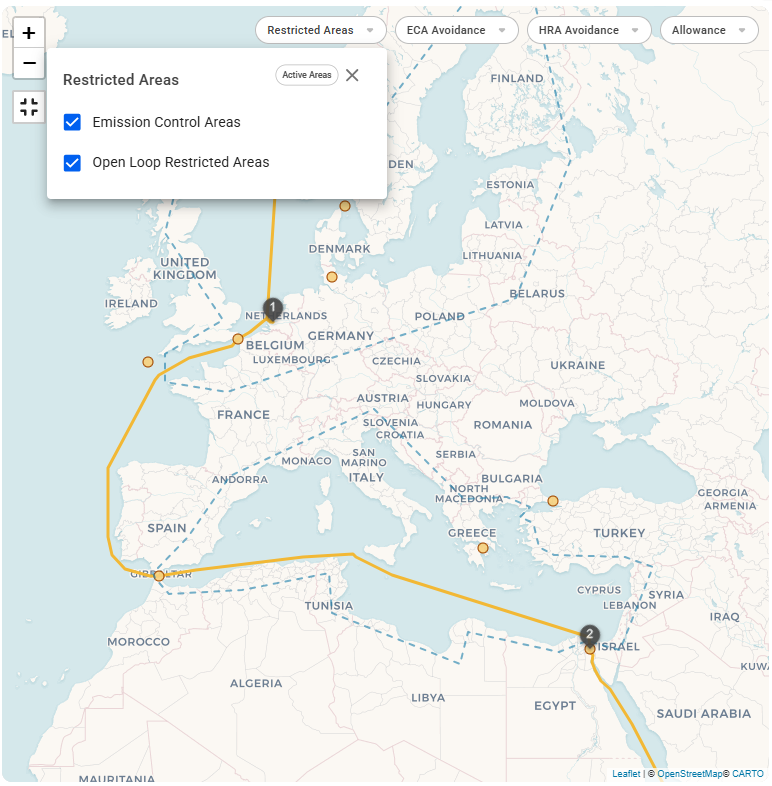
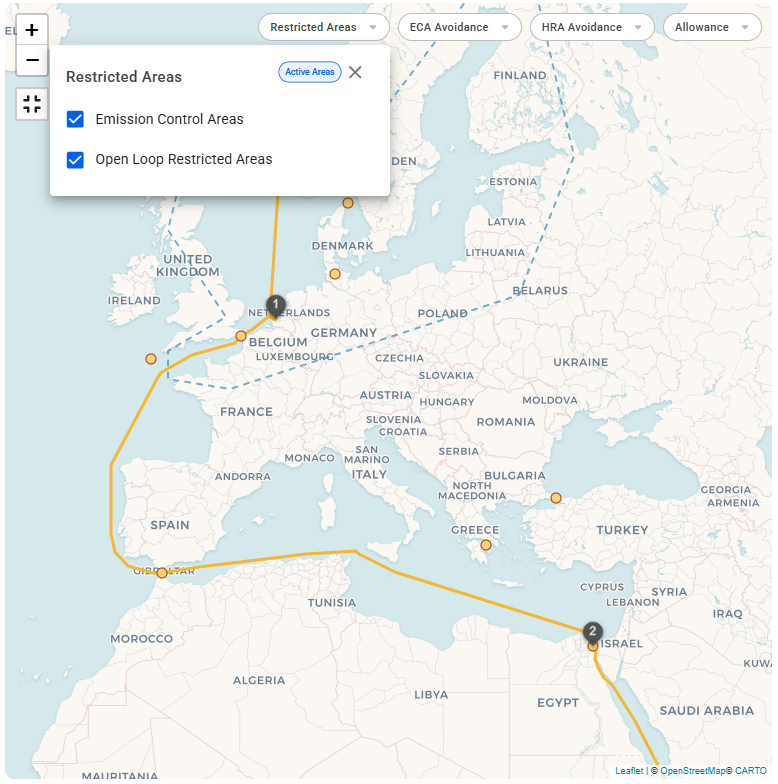
A new filter, **"Active Areas,"** has been added to display only restricted areas with active Start and End Dates. This filter is enabled by default and is ***voyage specific***. When selected, the map will only show the areas where restrictions are currently in effect for the ***current voyage***. This can be seen in the figures below.
{% tabs %}
{% tab title="Show All Areas" %}