# Claim Natures
This module allows administrators to create and modify claim natures. By default, the list displays all enabled claim natures. However, you can also view disabled claim natures by using the 'Disabled' filter in the top-right of the header (see Figure 1).
Figure 1: Claim Nature List
## Filtering and Sorting
[Quick filters](https://docs.dataloy.com/release-8.16/voyage-management-system/sorting-and-filtering-lists#quick-filters) in the top-right header allow you to filter by disabled claim natures ( see Figure 1 for reference ).
Figure 2: Claim Natures List sorted ascendingly by description
To sort the list, click the sorting option in the list headers ( see Figure 2 ). For more information on filtering and sorting, refer to the [**Sorting and Filtering Lists**](https://docs.dataloy.com/release-8.16/voyage-management-system/step-by-step-guides/sorting-and-filtering-lists) page.
## Creating a Claim Nature
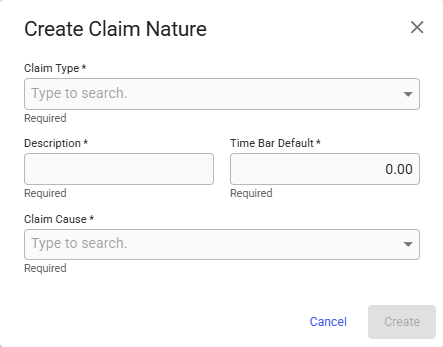
To create a new Claim Nature, click the blue plus button in the top-right corner of the page. When clicked, a modal will appear where you can select the claim type, enter a description, set the default time bar, and choose the [cause of the claim](https://docs.dataloy.com/release-8.16/voyage-management-system/step-by-step-guides/master-data/claim-causes) ( see Figure 3 ).
**Note:** All fields are required. Once the Claim Nature is created, the claim nature drawer will open.
Figure 3: Create Claim Nature Modal
## Editing a Claim Nature
To edit a claim nature, click its row in the list. This will open a drawer where you can update the fields (see Figure 4 ).
Figure 4: Claim Nature Drawer
In the drawer, you can enable or disable the claim nature using the secondary action menu ( vertical ellipsis ) in the top-right corner.
**Note:** If the selected claim nature is disabled, you *must* enable it before making any changes.