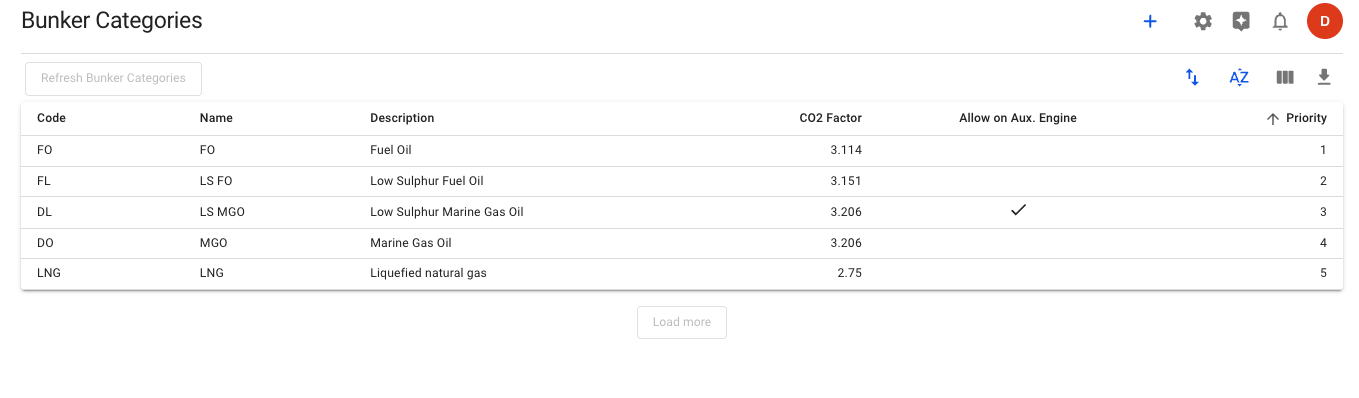
This list provides an overview of all bunker categories in the system and offers insight into the logic that determines the default bunker usage for **all voyages** without a [vessel bunker category configuration](https://docs.dataloy.com/release-8.16/voyage-management-system/step-by-step-guides/vessels/vessel-speed-and-consumption-data) for legs that lie beyond not emission restricted areas.
The significance of the column *Priority* is that it specifies the bunker hierarchy in which the bunkers are consumed in the area that has no restrictions.
Example:
* In an area without any restrictions, the priority 1 bunker category will be selected (ref. figure 1, the category will be FO).
***
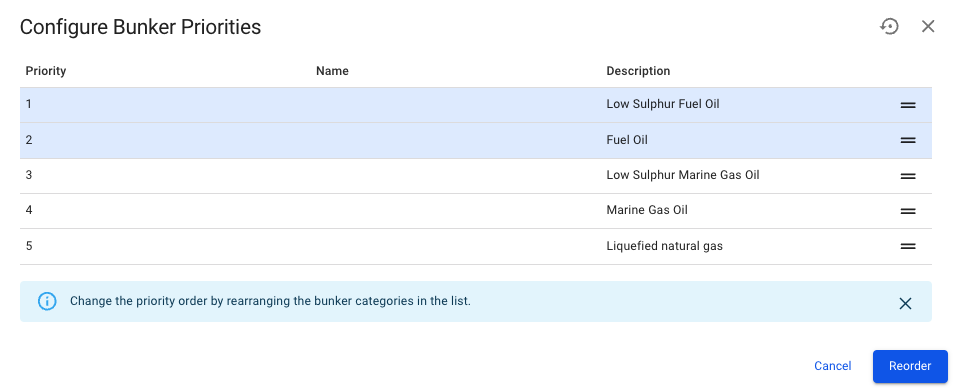
One key feature is the reorder functionality, located at the top-right of the list (↑↓). See the figure below for the reorder modal insight:
(Figure 2) Bunker Category reorder modal
If the reorder above is completed, the bunker category *LS FO* will become the priority 1 category, meaning that it will be used as the most favoured category for all voyages without a [vessel bunker category configuration](https://docs.dataloy.com/release-8.16/voyage-management-system/step-by-step-guides/vessels/vessel-speed-and-consumption-data) in areas without emission restrictions (e.g. high seas).