# Export to Excel Sheet
For most lists in VMS, you can navigate to this icon on the right-most top of the list:
Export to Excel Icon
This option gives you the possibility to *export* all the list content into one single Excel sheet, in a format of your choosing. This feature works on filtered and/or sorted lists, as well as if the list is customised with the [*Customise Columns*](https://docs.dataloy.com/release-8.16/voyage-management-system/step-by-step-guides/customising-list-columns) feature, giving you the opportunity to have a fully tailored list accorded to your needs.
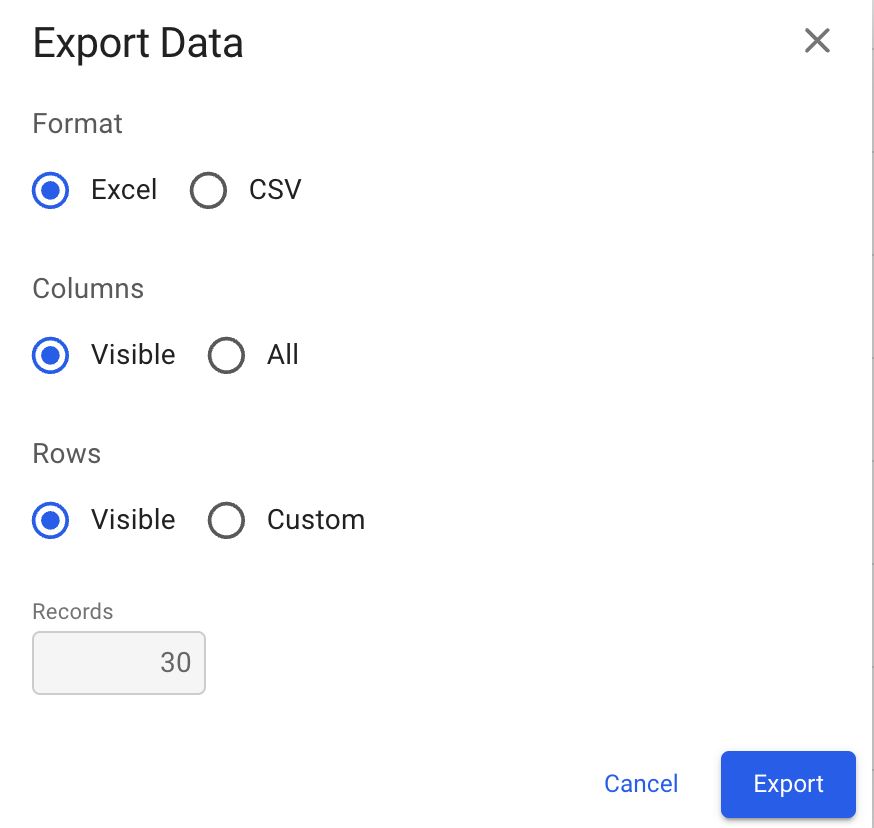
By clicking the icon, this modal will display:
Export Data Modal
Here, you can decide the *format* of the Excel sheet, and the *columns* and *rows* to display. There are some defaulted values, but you are free to choose the other options as well. When exporting, you will see a new file pop up on your chosen browser (e.g. Chrome).
Hereafter, you are free to print out this sheet, if needed.
### Some of the lists that have this feature:
#### **In list modules:**
* Vessels
* Operative
* Voyages
* Voyages
* Template Voyage
* Preliminary Voyages
* Cargoes
* Allocated
* Unallocated
* For Unallocated, we also have this feature: [create-cargo-by-importing-from-excel](https://docs.dataloy.com/release-8.16/voyage-management-system/step-by-step-guides/cargoes/create-cargoes/create-cargo-by-importing-from-excel "mention")
* Sub-cargoes
* Port Calls
#### In FAS (Fleet Plans):
* Cargoes
{% hint style="warning" %}
This was available in Web VMS way before version v7.11!
{% endhint %}