# Claims
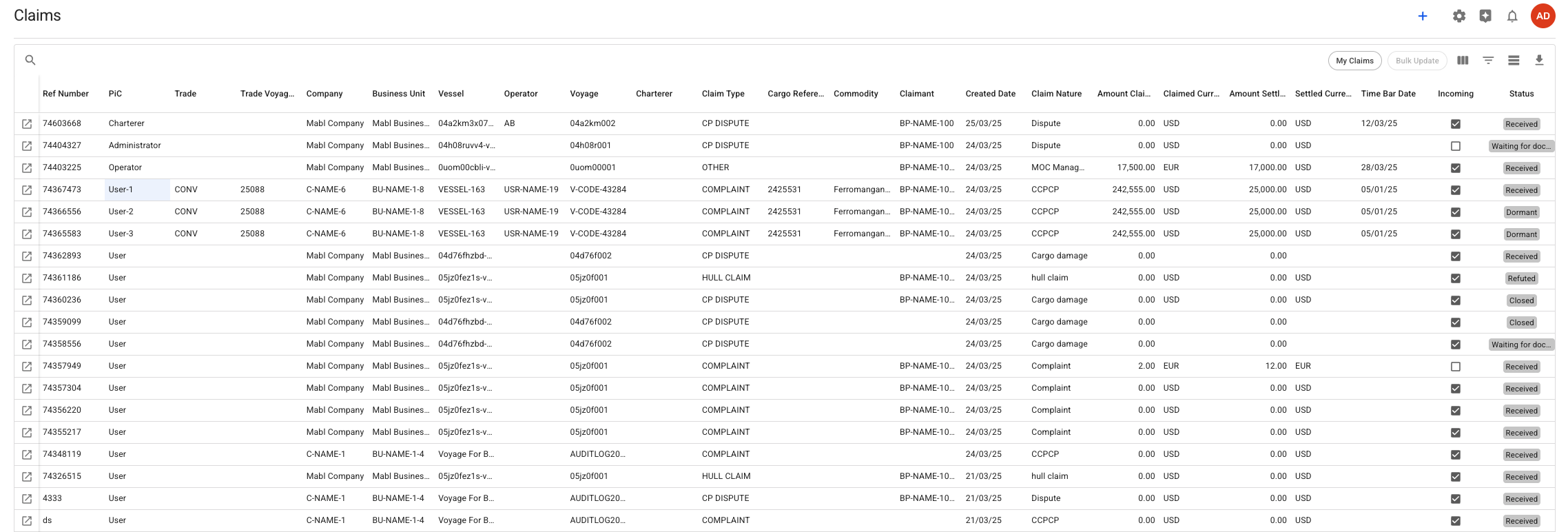
The Claims list can be found in the sidebar under the module labeled "Claim". Opened, displays a list of available claims (see Figure 1).
{% hint style="info" %}
This list features the grid functions, such as sorting, filtering, aggregation, resizing columns, and much more. For more details on features and usage, please refer to the[ data grid section](https://docs.dataloy.com/release-8.16/voyage-management-system/step-by-step-guides/data-grids).
{% endhint %}
Figure 1. Claims List
## Create and Edit a Claim
To create a claim, click the **+** icon located in the top right corner of the claims page (refer to Figure 1). For more information on how the claim creation proceeds, please visit the [Create a Claim](https://docs.dataloy.com/release-8.16/voyage-management-system/step-by-step-guides/claims/create-a-claim) page.
To modify an existing claim, click on the open drawer icon, which is usually found in the leftmost column of the grid. This action will open the [Claim drawer ](https://docs.dataloy.com/release-8.16/voyage-management-system/step-by-step-guides/claims/claim-drawer)for the selected claim.