# Create and Edit Duration and Rates

The Create/Edit Duration modal lets you specify details about a particular Duration and it's Rates.

## Create a Duration

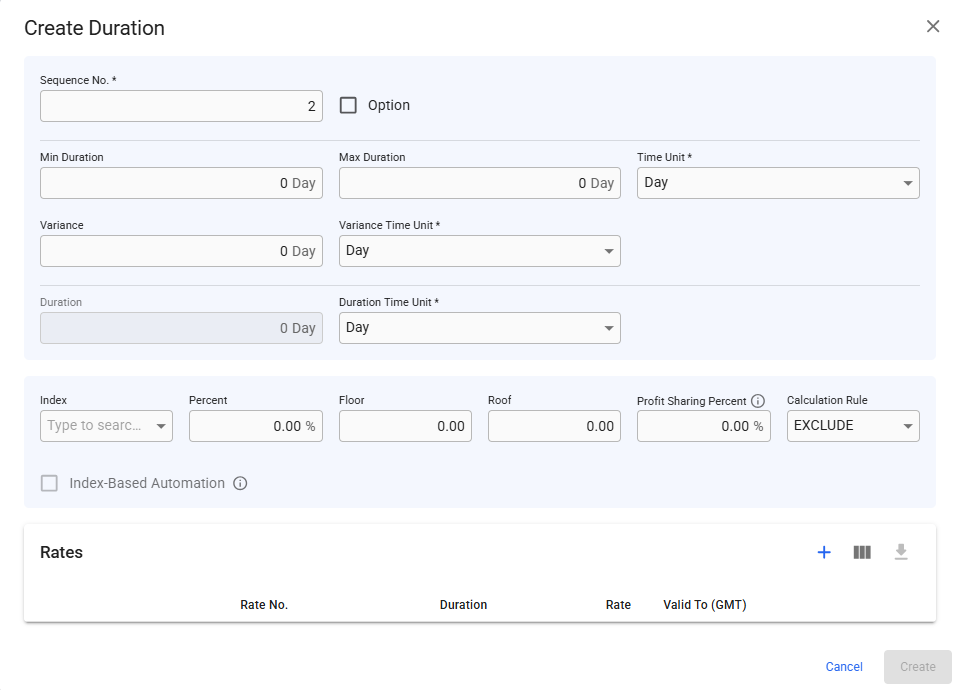
After clicking the ![](https://content.gitbook.com/content/uZ9lzqgHX4JL1Df67xog/blobs/YUKBmqTQ7ZmTGXbzaKVY/image.png)-icon, you will get this view:

<figure><img src="https://content.gitbook.com/content/uZ9lzqgHX4JL1Df67xog/blobs/Q2DMF6xojW7K0GNI5JdT/Screenshot%202025-09-03%20155629.png" alt=""><figcaption><p>Create TC Duration Modal</p></figcaption></figure>

Here, you can add inn various values for both the TC's duration and the duration's rates. You can create TC rates at the bottom **Rate** table.&#x20;

When connecting a duration to a Market Index, you will automatically get the last updated date of it's Market Index Values in GMT:

<figure><img src="https://3464155396-files.gitbook.io/~/files/v0/b/gitbook-x-prod.appspot.com/o/spaces%2FuZ9lzqgHX4JL1Df67xog%2Fuploads%2Fbn442P37pvhrUyVOpkby%2Fimage.png?alt=media&#x26;token=f11591b8-d8ec-49dd-a3ca-1dbf04bd6d66" alt=""><figcaption><p>Connect TC Duration to a Market Index</p></figcaption></figure>

## Edit a Duration

After opening an existing duration by clicking on one of the row items, you will get this view:&#x20;

<figure><img src="https://3464155396-files.gitbook.io/~/files/v0/b/gitbook-x-prod.appspot.com/o/spaces%2FuZ9lzqgHX4JL1Df67xog%2Fuploads%2FVGx0JynMUXsRXoElkZrf%2Fimage.png?alt=media&#x26;token=2defb301-69a2-4f9f-9da8-2149a58d32f4" alt=""><figcaption><p>Edit TC Duration Modal</p></figcaption></figure>

### Duration Details

The top section of **Duration Details** lets you specify the length of the duration, by setting the minimum and maximum duration, as well as the variance. You can also decide the mix/max time unit, as well as the variance time unit.

Clicking the Option checkbox, will display an additional dropdown menu for Option Status next to it, letting you select the duration as Declared, Forfeited or Not Declared.

In the second section, the duration itself is calculated based on the rule selected in the Duration Length Rule dropdown menu, with the default rule being **Sum of all TC Rates**. You can select the duration's time unit as well. All of the units can be of type 'Day' or 'Month'.&#x20;

#### Enable Time Automation

In the third section, you can tick the **Time Automation** checkbox, which then enables the Default Rate Length, the rule of Duration Length Rule is defaulted to **Maximum Duration + Variance**, and the rates will be generated automatically within the Rate table at the bottom of the modal. Changing the default rate length will delete all existing TC rates, and re-generate new ones based on the new value and current rule. The current rule decides how duration is calculated, as mentioned above. You can also change min/max and/or variance fields, which the duration and TC rates will update accordingly.&#x20;

E.g., take the below example; if time automation is enabled, the duration length rule will become Maximum Duration + Variance\*, which is here 20 days + 2 days = 22 days under duration. Since default rate length is now enabled, we can now override the defaulted 22 days, to e.g. 10 days:

<figure><img src="https://3464155396-files.gitbook.io/~/files/v0/b/gitbook-x-prod.appspot.com/o/spaces%2FuZ9lzqgHX4JL1Df67xog%2Fuploads%2FMhtU0eWTCzT57X8g3XbT%2Fimage.png?alt=media&#x26;token=5129d1a2-ee68-48c0-a40b-030477ce0b16" alt=""><figcaption><p>Edit TC Duration Modal, Time Automation enabled</p></figcaption></figure>

As you can see, we have now generated 3 TC rates, which first and second ones have durations of 10 days each, and the remaining of 2 days in the third. Hence, the input of duration rate length decides how many are generated until we reach the duration. The action of enabling this checkbox will also delete all existing TC Rates, and re-generate new ones based on the current rule. Ticking it off will keep the rates as is, but you can change them or *delete* them however you like again.&#x20;

\*You can override the rule even if it's defaulted at Maximum Duration + Variance.&#x20;

{% hint style="warning" %}
When enabling time automation, it will no longer be possible to create, delete or edit the sequence of the TC rates.
{% endhint %}

The Valid To date is based on:

* For TC Out contracts: the delivery port call's ATA date
* For TC In contracts: the voyage start date of the first linked voyage

### Index-Based Rate

In the **Index-Based Rate** section, you can specify a particular Index ([Market Index](https://docs.dataloy.com/release-8.16/voyage-management-system/step-by-step-guides/chartering/market-indices)) the TC rates should follow.

#### Enable **Index-based Automation**&#x20;

After selecting an Index, when you tick the **Index-based Automation** checkbox, each of the rates in the duration will be automatically generated based on this index. Note that this will not generate any spots here to follow if you don't select an index first! With a default rate length = 15, we for instance get:

<figure><img src="https://3464155396-files.gitbook.io/~/files/v0/b/gitbook-x-prod.appspot.com/o/spaces%2FuZ9lzqgHX4JL1Df67xog%2Fuploads%2FW3FfpvySjiz7ysmYZEw3%2FMI%20copy.jpg?alt=media&#x26;token=6d0cd0b0-eaeb-4e75-9a1f-164c8ed57fdc" alt=""><figcaption><p>Edit TC Duration Modal, Index-Based Rate and Time Automation enabled</p></figcaption></figure>

Note that another Index is chosen to illustrate this section, along with other TC values.

Based on the linked Market Index's Values (MIV):

<figure><img src="https://3464155396-files.gitbook.io/~/files/v0/b/gitbook-x-prod.appspot.com/o/spaces%2FuZ9lzqgHX4JL1Df67xog%2Fuploads%2F3IylkSqmo4sy21GoFkAo%2FScreenshot%202025-09-09%20at%2014.47.37.png?alt=media&#x26;token=8b328407-4d90-41d1-b1c3-6146f4e7e499" alt=""><figcaption><p>Market Index Values of a Market Index</p></figcaption></figure>

In the first above example, which is in Calculation Rule = PREVIOUS, you can see that rates #1 and #2 are calculated by a weighted average, based on their timestamps of the day, while rate #3 is > than the last MIV date. Meaning, rate #3 is calculated based on a forward curve.&#x20;

{% hint style="warning" %}
Note that:

* it's not possible to enable the Index-based Automation without choosing an Index first
* if Index-based Automation is enabled, it is not possible to remove the Index chosen
  {% endhint %}

The whole Index-based Automation section is collapsible to make the Rates table more of a priority, and your chosen view is persisted.&#x20;

You can also decide the Percent to count of the rates, you can also choose Floor and/or Roof for the rates to follow, as well as the Profit Sharing Percent.&#x20;

#### Select a Calculation Rule

As you saw in all above examples, you can choose a Calculation Rule; EXCLUDE, PREVIOUS or NEXT.

EXCLUDE: is the default selected rule. Calculates x days in average of published indices, **excluding** the days that are not registered in the system.&#x20;

&#x20;     **Note**: EXCLUDE follows the same logic as earlier implementations of TC rates.

PREVIOUS: calculates x days in average of published indices, using the latest available index for the **previous** index registered in the system.&#x20;

NEXT: calculates x days in average of published indices, using the latest available index for the **next** index registered in the system.&#x20;

{% hint style="warning" %}
These rules only affect dates from today and going backwards in time. However, any date that goes into the future will always use the **previously available** MIV when calculating the rate.
{% endhint %}
