# Comissions

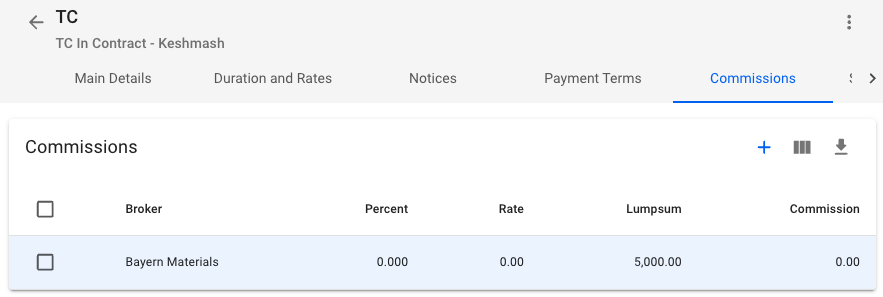
In the **Comissions** tab you can **view**, **create**, **edit** and **delete** **Comissions**.&#x20;

<figure><img src="https://content.gitbook.com/content/uZ9lzqgHX4JL1Df67xog/blobs/Tc4zKSj7zpcd2uDrBJhG/Skjermbilde%202024-01-05%20kl.%2016.29.46.png" alt=""><figcaption><p>Comissions tab in TC Drawer</p></figcaption></figure>

By clicking the <img src="https://content.gitbook.com/content/uZ9lzqgHX4JL1Df67xog/blobs/1ydDqPILaXWojs1rrFAo/create-24px.svg" alt="" data-size="line">-icon in the upper right corner of the Section you can **create** new **Comissions**. Clicking on a Commission in the list will allow you to edit or delete the commission.
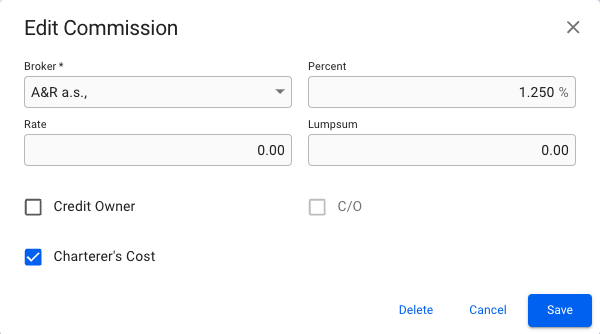
<figure><img src="https://content.gitbook.com/content/uZ9lzqgHX4JL1Df67xog/blobs/UC4MWU9hJGhKXl5Jsd7t/Skjermbilde%202024-01-05%20kl.%2016.30.35.png" alt=""><figcaption><p>Edit Comission Modal</p></figcaption></figure>
