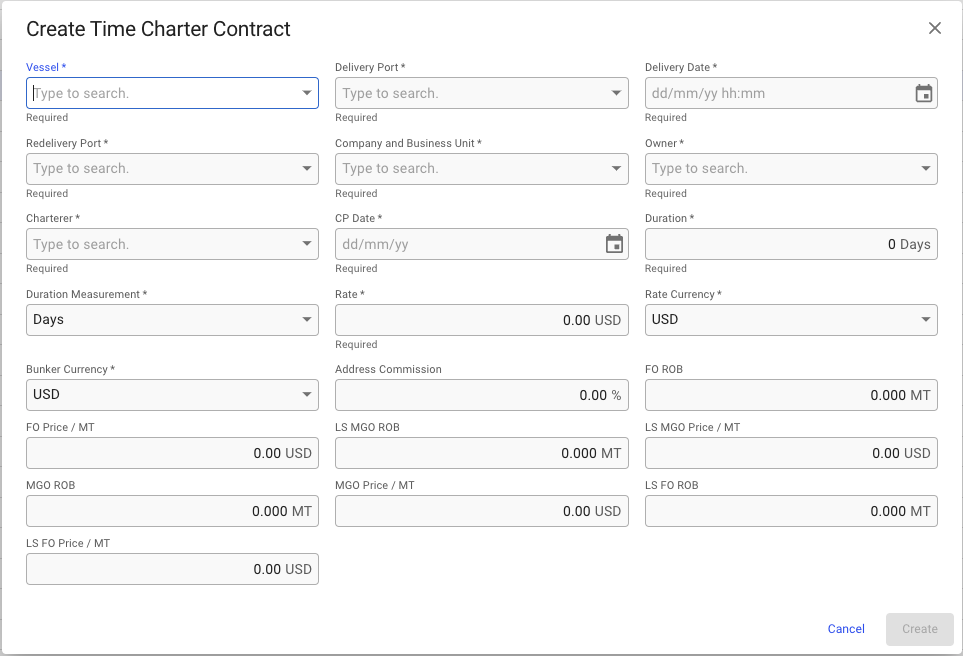
Create Time Charter Contract modal
 **Time Charter Contracts** module from the menu on the left.
2. In the top right corner, click the
**Time Charter Contracts** module from the menu on the left.
2. In the top right corner, click the  icon.
3. Select **Create Time Charter Contract.**
4. In the modal, you can fill in the required fields and add any additional information about the **Time Charter Contract**.
5. After you have filled in, you can click **Create**.
### **Required fields**:
* Vessel
* Delivery Port
* Delivery Date
* Redelivery Port
* Company and Business Unit
* Owner
* Charterer
* CP Date
* Duration
* Duration Measurement
* Rate
* Rate Currency
* Bunker Currency
### The Create Modal:
icon.
3. Select **Create Time Charter Contract.**
4. In the modal, you can fill in the required fields and add any additional information about the **Time Charter Contract**.
5. After you have filled in, you can click **Create**.
### **Required fields**:
* Vessel
* Delivery Port
* Delivery Date
* Redelivery Port
* Company and Business Unit
* Owner
* Charterer
* CP Date
* Duration
* Duration Measurement
* Rate
* Rate Currency
* Bunker Currency
### The Create Modal:
Create Time Charter Contract modal