# Cargo Drawer

### Header

![Top section of cargo drawer](https://content.gitbook.com/content/uZ9lzqgHX4JL1Df67xog/blobs/ziyjnBPTUlEEd8mvAXCG/Screenshot%202021-12-01%20at%2010.48.40.png)

When you open the cargo drawer you see on the top left the vessel and voyage the cargo is allocated to, if it is an allocated cargo. You can click both chips to open the vessel drawer or the voyage drawer.

Next you see the cargo reference, which is a unique identifier of the cargo. You can [edit the cargo reference](https://docs.dataloy.com/release-8.16/voyage-management-system/step-by-step-guides/cargoes/maintain-cargoes/cargo-drawer-actions) under the three dots.&#x20;

Then you see the cargo status and can [change the cargo status](https://docs.dataloy.com/release-8.16/voyage-management-system/step-by-step-guides/cargoes/maintain-cargoes/cargo-drawer-actions/change-cargo-status).

You also see the Cargo Type, and Cargo Subtype if applicable, which is automatically set by the system.

<figure><img src="https://content.gitbook.com/content/uZ9lzqgHX4JL1Df67xog/blobs/15O6pbiyFNsSH1rv7qkG/Screenshot%202025-08-26%20113350.png" alt=""><figcaption><p>Top section of a preshipment cargo, which has cargo type spot and cargo subtype preshipment</p></figcaption></figure>

| Cargo Type                      | Meaning                                                     |
| ------------------------------- | ----------------------------------------------------------- |
| Spot                            | Standard cargo, which fulfills none of the conditions below |
| Contract of Affreightment (CoA) | Cargo which is connected to a contract of Affreightment     |

| Cargo Subtype | Meaning                                                         |
| ------------- | --------------------------------------------------------------- |
| Relet         | Cargo with a Freight Cost                                       |
| Preshipment   | Freight Cost Cargo related to a transshipment before loading    |
| Transshipment | Freight Cost Cargo related to a transshipment after discharging |
| Has Transfer  | First part of a cargo that is transported on two voyages        |
| Transfer      | Second part of a cargo that is transported on two voyages       |

If the cargo has type <img src="https://content.gitbook.com/content/uZ9lzqgHX4JL1Df67xog/blobs/YGqERliFvnA1n3FqgFCO/Screenshot%202025-08-26%20113115.png" alt="" data-size="line"> , you will see the Contract Name it is connected to and can click the Name to open the CoA drawer.

### Tabs

<figure><img src="https://content.gitbook.com/content/uZ9lzqgHX4JL1Df67xog/blobs/YPZNKMCgCtSbFQvzcdFj/Screenshot%202024-08-22%20at%2010.32.01.png" alt=""><figcaption></figcaption></figure>

By clicking the various tabs you get the relevant information about the cargo. Check out the next pages for information about the different tabs.

### Actions

<figure><img src="https://content.gitbook.com/content/uZ9lzqgHX4JL1Df67xog/blobs/bpTk2LB52YszlsW11tK2/Screenshot%202024-08-22%20at%2010.32.59.png" alt="" width="156"><figcaption></figcaption></figure>

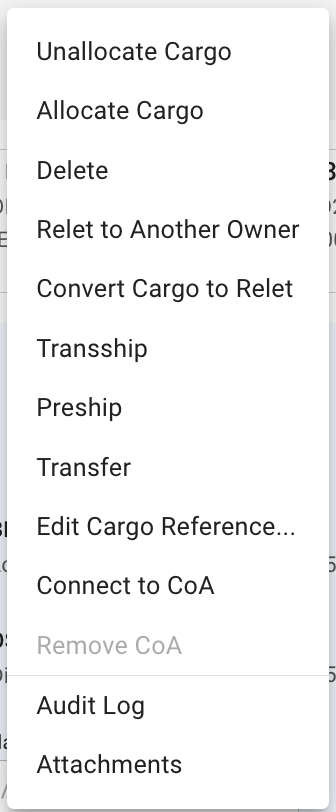
On the right side you have primary actions; PDF and copy. The three dots is a dropdown with secondary actions for the drawer. If you click the three dots you will be presented with the below view as a drop down:

<figure><img src="https://content.gitbook.com/content/uZ9lzqgHX4JL1Df67xog/blobs/5FoVj8TJB8D41XcPnjje/Screenshot%202024-08-22%20at%2008.56.57.png" alt="" width="168"><figcaption><p>Secondary actions available in the cargo drawer</p></figcaption></figure>

You can [allocate/unallocate](https://docs.dataloy.com/release-8.16/voyage-management-system/step-by-step-guides/cargoes/maintain-cargoes/cargo-drawer-actions/allocate-cargo) the cargo to move it to a voyage, change the voyage it is on or remove it from the current voyage.

You can [delete](https://docs.dataloy.com/release-8.16/voyage-management-system/step-by-step-guides/cargoes/maintain-cargoes/cargo-drawer-actions/deleting-cargo) a cargo.

You can [relet](https://docs.dataloy.com/release-8.16/voyage-management-system/step-by-step-guides/cargoes/maintain-cargoes/cargo-drawer-actions/relet-cargoes) a cargo to another owner.

You can convert the cargo to relet to change the cargo to be a freight cost instead of freight revenue.

You can add a [Transhipment, Preshipment](https://docs.dataloy.com/release-8.16/voyage-management-system/step-by-step-guides/cargoes/maintain-cargoes/cargo-drawer-actions/transship-and-preship-cargoes) or [Transfer](https://docs.dataloy.com/release-8.16/voyage-management-system/step-by-step-guides/cargoes/maintain-cargoes/cargo-drawer-actions/transfer-cargoes) of the cargo.

You can also [connect the cargo to a CoA](https://docs.dataloy.com/release-8.16/voyage-management-system/step-by-step-guides/cargoes/maintain-cargoes/cargo-drawer-actions/connect-cargo-to-coa) and [remove the CoA connection](https://docs.dataloy.com/release-8.16/voyage-management-system/step-by-step-guides/cargoes/maintain-cargoes/cargo-drawer-actions/remove-coa-from-cargo) when connected.

And finally you have the option to view the audit log or append attachments to the cargo.