# Bunker Adjustments Grid
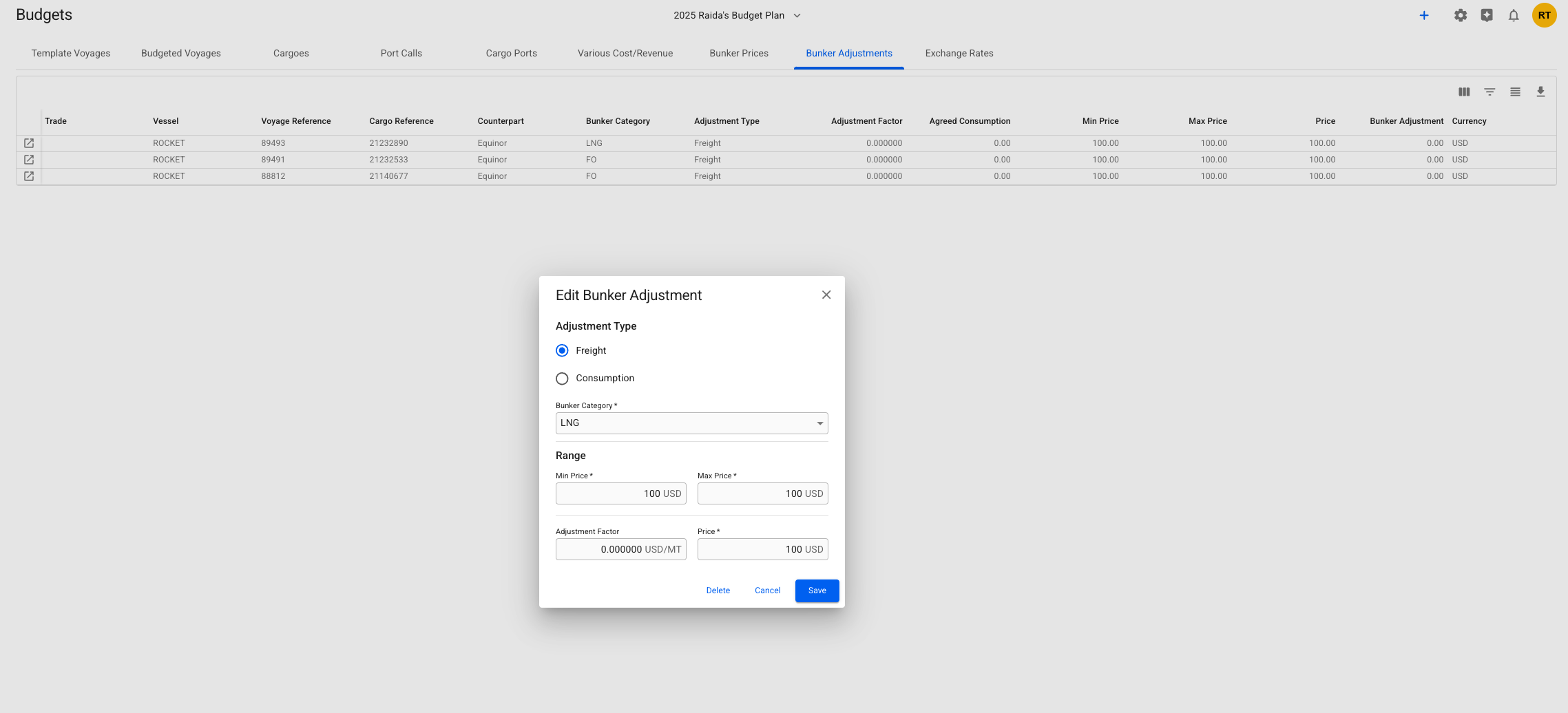
The template voyages' **bunker adjustments** can be found here:
Bunker Adjustments grid
All these rows are non-editable.
Read more about the grid's "base functionality" [here](https://docs.dataloy.com/release-8.16/voyage-management-system/step-by-step-guides/data-grids#base-functionality).
## Editing a Bunker Adjustment
By clicking the -icon in the left-most column, you will be able to *open* up the [Edit Bunker Adjustment modal](https://docs.dataloy.com/release-8.16/voyage-management-system/step-by-step-guides/cargoes/maintain-cargoes/cargo-drawer/main-details#bunker-adjustments) for that specific row. From the below view, you can edit the selected bunker adjustment:
Edit Bunker Adjustment modal from the Bunker Adjustments grid view
Changes done in the drawer will be reflected in the rows.
Additionally, you can also delete the selected Bunker Adjustment: