# Routing and routing options

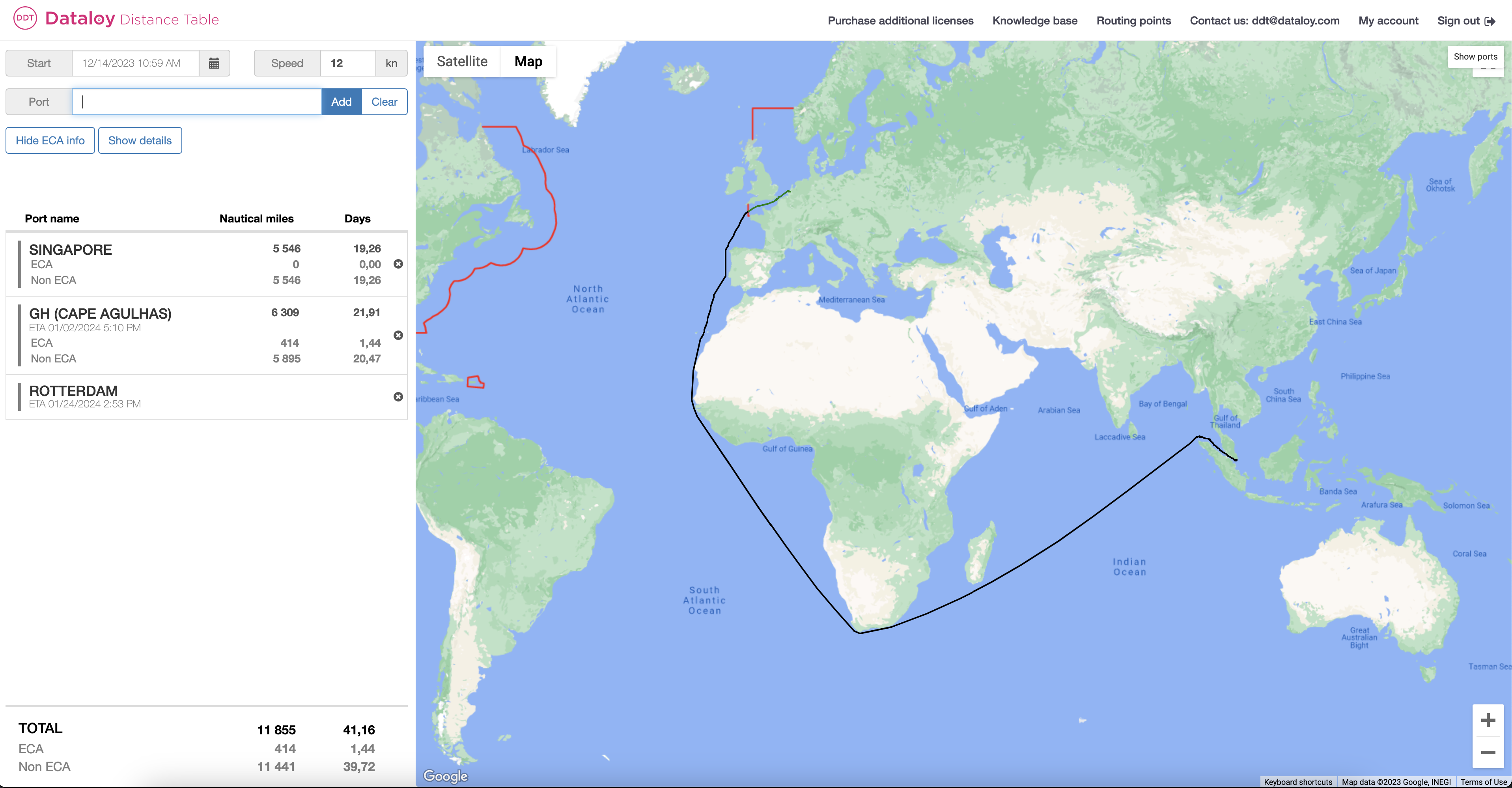
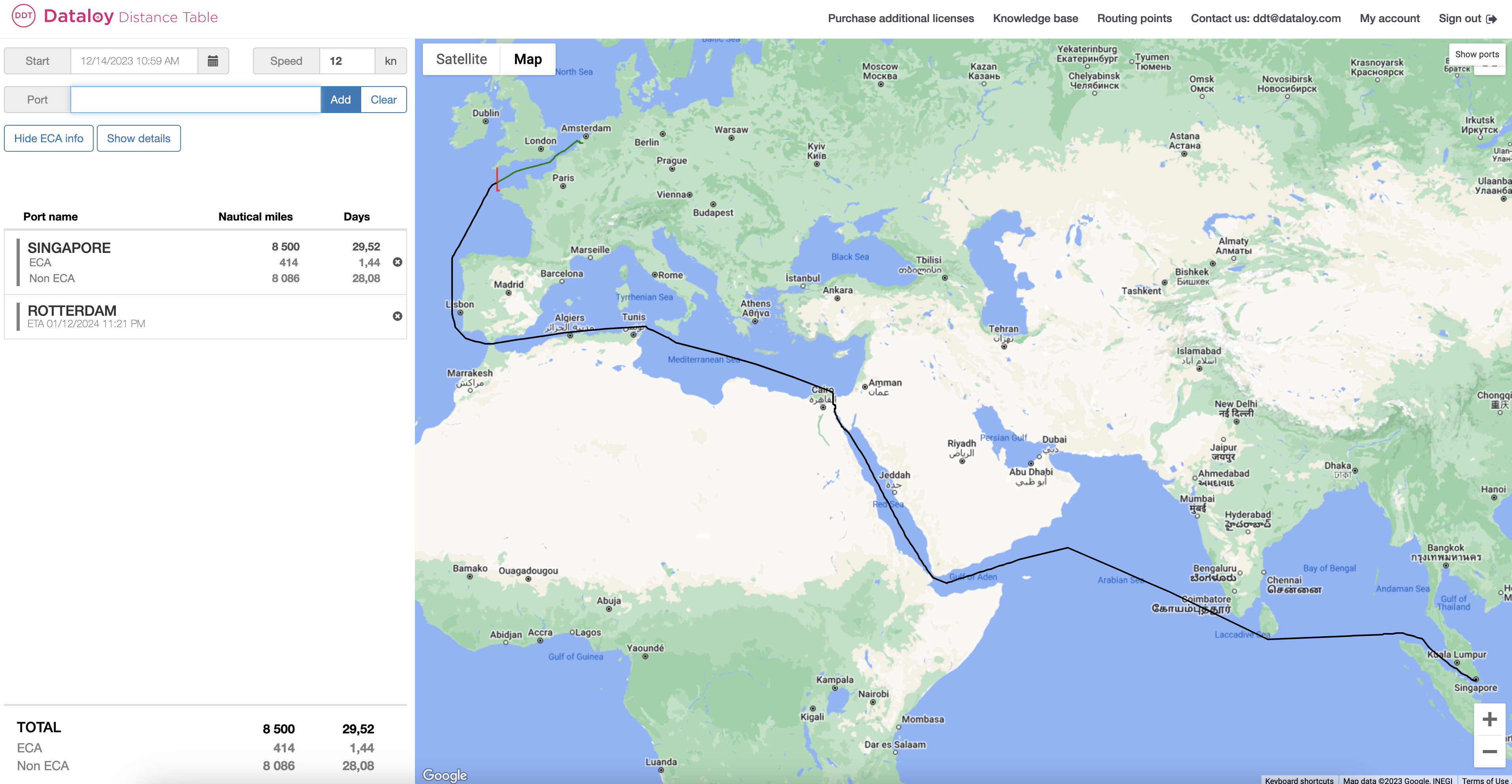
The routes in Dataloy Distances are, by default, the shortest route viable for a commercial ship. As ships have varying sizes, route customisation is essential to get the most accurate route for your needs.&#x20;

The routes can be customised by adding additional ports, routing points, and canals. It is also possible to add [points using latitude and longitudes](https://docs.dataloy.com/release-8.16/dataloy-distance-table-ddt/custom-point-using-latitude-and-longitude) of your choice.&#x20;

<div align="left"><figure><img src="https://content.gitbook.com/content/uZ9lzqgHX4JL1Df67xog/blobs/RxnHqFwkZlRJP8DegRVc/Screenshot%202023-12-14%20at%2011.16.16.png" alt="" width="375"><figcaption><p>Default route via Suez Canal</p></figcaption></figure></div>

<div align="right"><figure><img src="https://content.gitbook.com/content/uZ9lzqgHX4JL1Df67xog/blobs/JHlen6M7u3StJ3o37t60/Screenshot%202023-12-14%20at%2011.16.43.png" alt="" width="375"><figcaption><p>Customised route via Cape Agulhas</p></figcaption></figure></div>

**To Search for/Add a Routing Point/Port**

1. Routing point searches can be performed in two ways: in the search field or by using a map.
2. Click the "**Show Ports" button** to show all routing points/ports on the map.\
   The ports will show according to zoom level, so you might need to zoom in to display smaller ports. \
   \
   ![](https://dataloy-cloud.atlassian.net/wiki/download/thumbnails/923502109/Screenshot%202019-04-30%20at%2008.43.37.png?version=1\&modificationDate=1556606710882\&cacheVersion=1\&api=v2\&width=839\&height=150)\ <br>
3. Locate the applicable **routing point** on the map.
4. Click on or hover over (with the cursor) the applicable **routing point symbol**\
   &#x20;![](https://dataloy-cloud.atlassian.net/wiki/download/thumbnails/923502109/Screenshot%202019-04-30%20at%2008.45.57.png?version=1\&modificationDate=1556606781724\&cacheVersion=1\&api=v2\&width=60\&height=44).
5. An information pop-up opens, providing the routing point/port name and/or code and details.
6. Enter the **routing point name** or **code** in the search field to the left.
7. A drop-down list of ports will be displayed.
8. From the list, either
   1. click the applicable **routing point/port** or
   2. when the routing point/port is at the top of the list, press the **Tab key** - the routing point/port name will display in full in the search field or
   3. use the **down-arrow to select applicable routing point/port** - it will highlight.
9. Click **Add** or press **Enter**. The routing point/port is added to the route.\
   \&#xNAN;***Note**: Drag the newly added routing point to the correct place in the port rotation (list of ports)*
10. Ensure the route is updated accordingly.&#x20;

The Dataloy Distance Table has several routing points for directing a sailing route outside piracy/war risk and ECA areas:

Common Routing Points:

| <ul><li>PC (Panama Canal)</li><li>SC (Suez Canal)</li><li>GH (Cape Good Hope)</li><li>MA (Magellan Strait)</li><li>CH (Cape Horn)</li><li>TO (Torres Strait)</li><li>WP (Wilsons Promontory)</li><li>SS (Singapore Strait)</li><li>SU (Sunda Strait)</li><li>NE (North East Passage)</li><li>NW (North West Passage)</li><li>KC (Kiel Canal)</li><li>TS (Tsugaru Strait)</li><li>OS (Osumi Strait)</li><li>LS (Lombok Strait)</li><li>OR (Oresund)</li><li>GB Great Belt)</li><li>PF (Pentland Firth)</li><li>DS (Dover Strait)</li><li>BR (Bishop Rock)</li></ul> | <ul><li>BI (Belle Isle)</li><li>CR (Cape Race)</li><li>WI (Windward Passage)</li><li>MP (Mona Passage)</li><li>AP (Anegada Passage)</li><li>PR (Providence Canal)</li><li>VP (Virgin Passage)</li><li>BL (Balabac Strait)</li><li>BS (Basilan Strait)</li><li>SG (Surigao Strait)</li><li>SB (San Bernardino Strait)</li><li>SJ (Selat Jailolo)</li><li>CC (Corinth Canal)</li><li>JE (Jomard Entrance)</li><li>OM (Selat Ombai)</li><li>JS (Johnstone Strait)</li><li>GV (Grenville Channel)</li><li>NP (Nanuku Passage)</li><li>CO (Cook Strait)</li></ul> |
| ------------------------------------------------------------------------------------------------------------------------------------------------------------------------------------------------------------------------------------------------------------------------------------------------------------------------------------------------------------------------------------------------------------------------------------------------------------------------------------------------------------------------------------------------------------------ | ------------------------------------------------------------------------------------------------------------------------------------------------------------------------------------------------------------------------------------------------------------------------------------------------------------------------------------------------------------------------------------------------------------------------------------------------------------------------------------------------------------------------------------------------------------ |