# Register Departures
To register a departure in a Port, open the drawer for the given Port Call by clicking it in the list.\
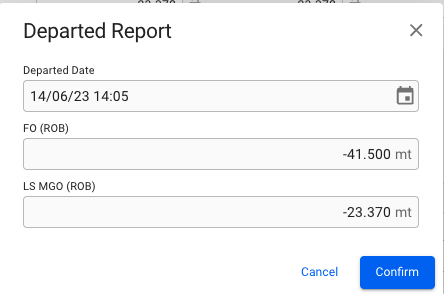
Then click the icon at the top of the drawer and select "Register Departure". A dialog will open and allow you to enter the departure details.
The bunker categories listed here are only those that were used during the voyage.
If registered date is in the past, the departure date will be locked. Registered ROBs will be locked as Departure ROBs.
 icon at the top of the drawer and select "Register Departure". A dialog will open and allow you to enter the departure details.
The bunker categories listed here are only those that were used during the voyage.
icon at the top of the drawer and select "Register Departure". A dialog will open and allow you to enter the departure details.
The bunker categories listed here are only those that were used during the voyage.