# Schedule

## Managing Port Calls

### Schedule

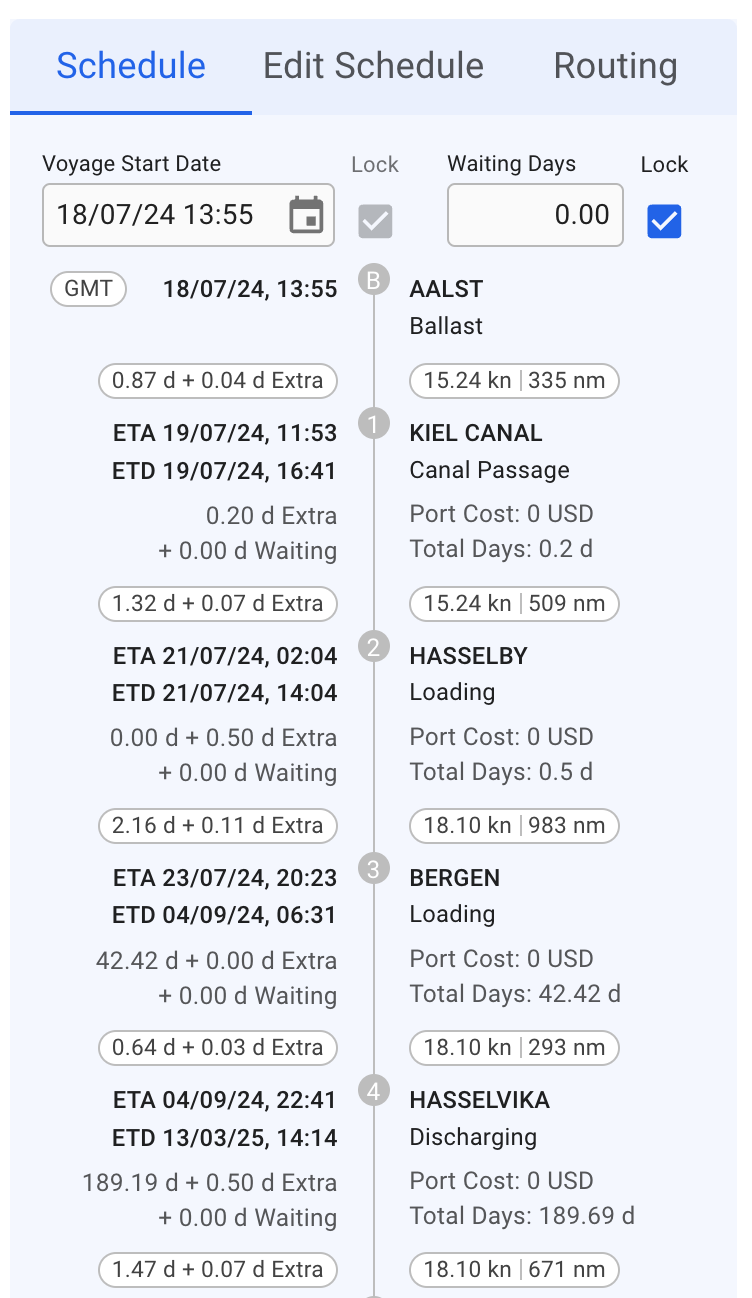
This is a timeline of port calls on a voyage, in which the left side displays the *ETA* and *ETD* time- and dates, as well as *Days Extra* and *Waiting Days*, with the last two also having a hover/tooltip. On the right side displays the *port calls*, their *reason for calls*, *Port Costs* and *Total Days*, with also a tooltip on the last two here.

&#x20;You can *create*, *rearrange*, *delete* and *edit* port calls directly from this section (click on the picture for better view):

<figure><img src="https://content.gitbook.com/content/W3oa0rI5VDyYPnwDBtD7/blobs/uzGbGncFvuAob9slI11i/Screenshot%202023-12-29%20at%2016.31.48.png" alt="" width="188"><figcaption><p>The Port Call Schedule</p></figcaption></figure>

#### Hover Toolbar

When hovering the mouse over a port call in the schedule, a toolbar in the upper right will appear.

* To *insert* a port call before or after the port call you are editing, click the **Create** <img src="https://content.gitbook.com/content/W3oa0rI5VDyYPnwDBtD7/blobs/3EN4gneueoTAns71yEpT/create-24px.svg" alt="" data-size="original"> button and select **Before** or **After.** A window to create a new port call then pops up.
* To *edit* a port call, click the **Edit** <img src="https://content.gitbook.com/content/W3oa0rI5VDyYPnwDBtD7/blobs/npnMZ4vUxI2y2ZR1nPq4/edit-24px.svg" alt="" data-size="original"> button.
* To *delete* a port call, click the **Delete** <img src="https://content.gitbook.com/content/W3oa0rI5VDyYPnwDBtD7/blobs/fJw29sgVU4csETQejz3g/delete.svg" alt="" data-size="original">button.
* To *change* the order of port calls, simply *hover over* a port call to move it into place.

#### Locking Voyage Start Date and Waiting Days

Within the Schedule section, you will find a checkbox for *locking* the update of *voyage start date* and *Waiting Days*. This checkbox is not visible while the voyage has status **Estimate** or **Unallocated:**

<figure><img src="https://content.gitbook.com/content/W3oa0rI5VDyYPnwDBtD7/blobs/sIiscAl4mtLx5I8OYlxY/image.png" alt=""><figcaption><p>Voyage Start Date and Waiting Days</p></figcaption></figure>

### Edit Schedule

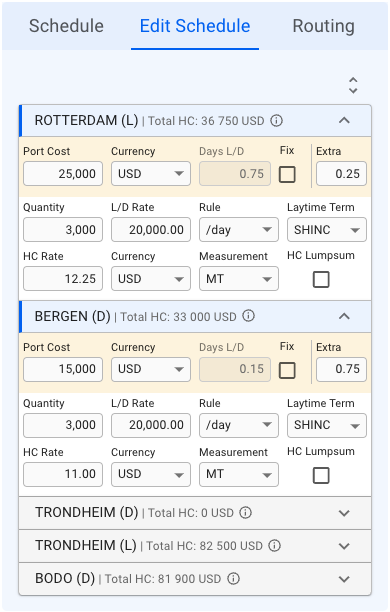
This list displays a more detailed view of all the port calls in the schedule (click on the picture for better view):

<figure><img src="https://content.gitbook.com/content/W3oa0rI5VDyYPnwDBtD7/blobs/bPRsnKyzdWd61ufxlzul/Skjermbilde%202024-08-06%20kl.%2014.07.33.png" alt=""><figcaption><p>The Port Call Edit Schedule</p></figcaption></figure>

With this icon <picture><source srcset="https://content.gitbook.com/content/W3oa0rI5VDyYPnwDBtD7/blobs/wKuKOHPzaOKw48obHXGb/Screenshot%202023-12-29%20at%2016.38.04.png" media="(prefers-color-scheme: dark)"><img src="https://content.gitbook.com/content/W3oa0rI5VDyYPnwDBtD7/blobs/ruWBKR2YcTrsm336itxk/Screenshot%202023-12-29%20at%2016.38.04.png" alt="" data-size="line"></picture>, you can either *expand* or *collapse* all of the port call items in the list (the list is expanded by default). You can also *open* and *close* the collapsable items, independent of each other, to view the detailed information.

#### Detailed Information

The first row, in yellow highlight, you can find the **Port Call's** *Port Cost*, *Currency*, *Days L/D, Fix* checkbox and *Extra* (days in port).

The next two rows, you can find the **Cargo Port's** *Quantity, L/D Rate, Rule, Laytime Term, HC Rate, (HC) Currency, (HC) Measurement* and *HC Lumpsum* checkbox.

All of these fields are *editable*. The cargo highlighted in **blue** in the Cargo List section will also have its port calls highlighted correspondingly in the Edit Schedule section, meaning, you are viewing the *selected cargo's* information.

**Additional Hover Information:**

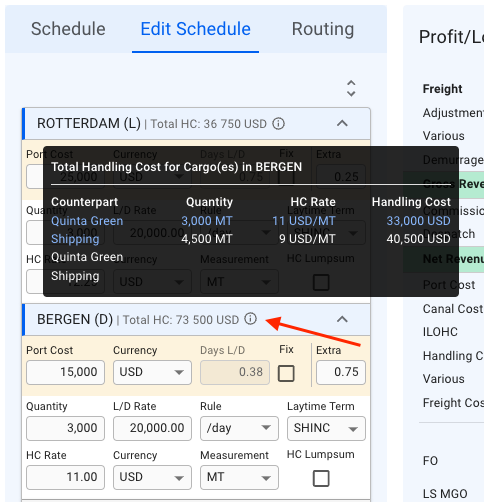
All of the collapsible headers are displaying the *Port Call Name, Reason for Call* and *Total Handling Cost (HC)*. Next to the last mentioned, there is an <img src="https://content.gitbook.com/content/W3oa0rI5VDyYPnwDBtD7/blobs/DCIz3AsFhxnD7227mmho/Screenshot%202023-12-29%20at%2016.49.45.png" alt="" data-size="line"> icon, which you can hover on to display additional information inside a tooltip:&#x20;

<figure><img src="https://content.gitbook.com/content/W3oa0rI5VDyYPnwDBtD7/blobs/CN1IcJnm6F6fahQPsNdm/Skjermbilde%202024-08-06%20kl.%2014.12.23.png" alt=""><figcaption><p>Tooltip for Additional Total Handling Cost Information</p></figcaption></figure>

This tooltip displays, per **Port Call**, the *Counterpart*, *Quantity*, *HC Rate* and *Handling Cost* for each of it's **Cargo Ports**. Again, with the *selected cargo* from the Cargo List section highlighted in **blue**.&#x20;

### **Routing**

TBA.