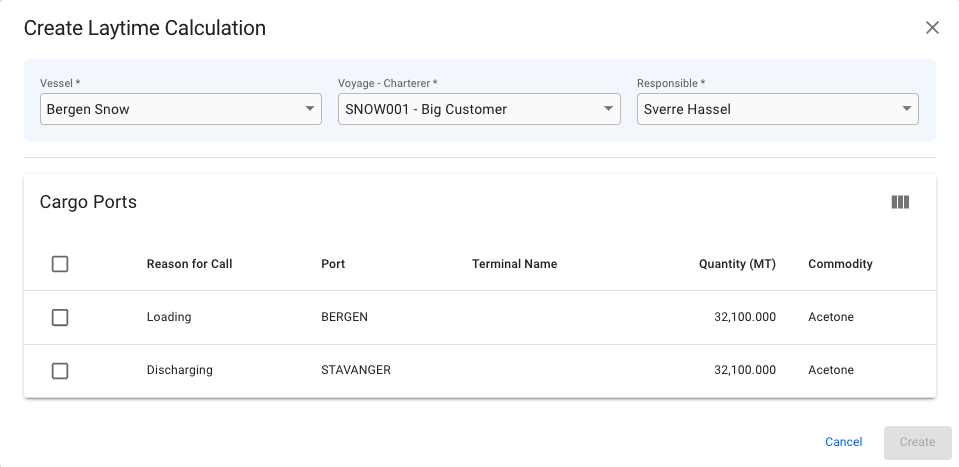
Vessel and Voyage - Charterer combination selected
 in the top right corner.
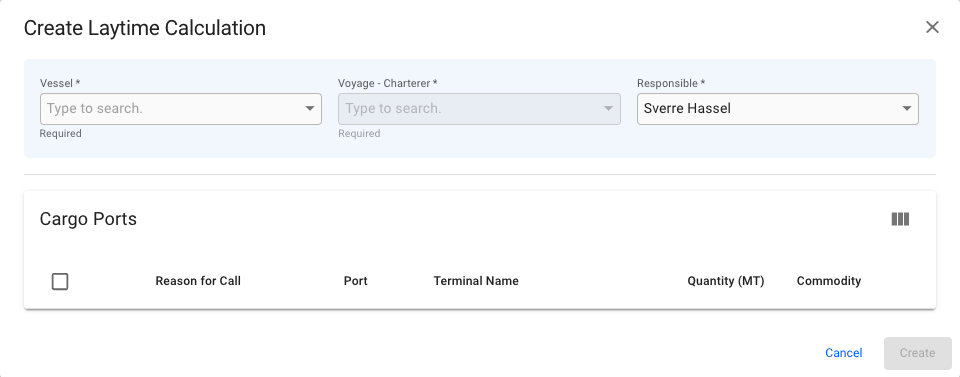
3. Fill in all required fields listed below in the Create New Laytime Calculation window.
4. Click **Create**.
### **Required fields**
| *Vessel* | Used to filter *Vessels* |
| ----------------------- | --------------------------------------------------------- |
| *Voyage - Charterer* | Combines charterer of a cargo and a voyage into one field |
| *Responsible Charterer* | Responsible charterer, default to the current user |
| *Cargo Ports* | Cargo Ports to be included in the calculations |
{% hint style="info" %}
Field Conditions
Each field narrows down the next choice. Once a Vessel has been selected, the Voyage - Charterer field will be enabled. With both Vessel and Voyage - Charterer selected, the related cargo ports will appear underneath.
At least one cargo port MUST be chosen.
{% endhint %}
in the top right corner.
3. Fill in all required fields listed below in the Create New Laytime Calculation window.
4. Click **Create**.
### **Required fields**
| *Vessel* | Used to filter *Vessels* |
| ----------------------- | --------------------------------------------------------- |
| *Voyage - Charterer* | Combines charterer of a cargo and a voyage into one field |
| *Responsible Charterer* | Responsible charterer, default to the current user |
| *Cargo Ports* | Cargo Ports to be included in the calculations |
{% hint style="info" %}
Field Conditions
Each field narrows down the next choice. Once a Vessel has been selected, the Voyage - Charterer field will be enabled. With both Vessel and Voyage - Charterer selected, the related cargo ports will appear underneath.
At least one cargo port MUST be chosen.
{% endhint %}
Vessel and Voyage - Charterer combination selected